We’ve covered core concepts like API, Token, and Temperature. Now it’s time for the practical part: How to actually call an API?
Many people think APIs are mysterious, but once you grasp a few key elements, calling an API is as simple as online shopping. This chapter will guide you step by step.
Three Core Elements of Calling an API
No matter what tool or platform you use, calling an AI API requires these three things:
1. API Key
API Key = Your ID
Just like you need a bank card PIN to withdraw money, calling an API requires an API Key to prove “This is me, you can serve me.”
What does an API Key look like?
It’s usually a long string of letters and numbers, for example:
sk-REPLACE_WITH_YOUR_API_KEY
Important Reminder:
- API Keys are private; do not share them with others.
- If someone gets your key, they can use your account to call APIs (spending your money).
- If you accidentally leak it, immediately delete the old key on the platform and generate a new one.
2. Base URL
Base URL = The restaurant’s address
When you order food delivery, you need to know where the restaurant is. When calling an API, you need to know where the server is.
Common Base URLs:
- OpenAI:
https://api.openai.com/v1 - Anthropic Claude:
https://api.anthropic.com/v1 - Google Gemini:
https://generativelanguage.googleapis.com/v1 - DeepSeek:
https://api.deepseek.com/v1
Third-party platforms have different URLs, but the format is similar.
3. Model Name
Model Name = The dish you want to order
At a restaurant, you say “I want braised pork.” When calling an API, you say “I want to use GPT-5.2.”
Common Model Names:
- OpenAI:
gpt-5.2,gpt-5.2-chat-latest - Claude:
claude-opus-4.5,claude-sonnet-4.5 - Gemini:
gemini-3-pro,gemini-3-flash - DeepSeek:
deepseek-chat,deepseek-coder
A Complete API Call Example
Combine these three things, and the simplest API call looks like this:
import openai

# 1. Set the API Key
openai.api_key = "sk-proj-YOUR_API_KEY"

# 2. Set the Base URL (if you use a third-party platform)
openai.base_url = "https://api.openai.com/v1"

# 3. Call the selected model
response = openai.chat.completions.create(
    model="gpt-5.2",  # Model Name
    messages=[
        {"role": "user", "content": "Hello"}
    ]
)

print(response.choices[0].message.content)
Looks complicated? Don’t worry, the platforms introduced later have simpler methods.
Official API vs Third-Party Platforms
Before introducing specific platforms, let’s clarify an important concept: What is the difference between official APIs and third-party platforms?
Official API
Official API = Buying directly from OpenAI, Anthropic, Google
Advantages:
- Best stability, direct connection to official servers
- Full features, new features supported immediately
- Highest security, data does not pass through third parties
Disadvantages:
- Requires a foreign credit card
- Requires a VPN to access (ChatGPT, Claude, Gemini)
- Relatively higher prices
- Registration may have barriers
Third-Party Platforms
Third-Party Platforms = Buying from resellers
Third-party platforms first buy API quotas from official sources and then resell them to you.
Advantages:
- Supports domestic payments (Alipay, WeChat Pay, UnionPay)
- No VPN required
- Usually have Chinese interface and customer service
- One platform can call multiple AIs (OpenAI, Claude, Gemini, etc.)
- Some platforms offer free credits
Disadvantages:
- Stability may not be as good as official
- Prices may be slightly higher than official (but some are cheaper)
- Security requires trusting the platform
- Feature updates may lag behind official
Which Should You Choose?
Choose official if you:
- Have a foreign credit card
- Have a stable VPN
- Value data security
- Need the latest features
Choose third-party if you:
- Don’t have foreign payment methods
- Don’t have a VPN
- Want to use domestic payments
- Want to call multiple AIs from one platform
Platform Recommendations (2 Domestic + 2 International)
Below are four API platforms I recommend, two domestic and two international, covering different needs.
1. DeepSeek Official (Domestic, Official Platform)
Website: https://platform.deepseek.com
Platform Type: Official Platform
Why Recommend?
- Official platform, stable and reliable
- DeepSeek V3.2 performance is close to GPT-5
- Fast access in China, no VPN needed
- Simple registration, just a phone number
- Extremely low price, great value
Steps to Get API Key:
- Open https://platform.deepseek.com
- Click “Login/Register” in the top right corner
- Register an account with your phone number
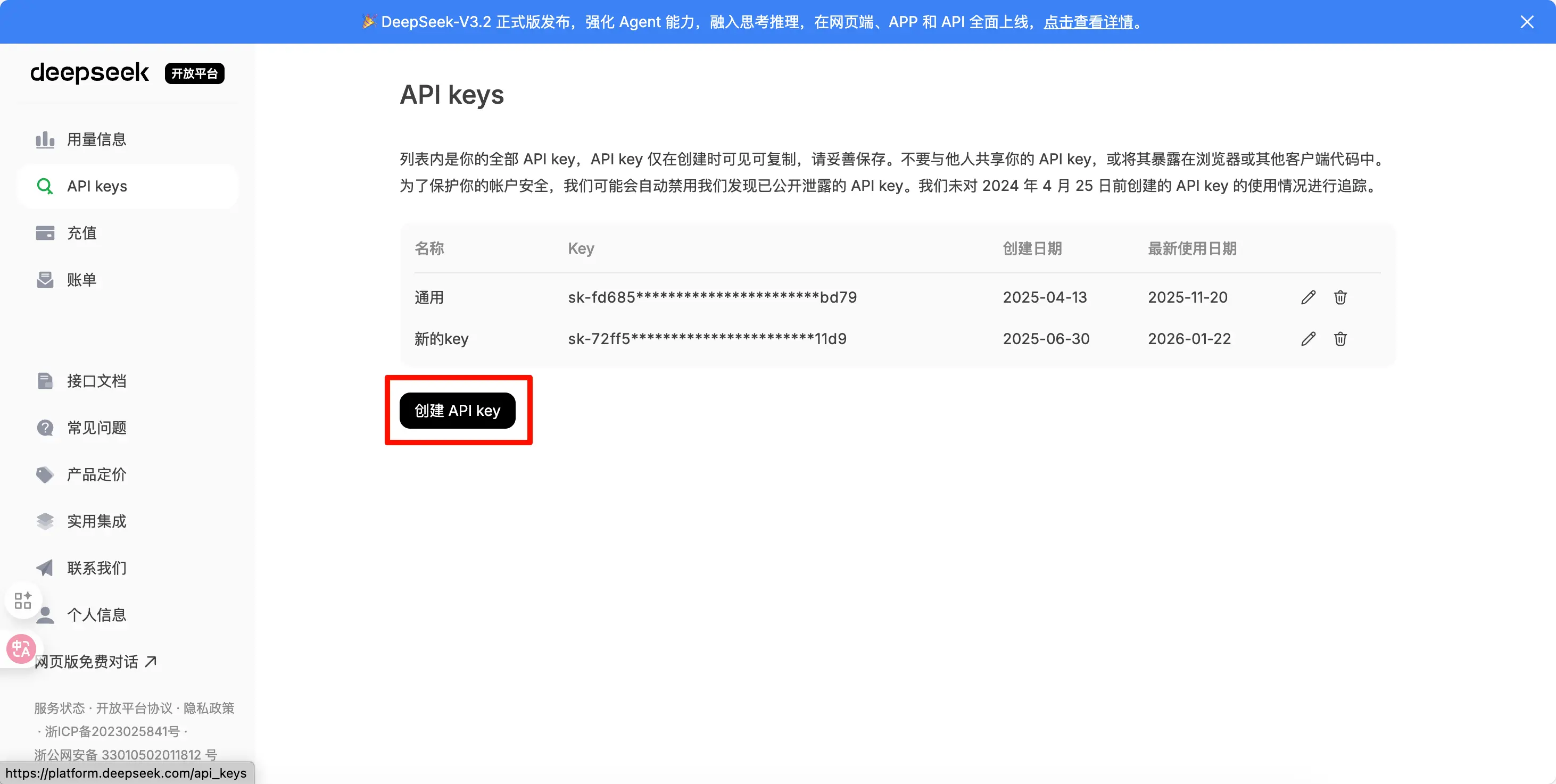
- After logging in, click “API Keys” on the left
- Click “Create API Key”
- Copy the key (it is only shown once, so save it)
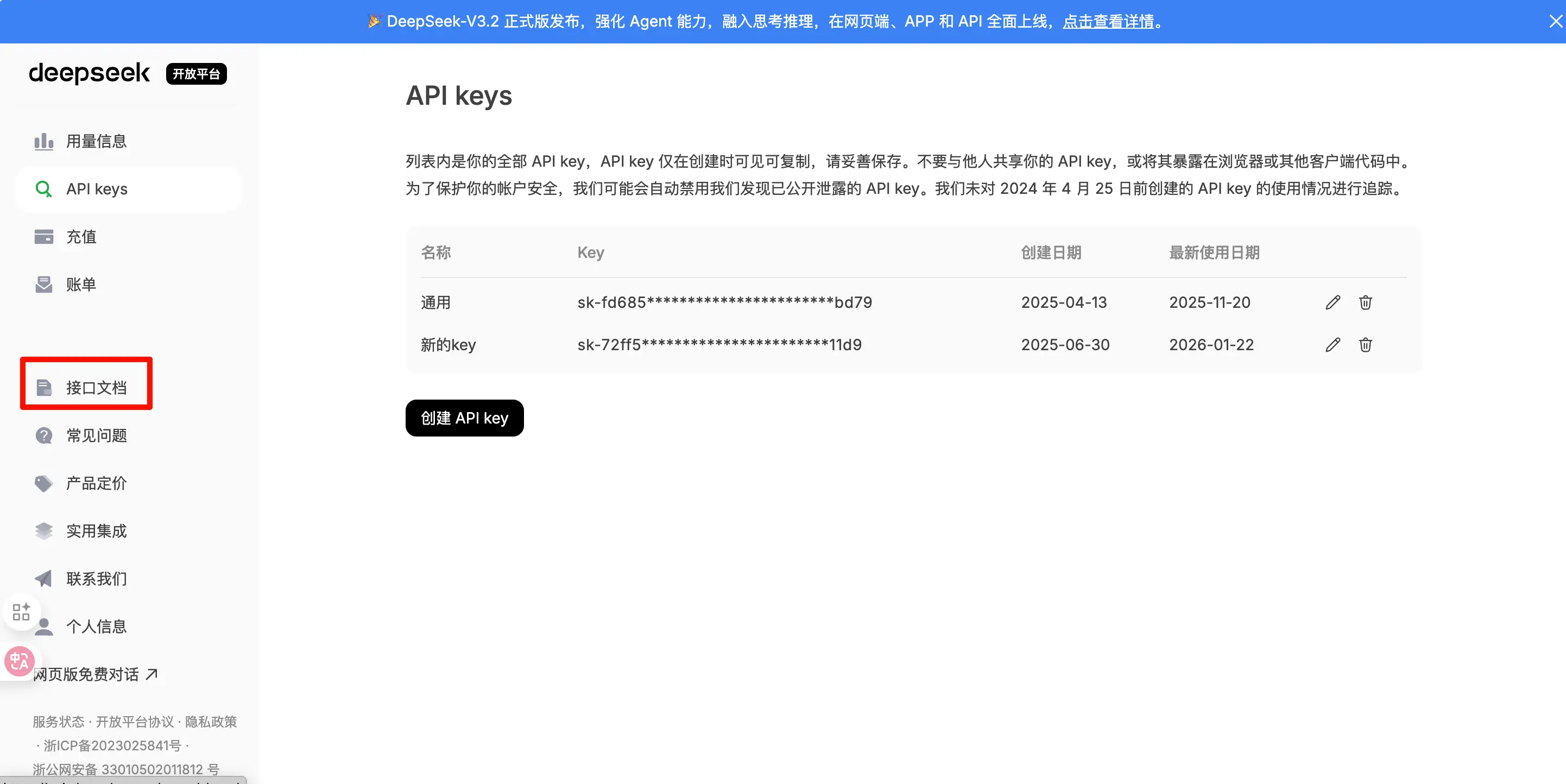
- Click “Interface Documentation” on the left to view the URL and model name
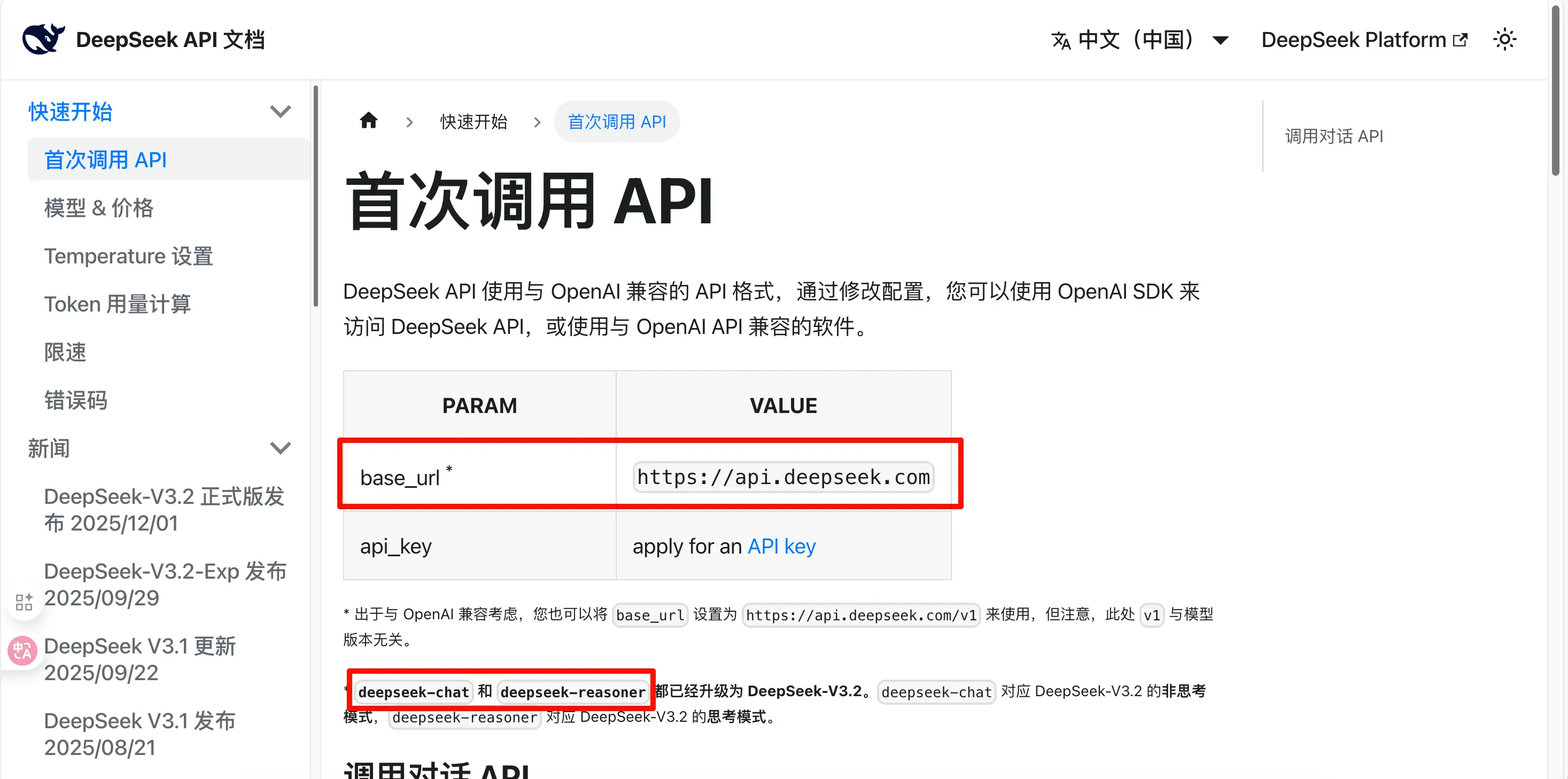
Call Parameters:
- Base URL:
https://api.deepseek.com - Model Name:
deepseek-chat(chat),deepseek-reasoner(reasoning) - API Key: The key you just copied
2. Volcano Engine (Domestic, Official Platform + Third-Party)
Website: https://console.volcengine.com/ark
Platform Type: Official Platform (under ByteDance)
Why Recommend?
- ByteDance official platform, stable and reliable
- Supports Doubao series models
- Supports domestic payments (Alipay, WeChat Pay, UnionPay)
- Affordable, great value
- Besides Doubao’s own models, you can also call many domestic open-source models like DeepSeek V3.2, GLM 4.7
Usage Steps:
- Open https://console.volcengine.com/ark
- Register a Volcano Engine account with your phone number
- Enter the “Ark Large Model” console
- Complete real-name authentication (requires ID)
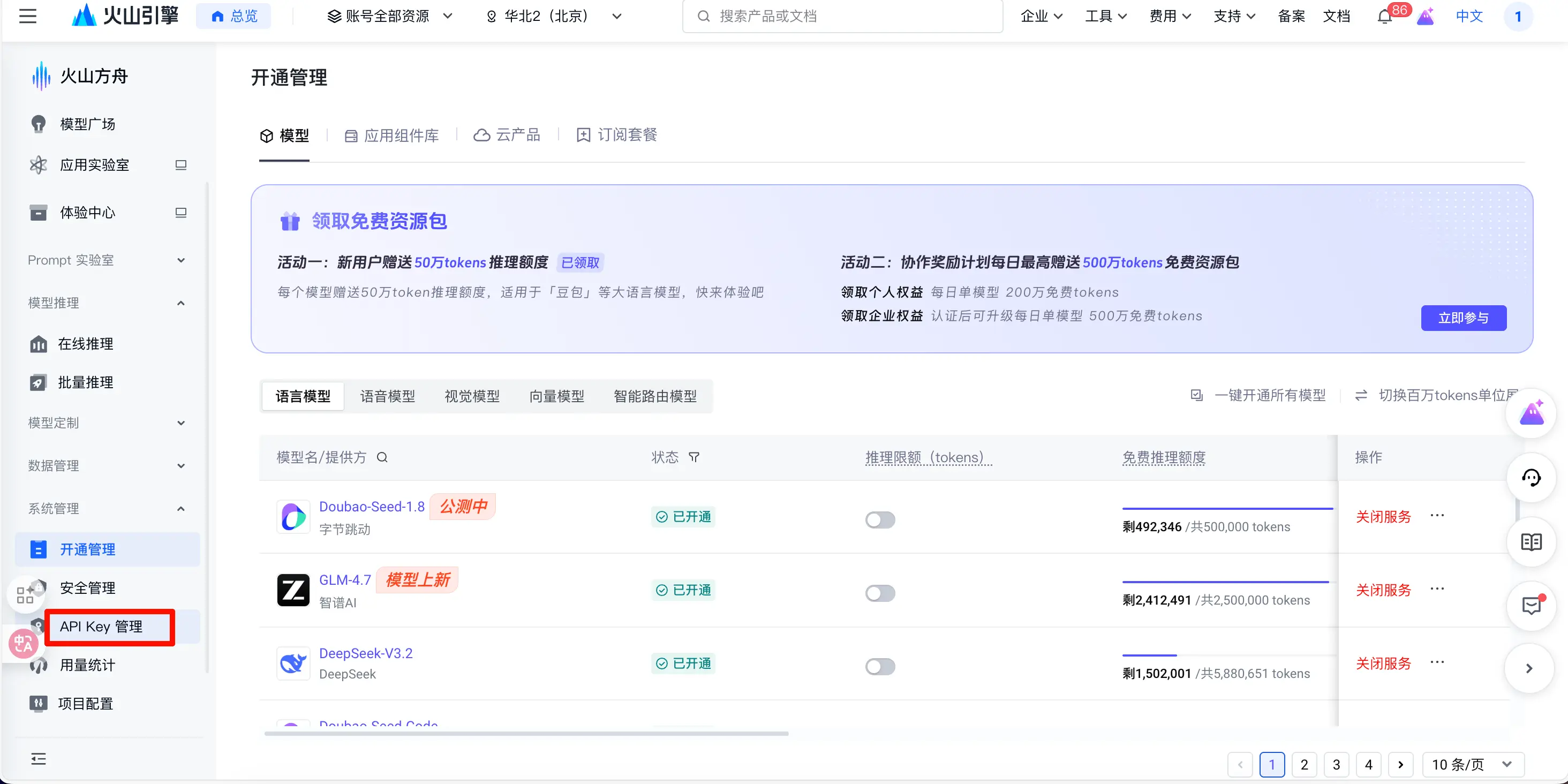
- Click “API Key Management”
- Create a new API key
- Copy and save the key
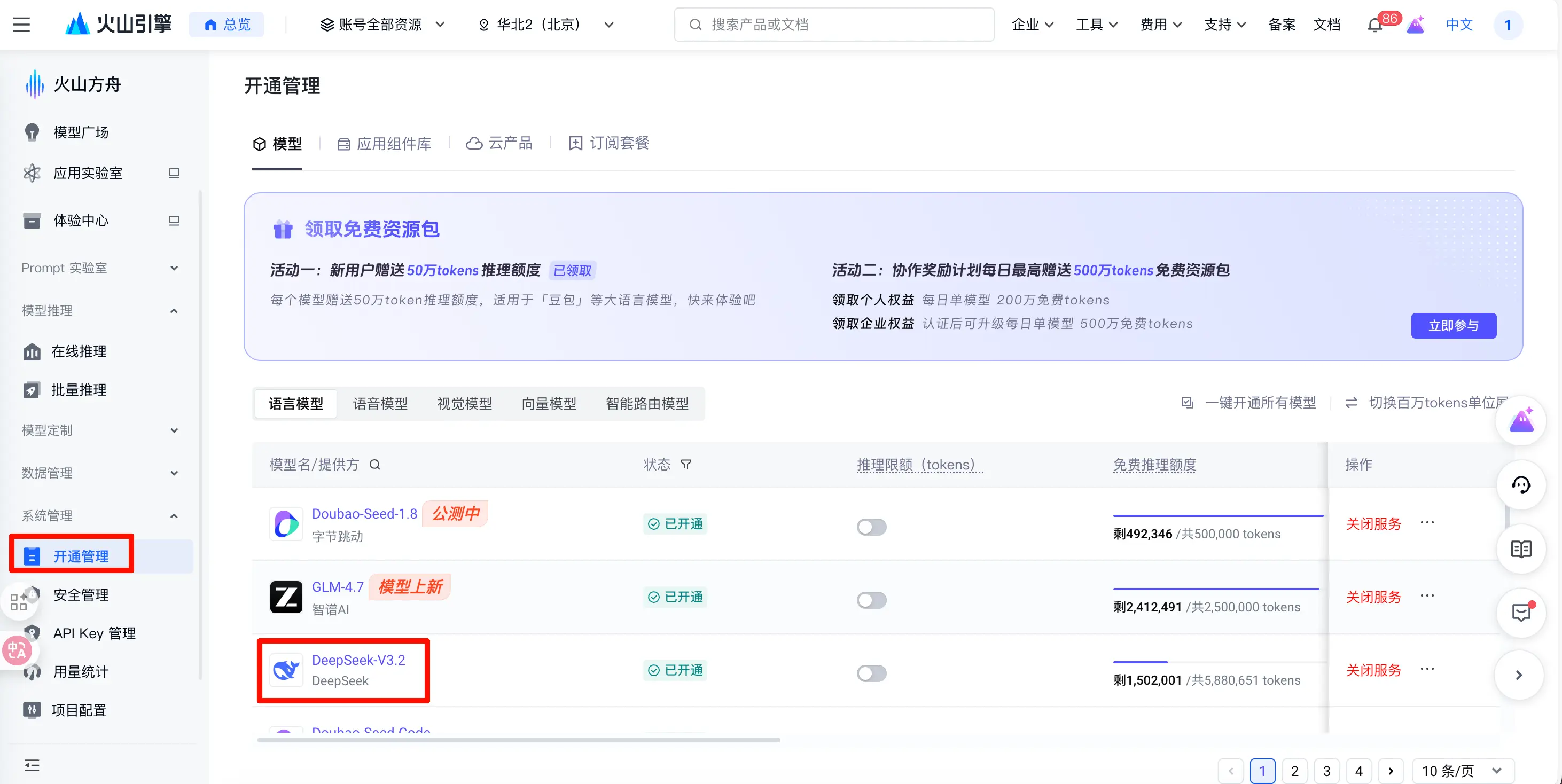
- Click “Activation Management” on the left, select the model you want to use
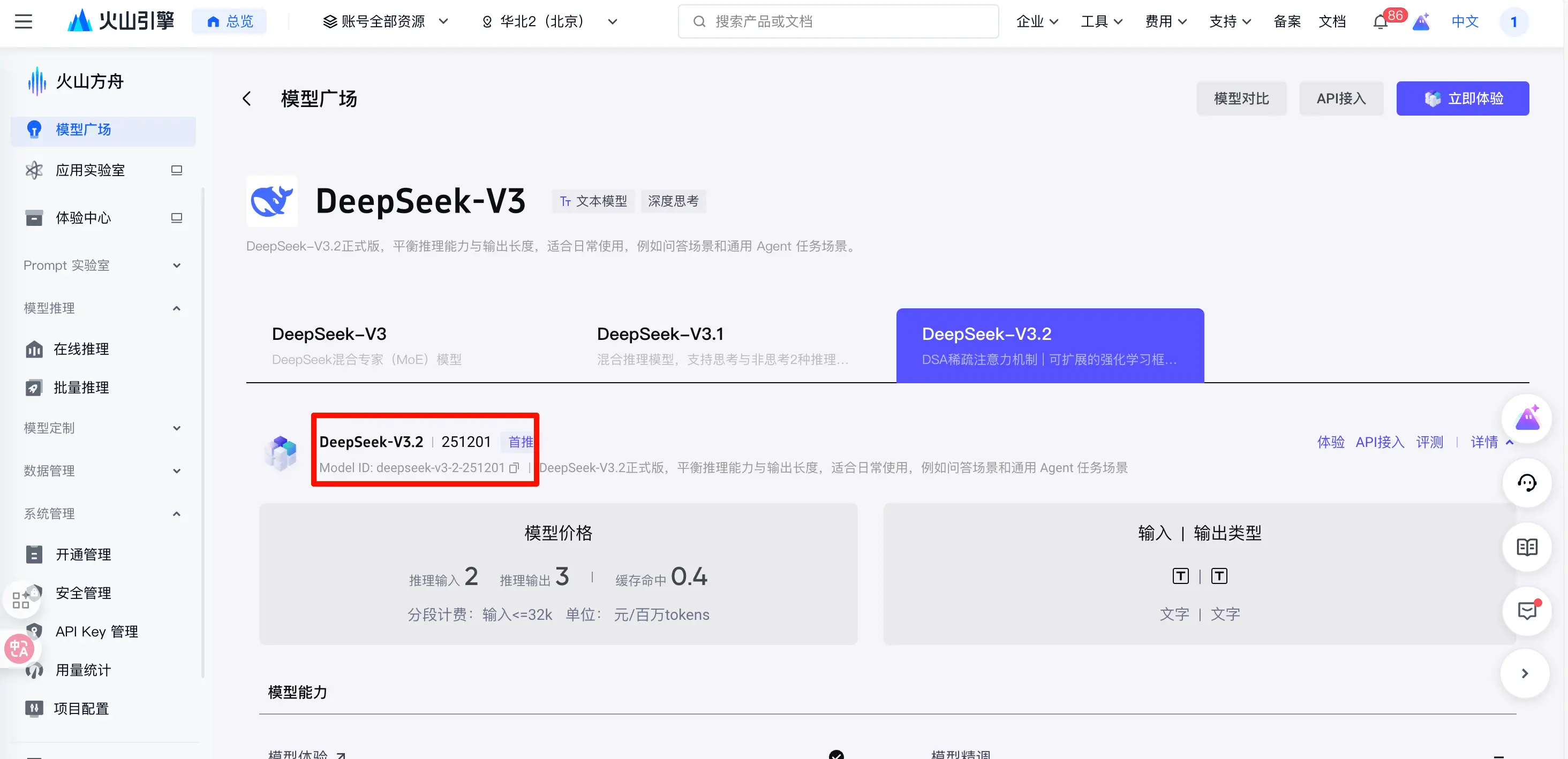
- On the new page, copy the model name you need (note: the same model may have different names on different platforms, so check carefully)
- Go back to the Activation Management page, check if the status is “Activated”, otherwise click on the right to activate model permissions
Call Parameters:
- Base URL:
https://ark.cn-beijing.volces.com/api/v3 - Model Name:
doubao-pro-32k,doubao-lite-32k, etc. - API Key: The key you created
New User Benefits:
- Free credits upon registration
- You can also participate in the activity shown above the screenshot to get more free credits. I have more than enough every day.
3. Google AI Studio (International, Official Platform)
Website: https://aistudio.google.com
Platform Type: Official Platform
Why Recommend?
- Google official platform
- Free credits available (with limits)
- Gemini 3 top-tier performance
- Stable and reliable
- Supports extremely long context (2 million tokens)
- Can be used for free directly in the web interface, no coding required
Also, How to Use the Web Version for Free
If you don’t want to write code, Google AI Studio offers a very convenient web chat interface where you can directly use models like Gemini 3 Pro and Gemini 3 Flash. It’s essentially like being a paid Gemini user.
Usage Steps:
- Open https://aistudio.google.com
- Log in with your Google account (VPN required)
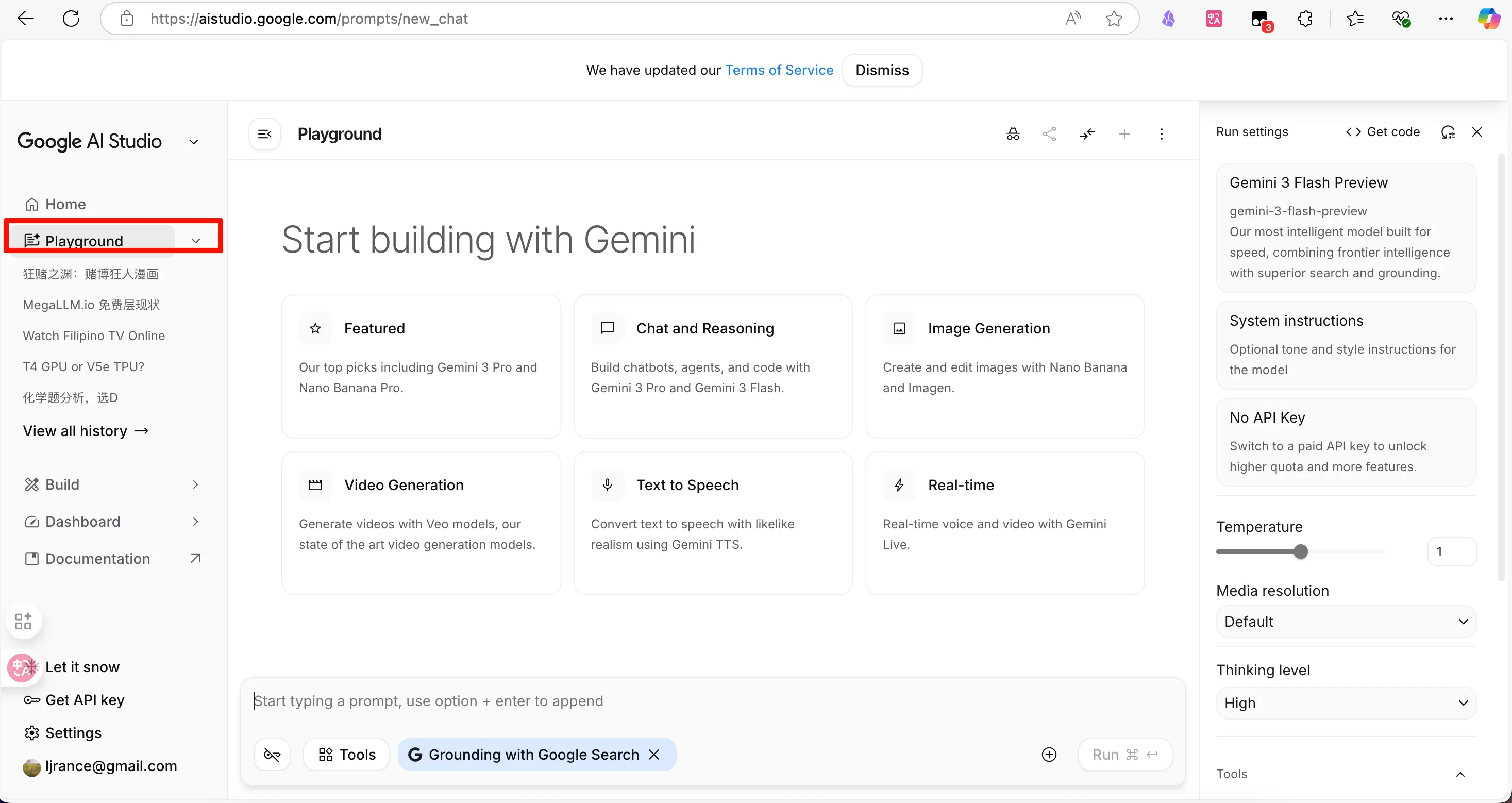
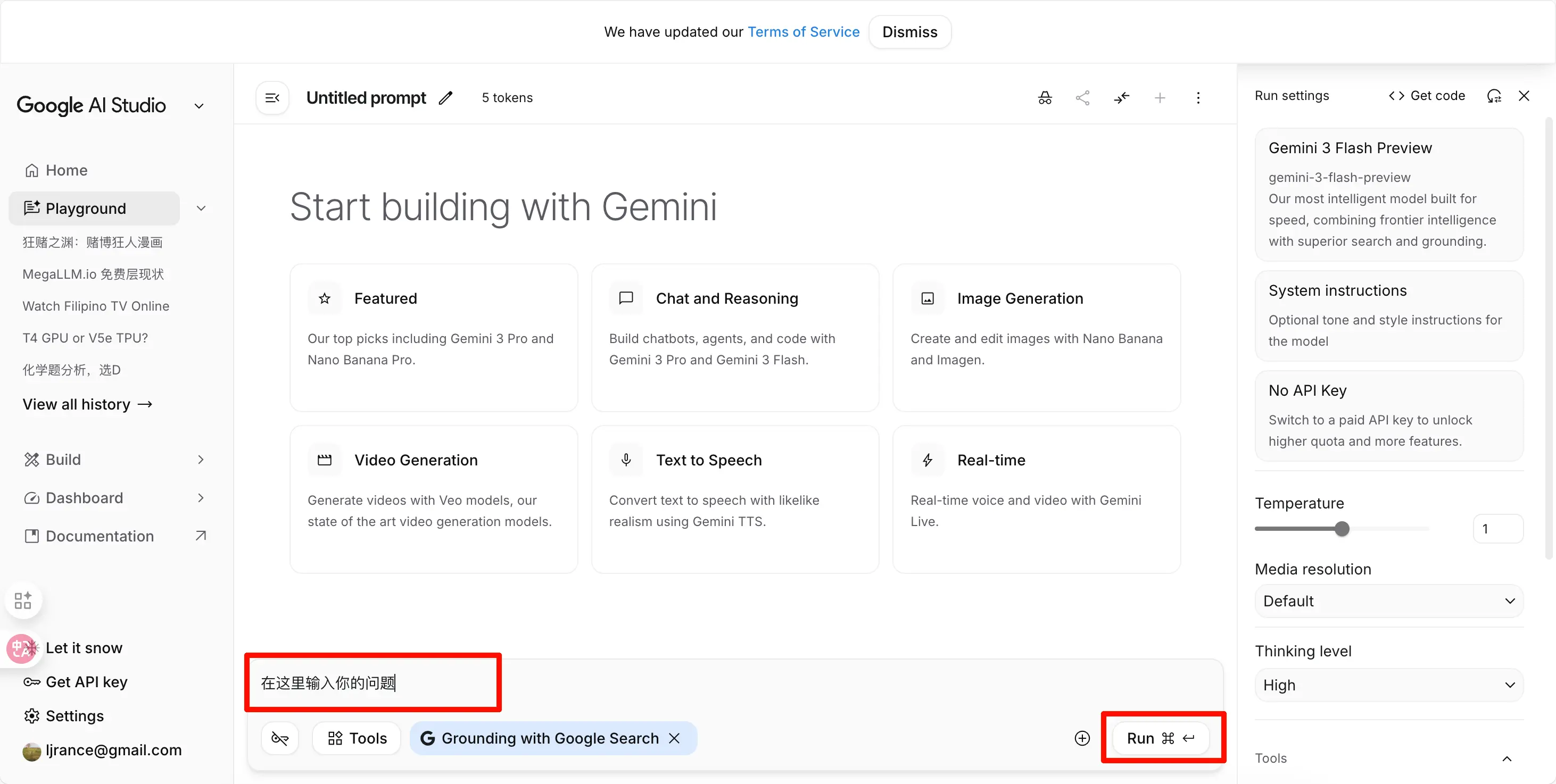
- Click “Playground” on the left
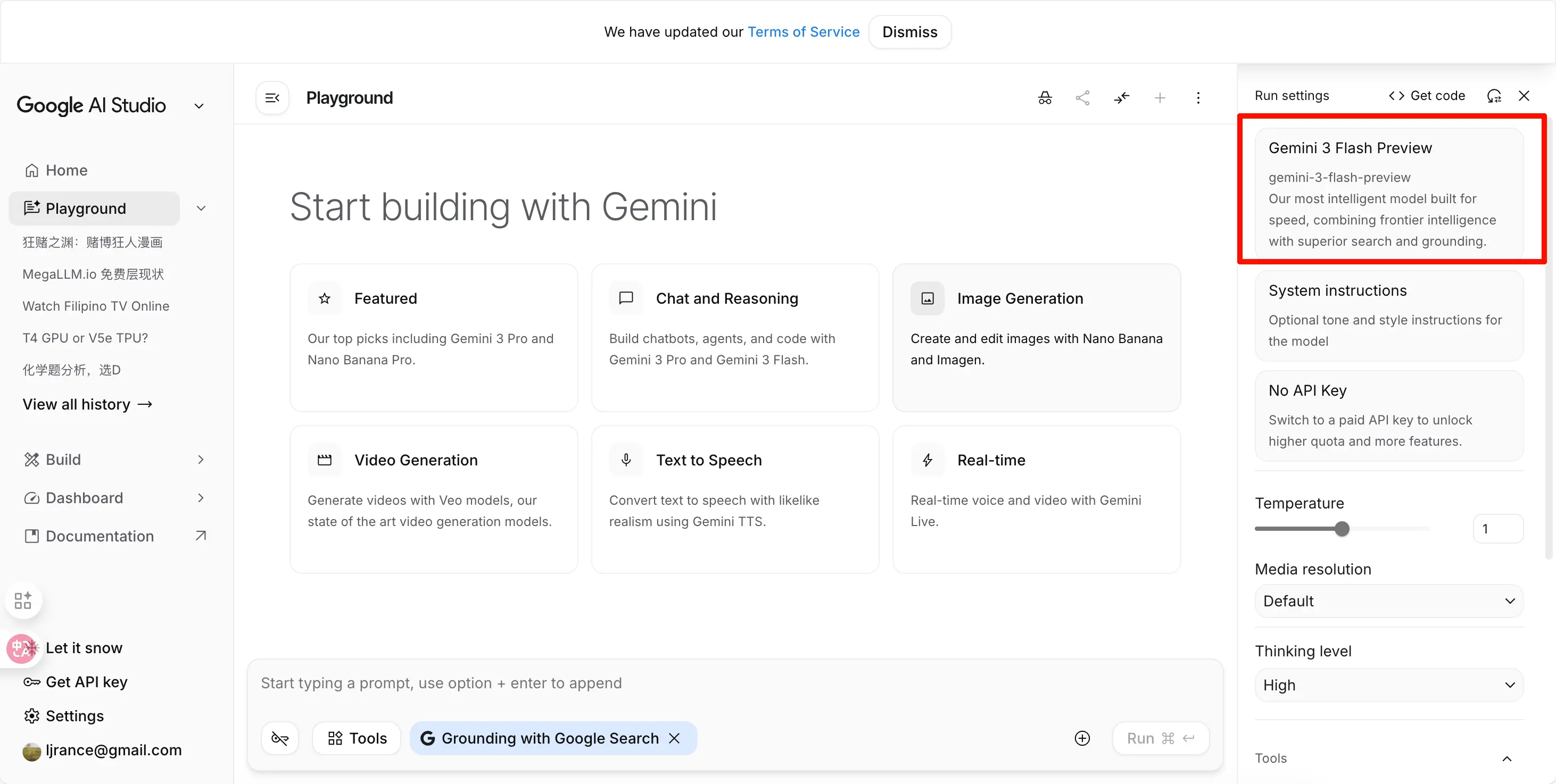
- In the top right, select a model:
- gemini-3-pro: Best model, suitable for complex tasks
- gemini-3-flash: Fast model, suitable for daily conversations
- Other experimental models available
- Type your question directly in the input box, then click “Run”, and the AI will answer
Advanced Features (Web Version):
1. Upload Files
- Click the + icon on the right side of the input box
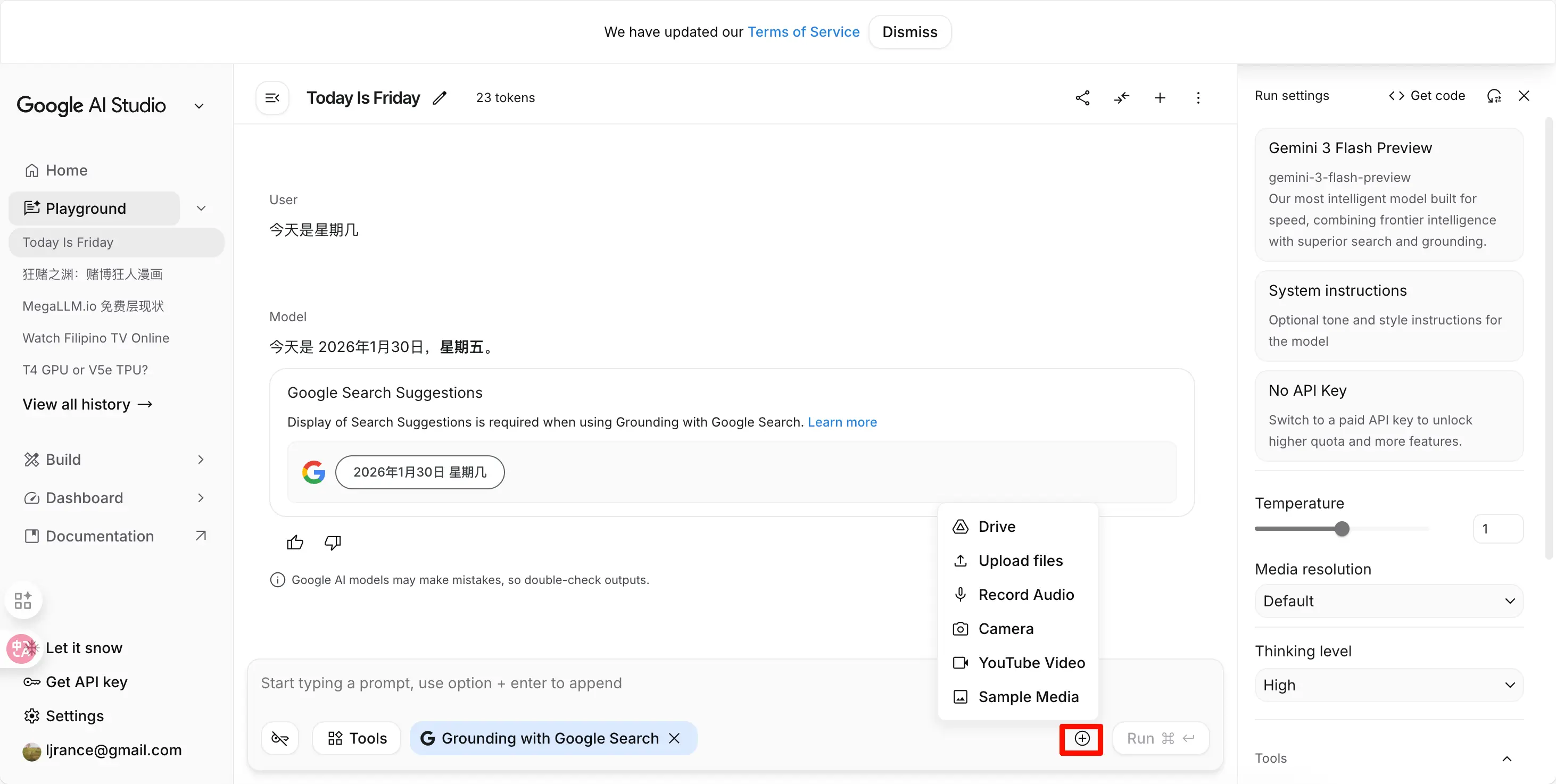
- You can upload images, PDFs, documents, etc.
- Supports multimodal understanding
2. Adjust Parameters
- On the right, you can adjust the parameters introduced earlier
- You can adjust:
- Temperature (creativity)
- Top P
- Max output tokens
- Safety settings
Advantages of the Web Version:
- No coding required
- No software installation needed
- Use directly in the browser
- User-friendly interface, full features
- Suitable for quick testing and daily use
Who is the web version for?
- Complete beginners who can’t code
- Those who want to quickly test Gemini’s capabilities
- Daily chatting and asking questions
- Handling multimodal tasks like documents and images
Get API Key (For Advanced Users)
Back to the main topic, here’s how to get an API Key.
Steps to Get API Key:
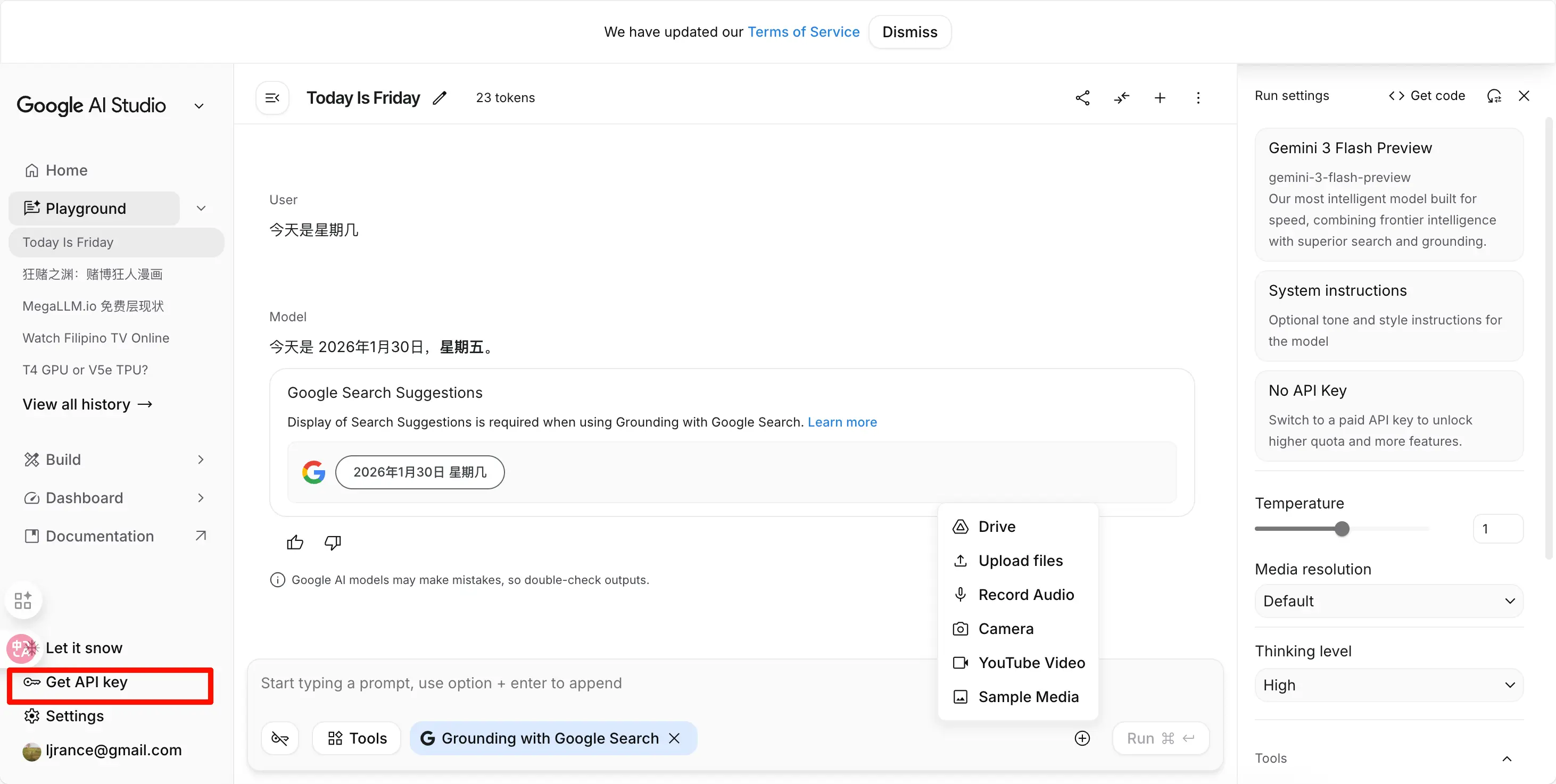
- On the AI Studio page, click “Get API Key” on the left
- Click “Create API Key”
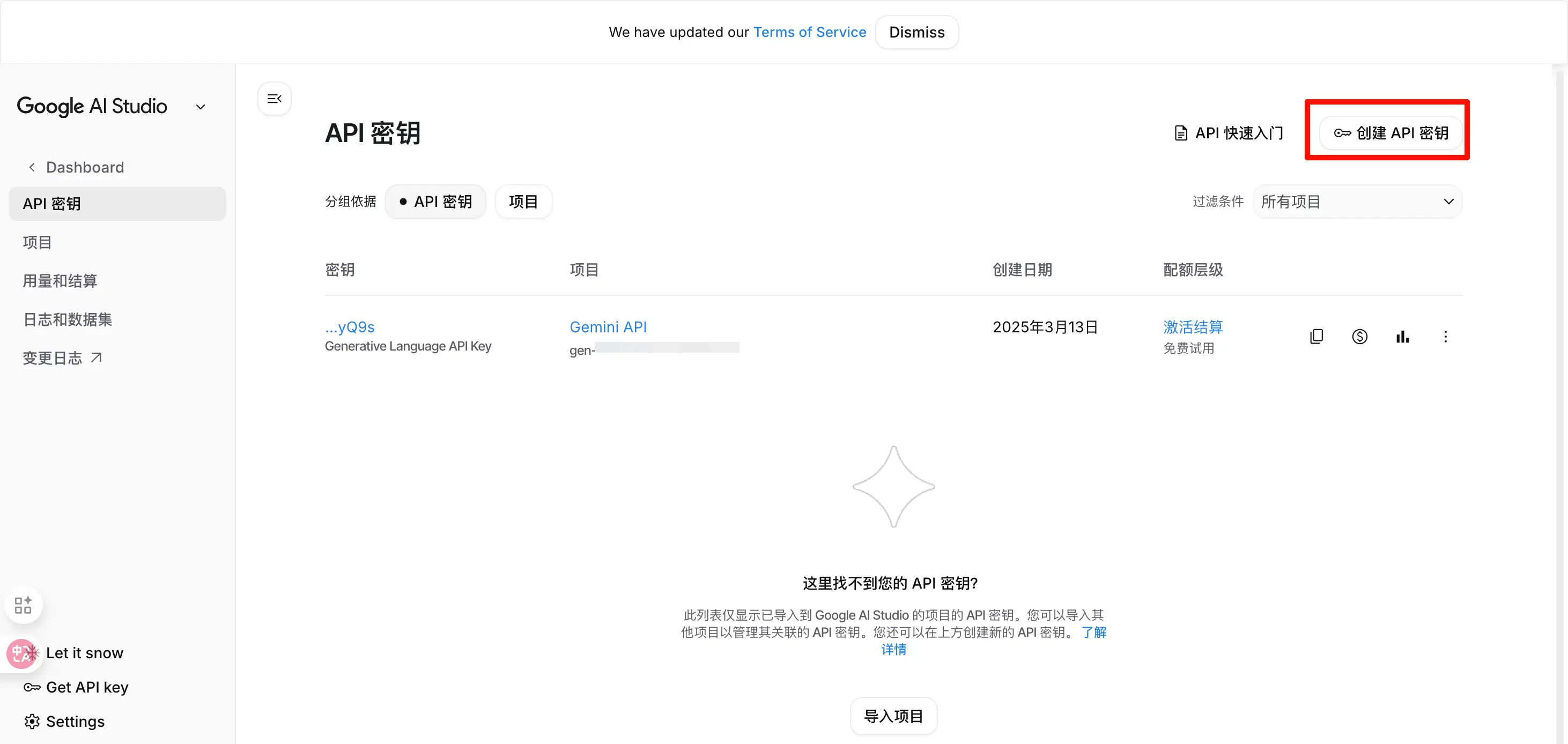
- Create and copy the generated API Key
- Go back to Playground, select and copy the model name on the right
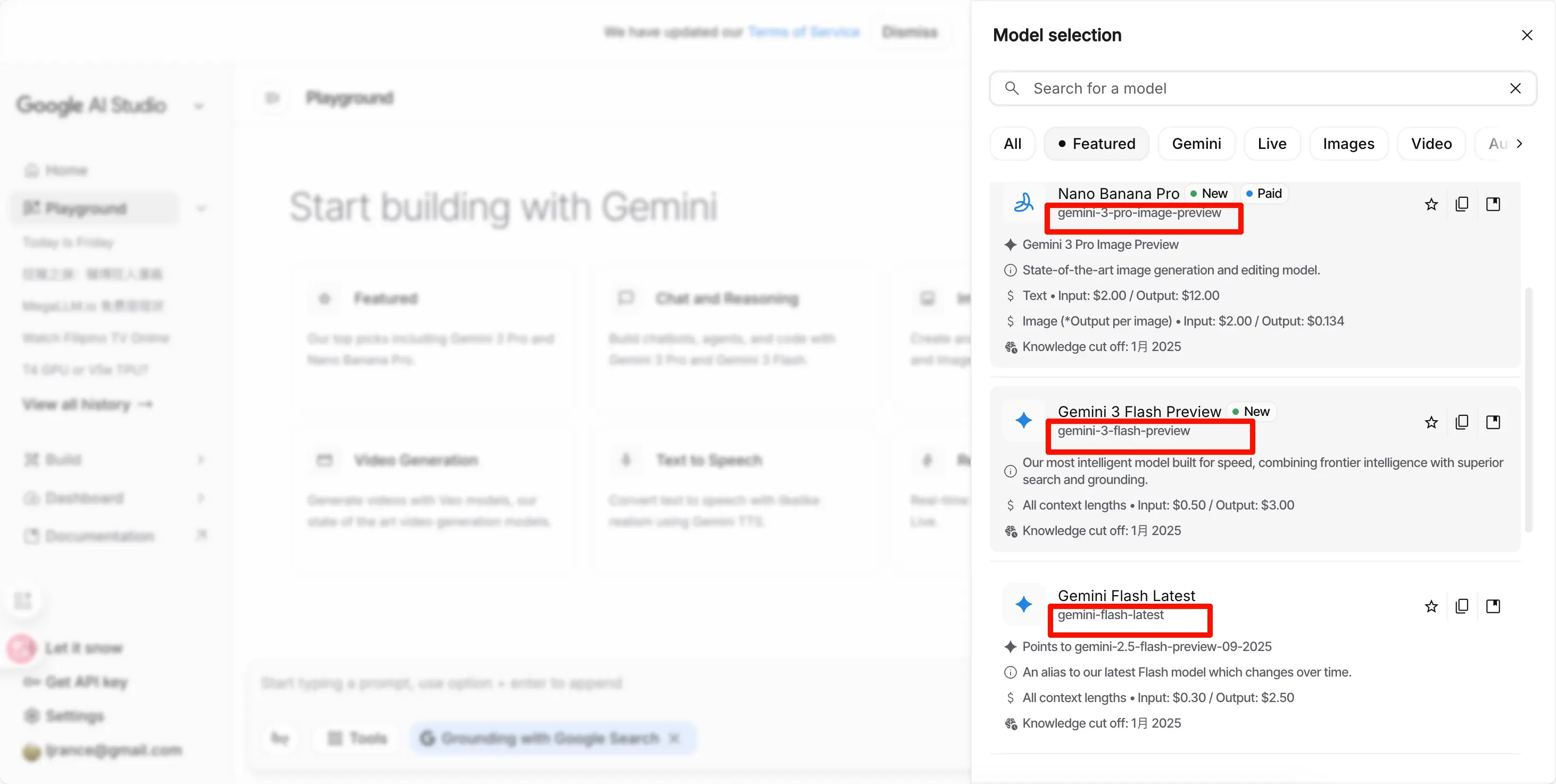
Call Parameters:
- Base URL:
https://generativelanguage.googleapis.com/v1beta - Model Name:
gemini-3-flash-preview - API Key: The key you copied
Free Tier Limits
Important note! Google AI Studio uses the free tier by default, with the following limits (as of January 2026), and these limits are subject to change:
- Requests per minute (RPM): 15
- Requests per day (RPD): 1500
- Tokens per minute (TPM): 1 million tokens
See detailed limits at: https://ai.google.dev/gemini-api/docs/rate-limits?hl=en
Is the free tier enough?
- Web chat: More than enough
- Occasional API calls: Sufficient
- Heavy automated calls: May not be enough
How to Remove Limits? Link Your Cloud Credits
Google Cloud offers $10 in free credits to new users. After linking it to AI Studio, you can unlock higher limits. For details on how to set up a Google Cloud account, search for “Google Cloud free credits” online—there are many tutorials. We won’t cover that here.
Linking Steps:
- In AI Studio, go back to the API interface and click “Set up billing”
- Link the Google Cloud billing account you created earlier
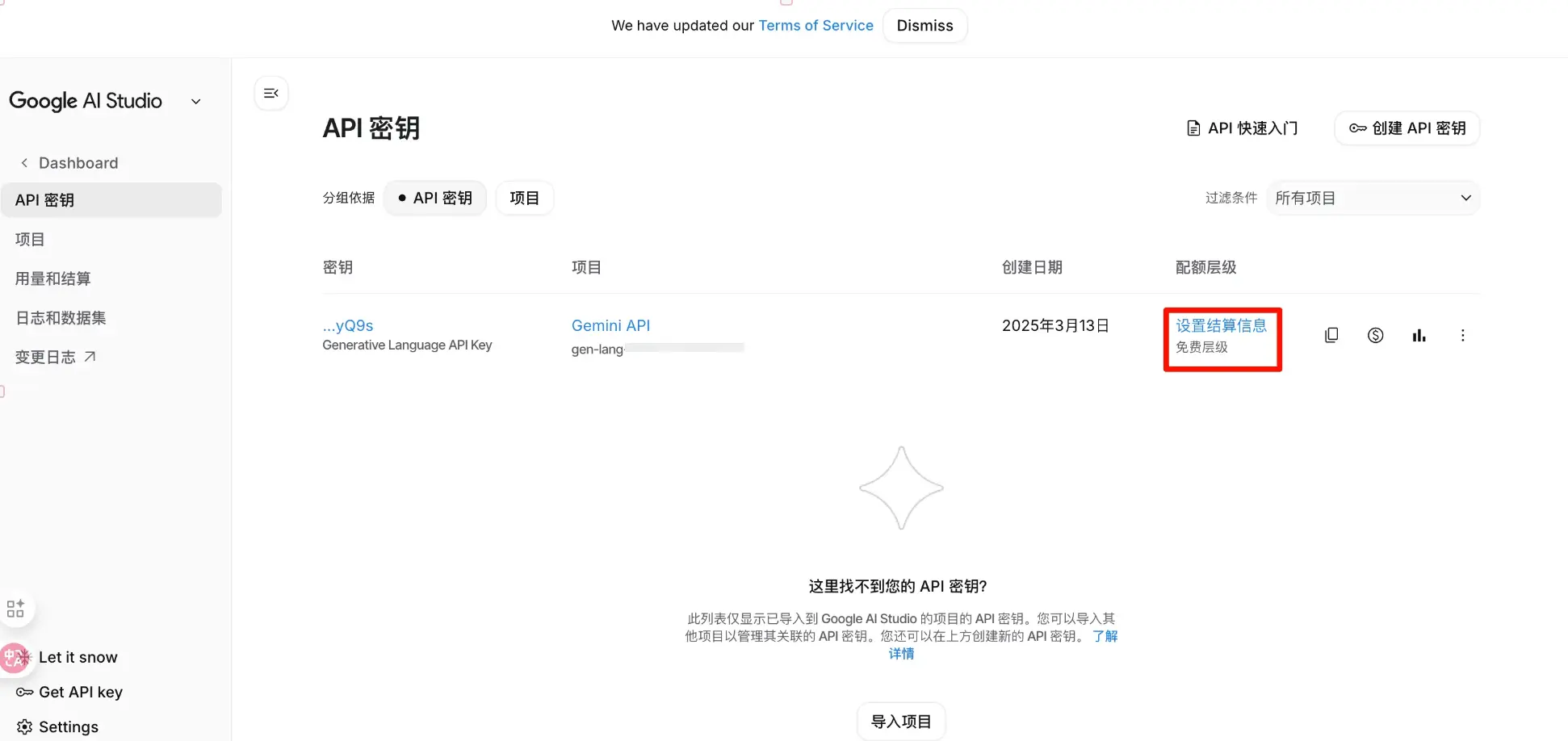
Benefits after linking:
- Rate limits significantly increased (RPM up to 1000+)
- Free credits still valid
- $10 can last a long time with the powerful flash model
- Both web version and API enjoy higher quotas
4. OpenRouter (International, Third-Party Platform)
Website: https://openrouter.ai
Platform Type: Third-Party Platform
Why Recommend?
- One platform to call all major AIs (GPT, Claude, Gemini, etc.)
- Transparent pricing, sometimes cheaper than official
- Supports Alipay payment (friendly for Chinese users)
- Supports credit card and cryptocurrency payments
- Free models available for trial
- Can call almost every available model
- Rankings are convincing
Steps to Get API Key:
- Open https://openrouter.ai
- Click “Sign In” in the top right corner, log in with Google or GitHub
- After logging in, click your avatar in the top right corner and select “Keys”
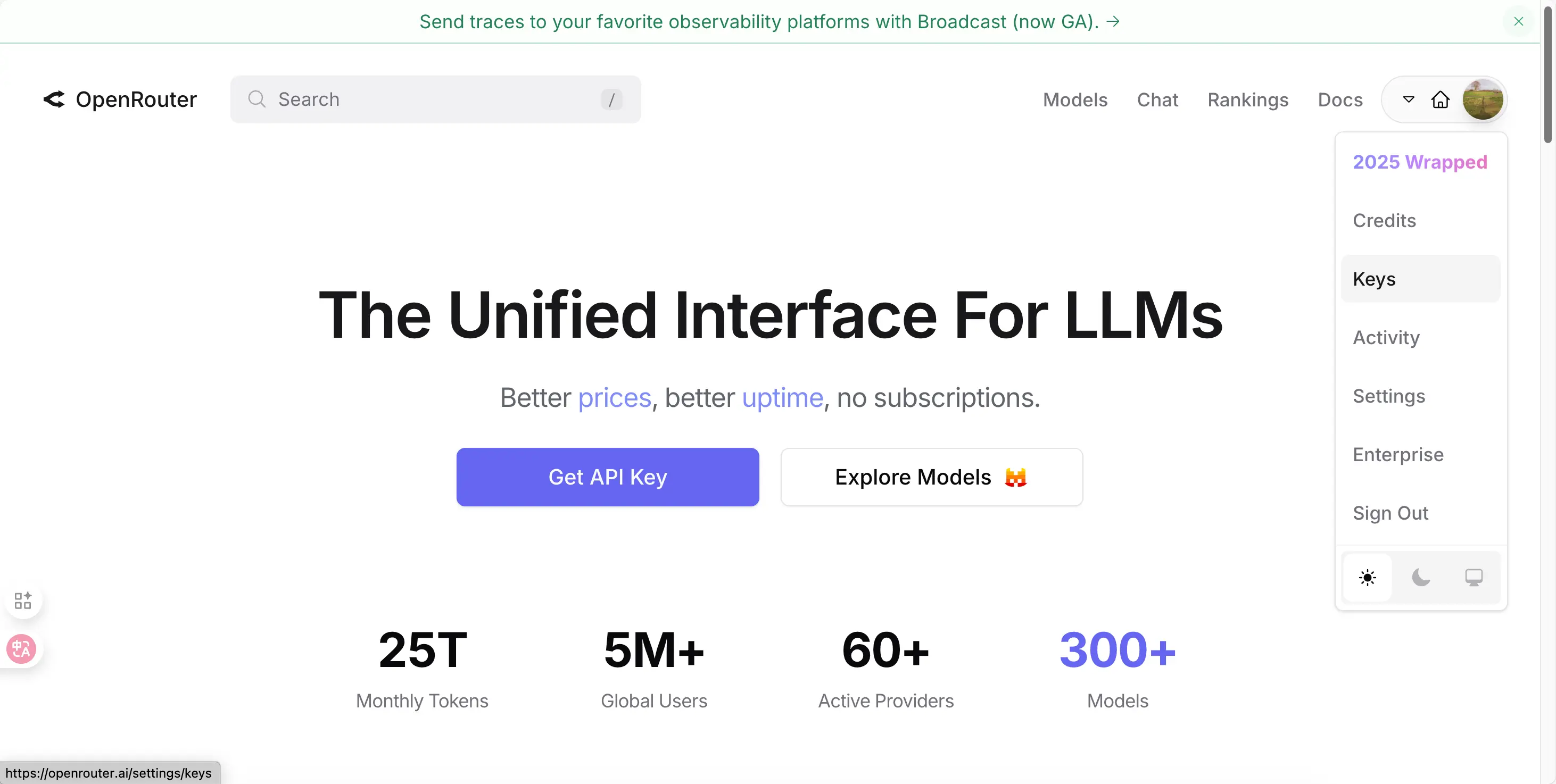
- Click “Create Key”
- Give the key a name and click create
- Copy the generated key
- Search for the model you want in the search box, then copy the name
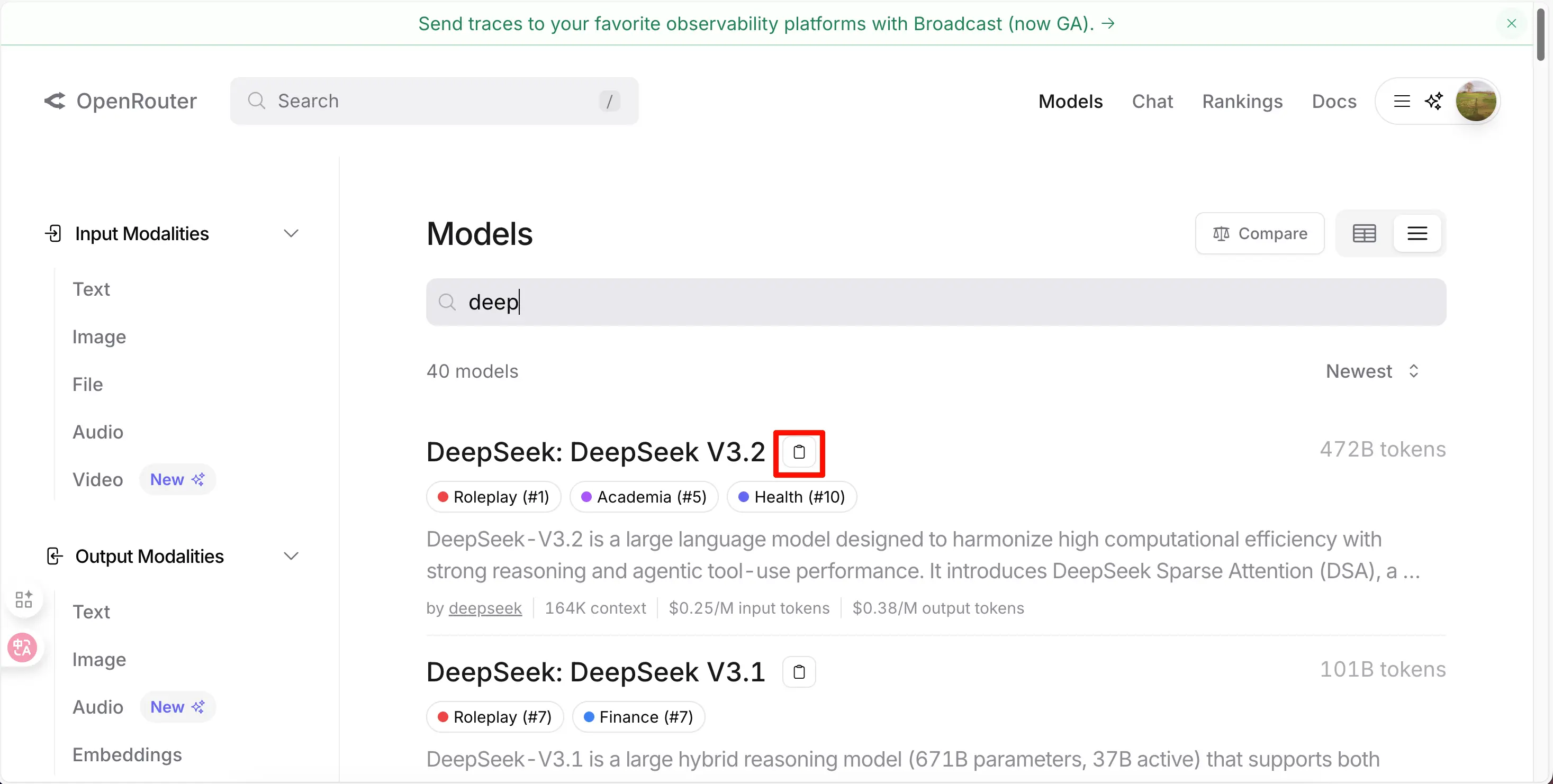
Call Parameters:
- Base URL:
https://openrouter.ai/api/v1 - Model Name:
- GPT-5.2:
openai/gpt-5.2 - Claude Opus 4.5:
anthropic/claude-opus-4.5 - Gemini 3 Pro:
google/gemini-3-pro - Free model:
meta-llama/llama-3.1-8b-instruct:free
- GPT-5.2:
- API Key: The key you created
Top-up Methods:
- Alipay (most convenient)
- Credit card
- Cryptocurrency (USDC, etc.)
Price Advantage:
- Some models are 10-20% cheaper than official
- Transparent pricing, see prices directly on the website
- Different providers compete, you choose the cheapest
Free Options:
- Some models are completely free (marked with
:free) - New users get free credits to try
- You can test with free models first
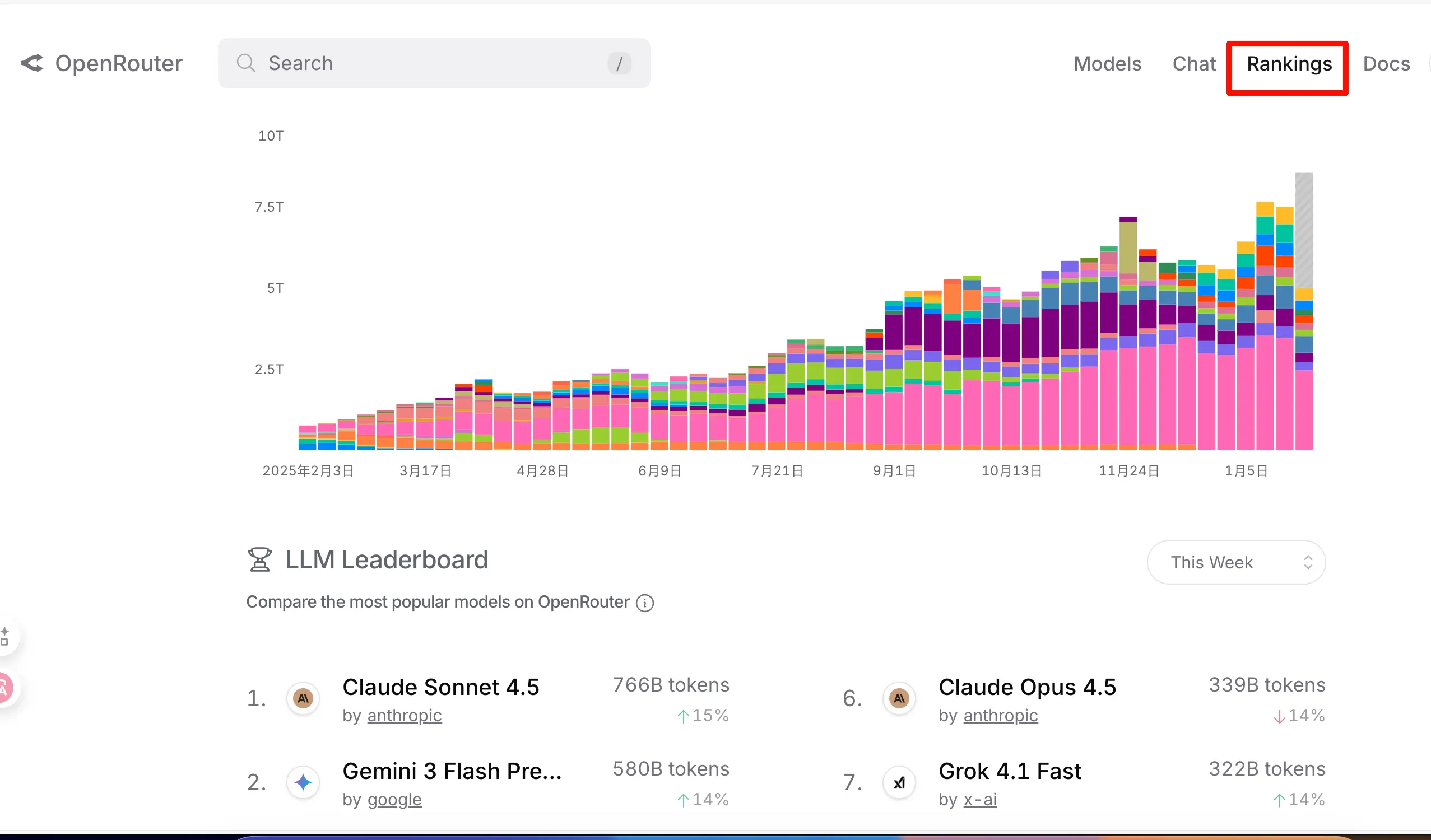
Model Rankings
- On the Rankings page, you can see the platform’s model call data; the rankings are very convincing.
Other Free Platforms
Due to space limitations, here are a few other platforms you can use for free:
Cerebras (Ultra-Fast Inference)
Website: https://cloud.cerebras.ai
Features:
- Extremely fast inference (claims to be the fastest in the world)
- Offers free Llama model calls
- Simple registration, just log in with GitHub
NVIDIA NIM (NVIDIA Official)
Website: https://build.nvidia.com
Features:
- NVIDIA’s official AI platform
- Offers multiple free models
- Suitable for testing and development
Both platforms offer free credits. If you’re interested, you can sign up and try them out.
Summary
Three Core Elements:
- API Key
- Base URL
- Model Name
Four Recommended Platforms:
- DeepSeek Official (Official) - Best low-cost choice in China
- Volcano Engine (Official + Third-Party) - Domestic platform, can call most domestic open-source models
- Google AI Studio (Official) - Best free choice internationally (with Cloud Credits), can be used directly in the web
- OpenRouter (Third-Party) - All-in-one platform, supports Alipay