Skill has become an indispensable method in my daily workflow. For anything that repeats three times or more, I think about turning it into a skill—not just to save time, but to ensure that the direction and steps don’t go off track every time. At least in theory.
But AI Still Goes Off Track
That statement is a bit exaggerated. The reality is that AI still skips steps. Take the WeChat public account writing skill I use every day. I set it to show me the first draft for revision, and only after I confirm it’s okay does it proceed to proofreading for typos. Sounds simple, right? But when it actually runs, it keeps skipping steps: it finishes the first draft without showing me and goes straight into proofreading and editing. By the time I notice, it has already quietly revised the file. When I call it out, it apologizes, says “sorry, my fault,” and then does it again the next time. Apologies don’t solve the problem.
Why AI Always Skips Steps
This problem is a little counterintuitive. At first I thought the AI wasn’t smart enough, but I was already using ChatGPT 5.4 and Opus 4.6, which are top-tier large models. Later I thought the rules weren’t clear enough, so I revised the rules in the skill over and over. It helped a bit, but didn’t fix the root cause. After some research, I learned that AI skipping steps isn’t about “not seeing the rules”—it’s determined by the generation mechanism:
- Probability-driven “acceleration impulse”. Large language models essentially predict the next token. The weight of completing the task is naturally higher than “staying on step 7 waiting for the user.” The sense of completion is its intrinsic drive.
- Rules decay in long contexts. The rules you set at the beginning have their attention weight diluted by the time the model reaches token 3000. Especially if you bury the rules in a long skill document, they get marginalized more easily.
- Especially severe in auto mode. When I use auto mode to write articles, the model tends to “run through all steps in one go.” My window to intervene becomes even narrower.
- CLAUDE.md and skill documents are essentially “soft constraints”. They are prompts that rely on the model’s “self-discipline” to follow. And self-discipline is fragile when faced with “I want to finish this task quickly.”
So the conclusion is: Verbal constraints fail under task-driven pressure. Simply writing documents, adding exclamation marks, or PUA-ing the AI can only alleviate the problem, not cure it. To truly fix it, you need to take it out of the model’s self-discipline zone—make it physically impossible to skip steps. That’s where Hooks come in.
What Is a Hook
Claude Code has a mechanism called Hook. It’s not a skill, not a prompt, and not the same as CLAUDE.md—it’s a local shell script attached to key points in the Claude Code lifecycle. The key difference:
- CLAUDE.md / skill are observed and executed by the model—the model can ignore them.
- Hook is enforced by the system—the model can’t ignore it even if it wants to.
A key sentence from the Anthropic official documentation on Hooks: Hooks are triggered by system events, not model decisions. That means hooks are attached to the entire Claude Code runtime. Every tool call the model makes—Write, Edit, Bash—must first pass through the hook for review. If the hook returns deny, it’s denied, even if you have --dangerously-skip-permissions enabled. This is what I call a “hard constraint”—not letting the AI make its own choices, but forcing its tool calls to pass through real shell script auditing.
Common Hook trigger points:
PreToolUse: Intercepts before the AI calls a tool.UserPromptSubmit: Processes your message before handing it to the AI.SessionStart: Triggered when a session starts or resumes.Stop: Triggered when Claude finishes a response.
Focus on the first two—they’re enough to build “step locking.”
In Practice: Step Gate for My WeChat Account Skill
All talk is useless without a concrete example. This screenshot is the Claude Code interface as I write this article. In the red box, the AI asks me to reply “pass step3 0090”—this passphrase is exactly the Step Gate Hook at work. The text you are reading now was written after I sent the passphrase and the hook allowed it.
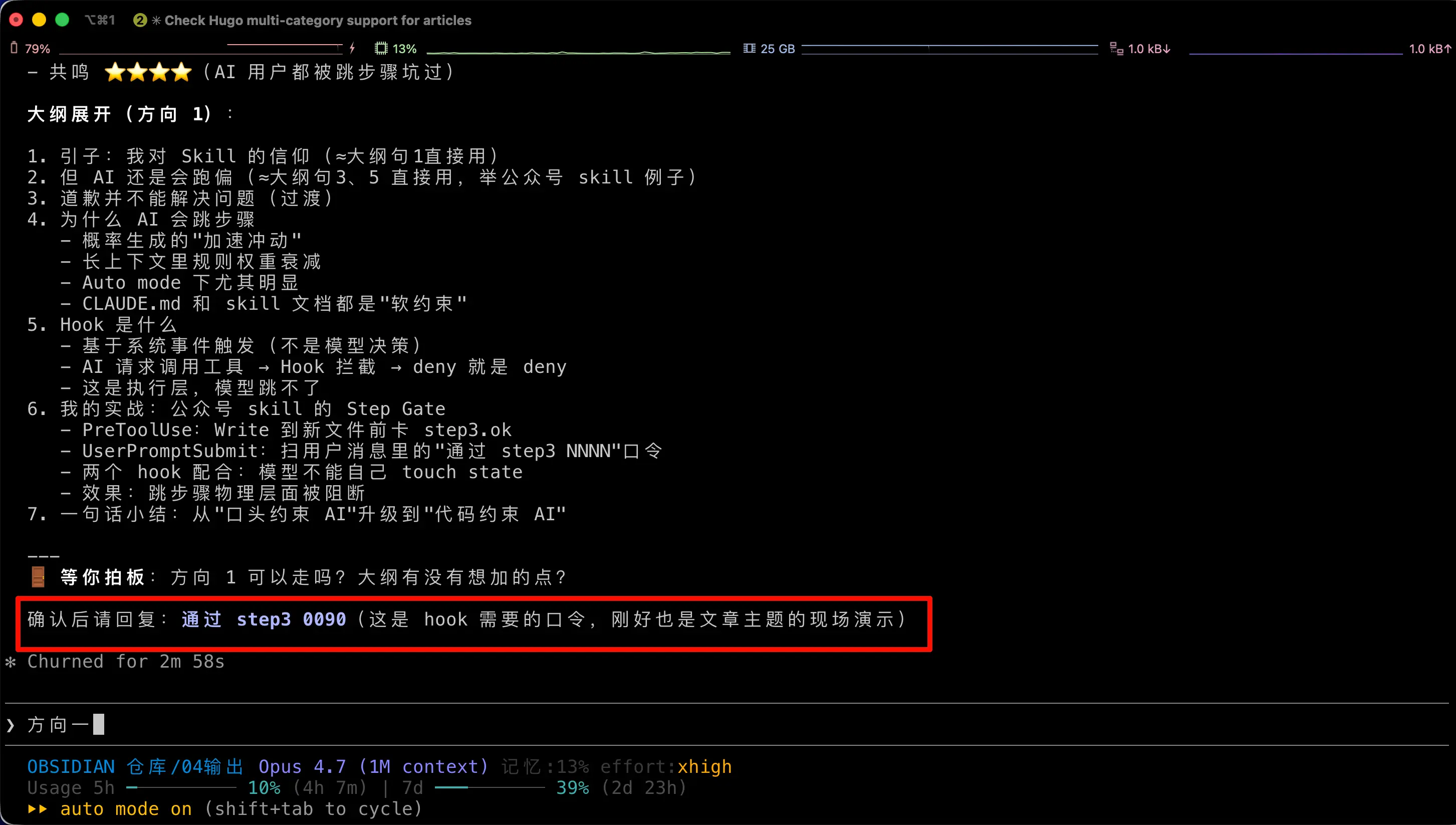
The entire Step Gate uses only two shell scripts plus a small configuration in settings.json. Let me break it down.
Register Two Hooks in settings.json
Add this to ~/.claude/settings.json:
"PreToolUse": [
  {
    "matcher": "Write|Edit",
    "hooks": [
      { "type": "command",
        "command": "~/.claude/skills/writing-gongzhonghao/scripts/gate_check.sh" }
    ]
  }
],
"UserPromptSubmit": [
  {
    "hooks": [
      { "type": "command",
        "command": "~/.claude/skills/writing-gongzhonghao/scripts/gate_mark.sh" }
    ]
  }
]
This configuration means:
- Every time the AI wants to Write or Edit a file,
gate_check.shruns first for review. - Every time I send a message,
gate_mark.shruns first to parse it.
gate_check.sh Handles Interception
The logic of this script is quite simple:
- If the AI wants to Write a new file
04-Output/NNNN xxx.md(corresponding to Step 3: create a new article), it checks whether the state filestep3.okexists. If not, it returnsdeny. - If the AI wants to Edit an existing article (corresponding to proofreading after Step 7), it checks whether
step7.okexists. If not, it also returnsdeny.
When denying, it also includes a prompt: “Step 3 topic discussion not confirmed: Please give me the outline/direction approval first. After confirmation, reply ‘pass step3 NNNN’ to create a new file.” This prompt is displayed directly to the AI, so it knows it’s stuck and asks me for the passphrase.
gate_mark.sh Handles Passphrase Release
How do I “release” it? I can’t let the AI release itself—that would be no constraint at all. The rule is: Only when my message contains a specific passphrase will the state file be touched. gate_mark.sh runs every time I send a message, scanning for patterns like pass stepN NNNN. If matched, it touches a .ok file in the corresponding directory.
So the complete chain becomes:
- AI finishes the outline and wants to create a new article → blocked by
gate_check.sh - AI asks me for the passphrase: “Please confirm the direction, reply ‘pass step3 0090’”
- I send “pass step3 0090” →
gate_mark.shtouches step3.ok - AI tries to create the file again →
gate_check.shallows it this time - After finishing the first draft, it wants to proceed to proofreading Edit → blocked again by step7.ok
- After I read the draft and send “pass step7 0090” → proofreading can begin
Throughout the process, the AI has no room for “self-discipline.” It can’t skip steps even if it wants to, because its tool calls are blocked at the system level.
Plug a Loophole: AI Cannot Touch State Files Itself
After designing the first version, I stared at the plan for a while and found a loophole—what if the AI uses Bash to touch step3.ok itself? Wouldn’t that bypass the constraint? So I added a specific rule in the skill document: AI must not touch state files itself, otherwise it would be removing its own constraints. This rule itself is still a soft constraint, but combined with the hard interception of hooks, it forms a sufficiently closed loop—as long as the AI doesn’t actively violate this rule (and Claude is actually cooperative), the hook constraint is real. If you want to be stricter, you can add a Bash matcher in PreToolUse to also block commands like touch. But I haven’t gone that far yet; it’s good enough.
If You Don’t Understand Code, Don’t Panic
You don’t need to write these shell scripts or JSON configurations yourself (I actually can’t write them either). The approach is simple: throw this article and your skill file to Claude or Codex, let it read them and help you modify—create scripts where needed, modify settings.json where needed. AI is particularly reliable for this kind of “configure environment according to documentation” task, much more stable than writing code from scratch. It learns the principles from the article while writing hooks according to your skill requirements, and the result rarely goes off track.
Summary in One Sentence
CLAUDE.md, skill documents, bold markers, repeating three times, PUA—these are all verbal constraints on AI. They work, but have a low ceiling.
Hooks are code constraints on AI. They move the rules to a place the AI can’t reach, turning “following rules” from a matter of model self-discipline into a mandatory requirement of the execution environment.
If you find yourself repeatedly telling the AI “Why are you skipping steps again?”, it’s time to consider using Hooks to constrain it.