When I introduced the Codex APP, I touched on a topic: Why you might not need to learn N8N anymore. This chapter expands on that.
What is N8N?
In a nutshell: N8N is a visual automation workflow platform.
The name N8N comes from “nodemation” (node + automation), with 8 letters between the first and last, hence N8N. It’s an open-source project that you can deploy on your own server for free.
What can it do? Think of it as an assembly line. Each “node” is a station on the line. Data enters at the first station, goes through a series of processes, and comes out at the last station.
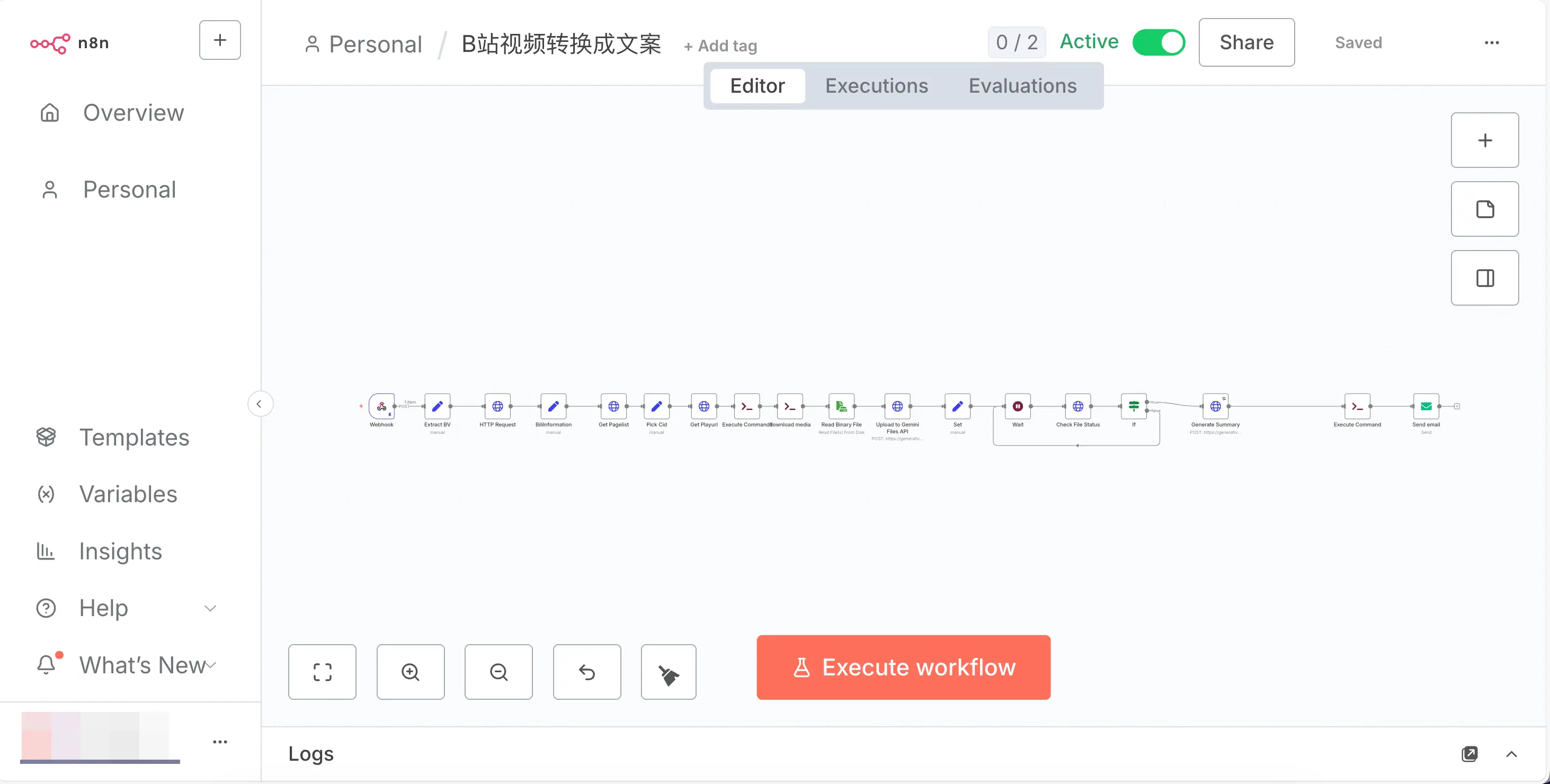 For example, you can build an assembly line like this:
- Node 1 (Trigger): Automatically starts at 9 AM every day
- Node 2 (HTTP Request): Fetches today’s news from a website
- Node 3 (Data Processing): Filters out AI-related content
- Node 4 (Send Notification): Sends the results to your email
Set it up and forget it—it runs automatically every day.
N8N has over 400 built-in nodes covering common services like Gmail, Slack, databases, Notion, and more. Since its launch in 2019, it has gained over 200,000 active users and raised funding at a $270 million valuation.
It’s definitely a great tool. I’ve deployed it myself and run many workflows on it.
N8N is Powerful, But It Has Four Major Problems for Beginners
Before Skill came along, N8N was almost the only choice for personal automation. But now things are different.
N8N has four major problems for beginners.
Problem 1: Too Much to Learn
When you open N8N, you need to understand: workflows, nodes, triggers, webhooks, credentials, expressions, data mapping…
Just for “Webhook” alone, you need to understand the HTTP protocol, the difference between POST and GET requests, and JSON data format.
For someone without a programming background, this isn’t learning automation—it’s learning programming.
Many people excitedly open a tutorial, and the first step is “Configure a Webhook node, set Method to POST”—and they’re immediately turned off.
Problem 2: Tutorials Can Never Keep Up with Updates
N8N updates very quickly, which is a good thing. But the problem is: you follow a tutorial and find that the interface looks different from the screenshots.
It’s not that the tutorial is wrong; N8N has been updated again.
What’s worse, N8N has had major version upgrades recently, and some workflows that worked before become incompatible after the upgrade. Something you spent a weekend building can be broken by a single update, and you have to reconfigure it.
Problem 3: Deployment Barrier is Not Low
N8N can be used in two ways: self-hosted or using the official cloud service.
Self-hosting gives you unlimited workflows for free (aside from server costs). But you need to know how to buy a server, install Docker, set up a reverse proxy, configure DNS… For a beginner, just getting N8N running can take half a day. Before you even start learning automation, you’re already put off by the deployment.
Using the official cloud service is convenient—just sign up and use it. But the free plan only gives you 5 workflows. Want more? The Starter plan is $20/month, and the Pro plan is $50/month. Before you’ve automated a few processes, you’ve already spent money.
Problem 4: Debugging Relies on Human Relay
When something goes wrong in N8N, the debugging process goes something like this:
- See an error message
- Don’t understand it, take a screenshot and send it to an AI (like ChatGPT)
- AI gives a solution, you go back to N8N and make changes
- Run it again, still wrong
- Screenshot again, ask AI again
- Go back and forth several times before it’s fixed
What are you doing? Acting as a translator between N8N and the AI.
Although N8N also has MCP to connect with AI, the experience is mediocre. You still have to manually go step by step asking the AI, and some issues take several attempts to pinpoint.
What Does N8N Actually Do?
Before discussing how Skill can replace it, let’s first understand the core principles of N8N.
Strip away the fancy visual interface, and N8N essentially does four things:
| Capability | Description | Example |
|---|---|---|
| Send Requests | Call external APIs or scrape web pages | Request weather API to get today’s weather |
| Process Data | Filter, transform, format data | From 100 news items, filter out AI-related ones |
| Trigger Execution | Run on a schedule or triggered by external events | Automatically run at 9 AM every day |
| Connect Services | Chain different tools together | Read email from Gmail → Save to Notion |
That’s it—just these four things.
And all four of these things can be done with scripts in Skill.
How Does Skill Replace N8N?
Remember Skill from earlier? Skill packages tools, APIs, and scripts into a command that you can invoke with a /.
There are three benefits to replacing N8N with Skill:
Benefit 1: No Need to Build It Yourself—AI Builds It for You
In N8N, you have to manually drag nodes, connect them, and configure parameters. When you’re stuck, you look up documentation or ask an AI.
With Skill?
You: Create a Skill that fetches the top 10 stories from Hacker News every day,
    formats them into a Markdown table, and saves them to my notes.
The AI directly writes the script, creates the Skill file, and tests it. You don’t need to understand HTTP requests or know what JSON looks like.
Benefit 2: When Something Goes Wrong, the AI Fixes It Directly
This is the best part.
I already described the debugging process for N8N errors above—screenshot, ask AI, modify, run again, screenshot again, ask again. Back and forth relaying.
With Skill, it’s completely different. The AI can directly see the error message, directly modify the script, and directly re-run it.
You just say “run it,” and the AI handles the rest in a closed loop.
From “human relay” to “AI closed loop,” the efficiency difference is more than tenfold.
Benefit 3: Learning Cost is Nearly Zero
With N8N, you need to learn: nodes, triggers, expressions, credentials, webhooks, data mapping…
With Skill, what do you need to learn?
You’ve already learned it.
If you’ve been following this guide, you already know how to use Claude Code or Codex. Using Skill is just typing /skill-name—no additional learning cost.
“But N8N Can Run Automatically!”
An important reason many people like N8N: Set it up and it runs automatically without human intervention.
“Doesn’t Skill require manually entering a command every time?”
No. Skill has several ways to achieve automatic execution.
Method 1: Codex APP’s Automations (Simplest)
The Codex APP introduced earlier has an Automations feature. Remember? It’s like setting an alarm for the AI.
You can set:
- Run a specific Skill at 9 AM every day
- Generate a report every Monday
- Check data every 6 hours
How to do it: Open Codex APP → Automations → Set frequency → Bind Skill → Save.
It has the same effect as N8N’s scheduled trigger, but the configuration is much simpler.
Method 2: System Scheduled Tasks (cron / launchd)
If you’re using the terminal-based CLI, you can use the operating system’s built-in scheduling tools.
macOS uses launchd, Linux uses cron. The principle is simple: write a rule telling the system “execute this command at this time.”
For example, if you want to automatically run a Skill at 8 AM every day:
# Tell the system to execute this command at 8 AM every day
claude -p "Run /my-daily-report"
You don’t need to write the configuration file yourself; let the AI generate it for you. Just say:
Create a macOS scheduled task to run the /my-daily-report Skill at 8 AM every day.
The AI will generate all the necessary configuration.
Method 3: Webhook Trigger
If you need external events to trigger actions (e.g., someone submits a form, a new commit on GitHub), you can have the AI write a simple script that listens for webhooks and calls the corresponding Skill when a signal is received.
This is a bit more complex, but the AI can still handle it for you.
N8N vs Skill Comparison
| Comparison Item | N8N | Skill |
|---|---|---|
| Ease of Getting Started | High (nodes, triggers, expressions, etc.) | Low (tell the AI what you want) |
| Setup Method | Manually drag nodes, configure parameters | AI automatically generates scripts and files |
| Debugging Method | Screenshot → Ask AI → Modify → Run again | AI directly sees error → directly modifies → directly runs |
| Visualization | ✅ Drag-and-drop flow chart | ❌ Pure script |
| Scheduled Execution | ✅ Built-in triggers | ✅ Automations / cron / launchd |
| Built-in Integrations | 400+ nodes, ready to use | AI uses scripts to connect, broader coverage |
| Deployment Requirements | Needs server (Docker) | Runs locally |
| Maintenance Cost | Medium (version updates may break compatibility) | Low (scripts don’t depend on platform version) |
| Target Audience | Those with some technical background | Everyone |
What Can N8N Do That Skill Can’t?
After all this praise for Skill, to be fair, let’s also talk about where N8N is irreplaceable.
1. Visual Workflow
N8N’s biggest selling point is its drag-and-drop canvas. You can intuitively see how data flows and which nodes connect to which. Skill is pure script—the AI understands it, but it’s not as intuitive for humans.
2. 24/7 Independent Operation
N8N is deployed on a server, so it keeps running even when your computer is off. Skill primarily runs locally. Although you can use Automations or cron for scheduled triggers, your computer needs to be on (unless you deploy the script to a cloud server).
3. Enterprise-Grade Scenarios
If you need to process tens of thousands of data records daily, integrate with dozens of external services, or have multiple people collaborating on workflow management—N8N is more stable in these scenarios. Skill is better suited for personal-level automation.
4. Webhook Ecosystem
N8N natively supports webhooks, so external systems can directly trigger workflows. Skill requires additional scripting to achieve the same effect.
However, that said.
For the readers of this guide—AI beginners—you probably won’t need any of these “things Skill can’t do.”
You don’t need to process tens of thousands of data records. You don’t need 24/7 uninterrupted operation. You don’t need to integrate with dozens of enterprise systems.
What you need is: to turn an idea into an automated workflow with the least time and the lowest barrier.
That’s exactly where Skill excels.
If you ever have enterprise-level needs in the future, you can always come back and learn N8N. By then, you’ll already have a solid foundation, so learning it will be much faster.
Summary
What you learned today:
- What N8N is: A visual automation workflow platform that lets you build automation by dragging and dropping nodes
- Four pain points for beginners: Too many concepts to learn, tutorials can’t keep up with updates, high deployment barrier or cost, debugging relies on human relay
- N8N’s core principles: Send requests, process data, trigger execution, connect services—all doable in Skill
- Three advantages of Skill over N8N: AI builds it for you, AI debugs for you, zero learning cost
- Skill can also run automatically: Automations, cron/launchd, Webhook—three methods
- Where N8N is irreplaceable: Visual workflow, independent server operation, enterprise-grade scenarios
Key takeaways:
- N8N is a great tool, but it’s not something AI beginners must learn
- Skill can achieve the same or even better results with a lower barrier
- If you ever need enterprise-level features, you can learn N8N later—with a solid foundation, you can learn anything quickly