We’ve covered the mainstream AI tools, and you’ve likely chosen the platform you want to use. Most AI tools from China are completely free to use on the web, and payment is only needed for APIs (more on that later). But overseas AI tools are different—many people get stuck at the payment step: How do I pay for overseas AI tools?
This chapter walks you through how to pay for overseas AI tools like ChatGPT, Claude, and Gemini, with a special focus on the highly recommended Apple subscription method.
Official Payment Methods (Not Recommended)
The official websites of ChatGPT, Claude, and Gemini all support direct subscription, but you need:
- A foreign credit card: Visa, MasterCard, American Express, etc.
- A foreign PayPal account: A PayPal account linked to a foreign credit card
- A foreign address: A foreign address is required for the billing address
Why is it not recommended?
Not user-friendly for users in China:
- Most credit cards issued in China will be rejected
- Even dual-currency cards may be rejected due to risk control
- Virtual credit cards (like Depay) carry the risk of account suspension
- Payment failures can lead to account freezing
Summary: Unless you have a genuine foreign credit card, it’s not recommended to pay directly on the official website. Below we introduce a more reliable method.
Apple Subscription Method (Highly Recommended)
Why recommend Apple subscription?
Apple subscription is currently the most stable and secure payment method:
- Supports UnionPay cards from China: No foreign credit card needed
- Low risk: Through official Apple channels, no risk of being banned by AI platforms
- Easy management: All subscriptions are managed centrally in your Apple ID
- Transparent pricing: Settled at Apple’s exchange rate, no additional fees
- One-click login and registration: You can directly log in to AI tools with your Apple ID without separate registration (more on this later)
Prerequisites
You need an Apple ID from a region other than mainland China. Recommended regions:
- US region: Most commonly used, widest app selection
- Japan region: Exchange rate can be more favorable
- Nigeria region: Cheapest
How to register a non-China Apple ID?
- Sign out of your current Apple ID
- Open the App Store and choose a free app to download
- Select ‘Create New Apple ID’ and choose United States/Japan/Hong Kong as the region
- Fill in the information (email, password, security questions)
- Select ‘None’ as the payment method for now, and fill in a random address (you can change it later)
Once registered, you’ll have a blank Apple ID for the selected region.
Getting Apple Gift Cards
Once you have a non-China Apple ID, you need to add funds to it. There are two ways to get gift cards:
Method 1: Purchase on Taobao/Xianyu (Fast but Risky)
Steps:
- Search for ‘US Apple Gift Card’ or ‘US iTunes’ on Taobao or Xianyu
- Choose a reputable seller (check reviews and sales volume)
- After purchase, the seller will send you a redemption code
- Redeem it immediately into your Apple ID
Advantages:
- Fast: you can get the code in minutes
- Sometimes slightly cheaper than official prices
Disadvantages:
- Risk of stolen credit cards: If the seller uses stolen credit cards to buy gift cards, your Apple ID could be banned
- Difficult after-sales support: hard to hold anyone accountable if problems arise
Important note: If you choose this method, be sure to pick a large, reputable store and redeem the code immediately after receiving it. If you encounter a stolen card issue, contact Apple Support immediately to explain the situation.
Method 2: Purchase from Apple’s Official Website (Recommended, Safe)
This is the safest method. Although it’s a bit more involved, it’s completely legal and risk-free. Detailed steps:
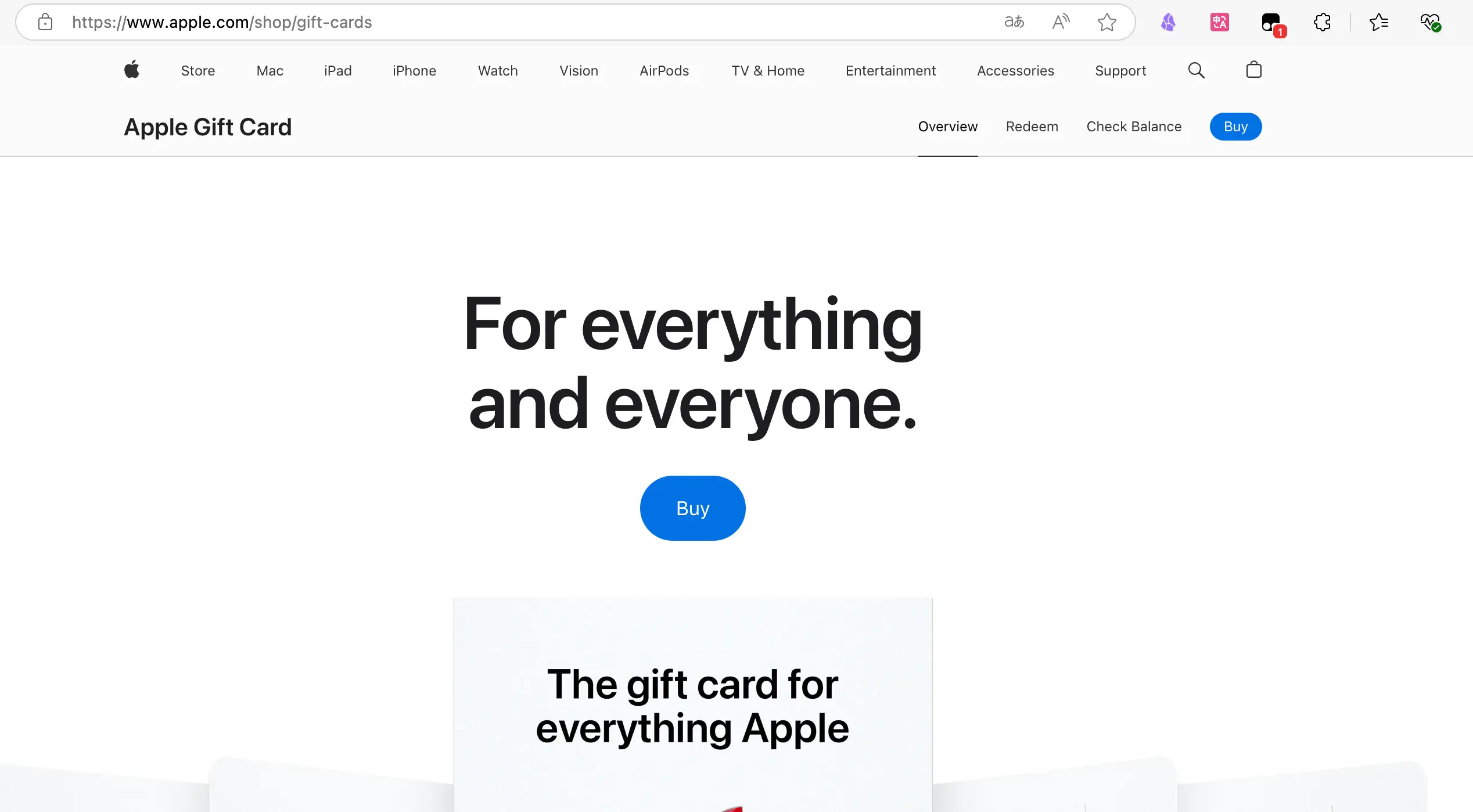
1. Open Apple’s official gift card purchase page
- URL: https://www.apple.com/shop/buy-giftcard/giftcard
- Note: You need to visit the US Apple website (if you have a US Apple ID)
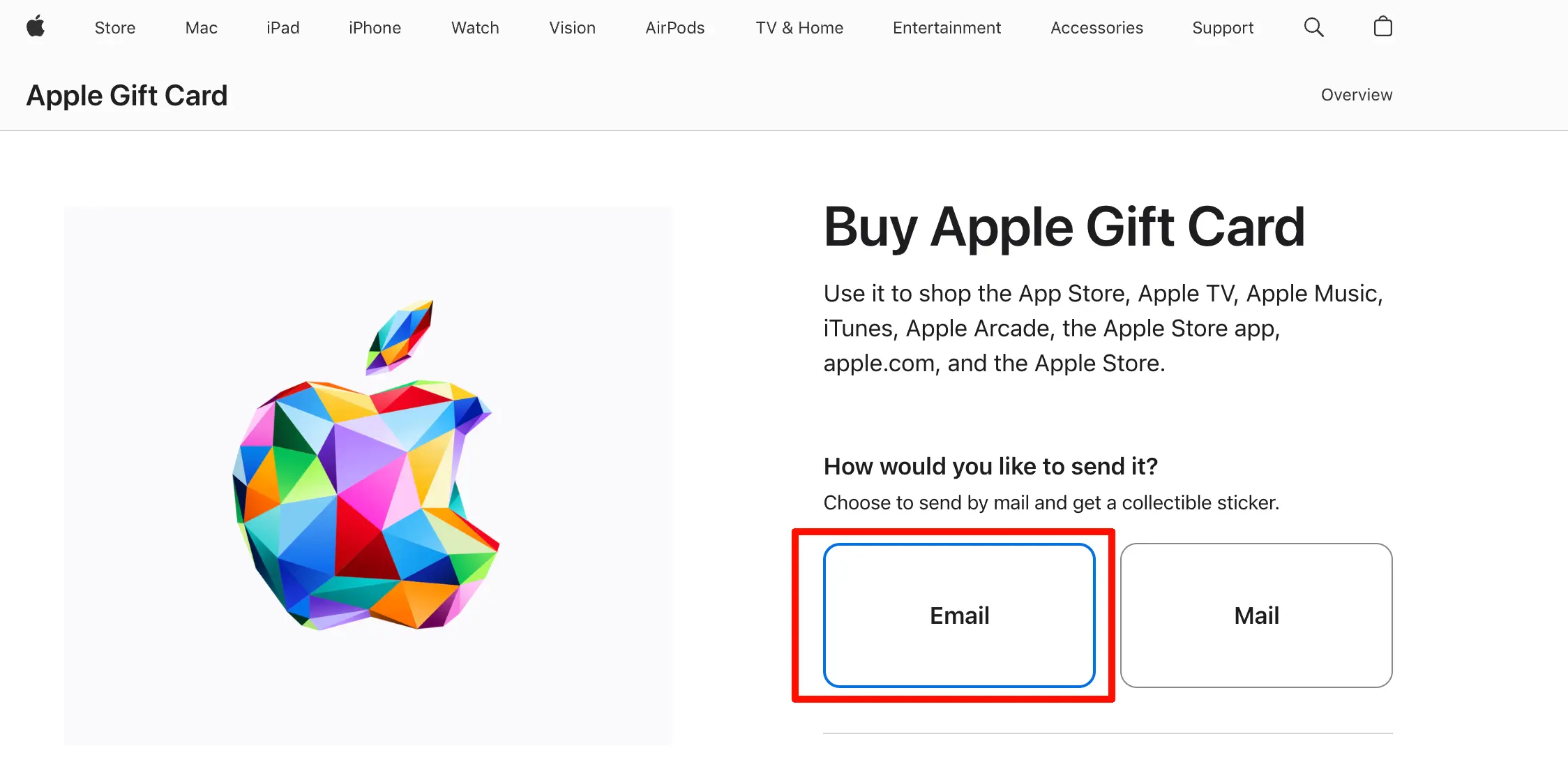
2. Choose the Email delivery method
- The page will ask if you want a physical card or an electronic card
- Select ‘Email’ (electronic card, sent to your email)
- Choose an amount: $25, $50, $100, or a custom amount
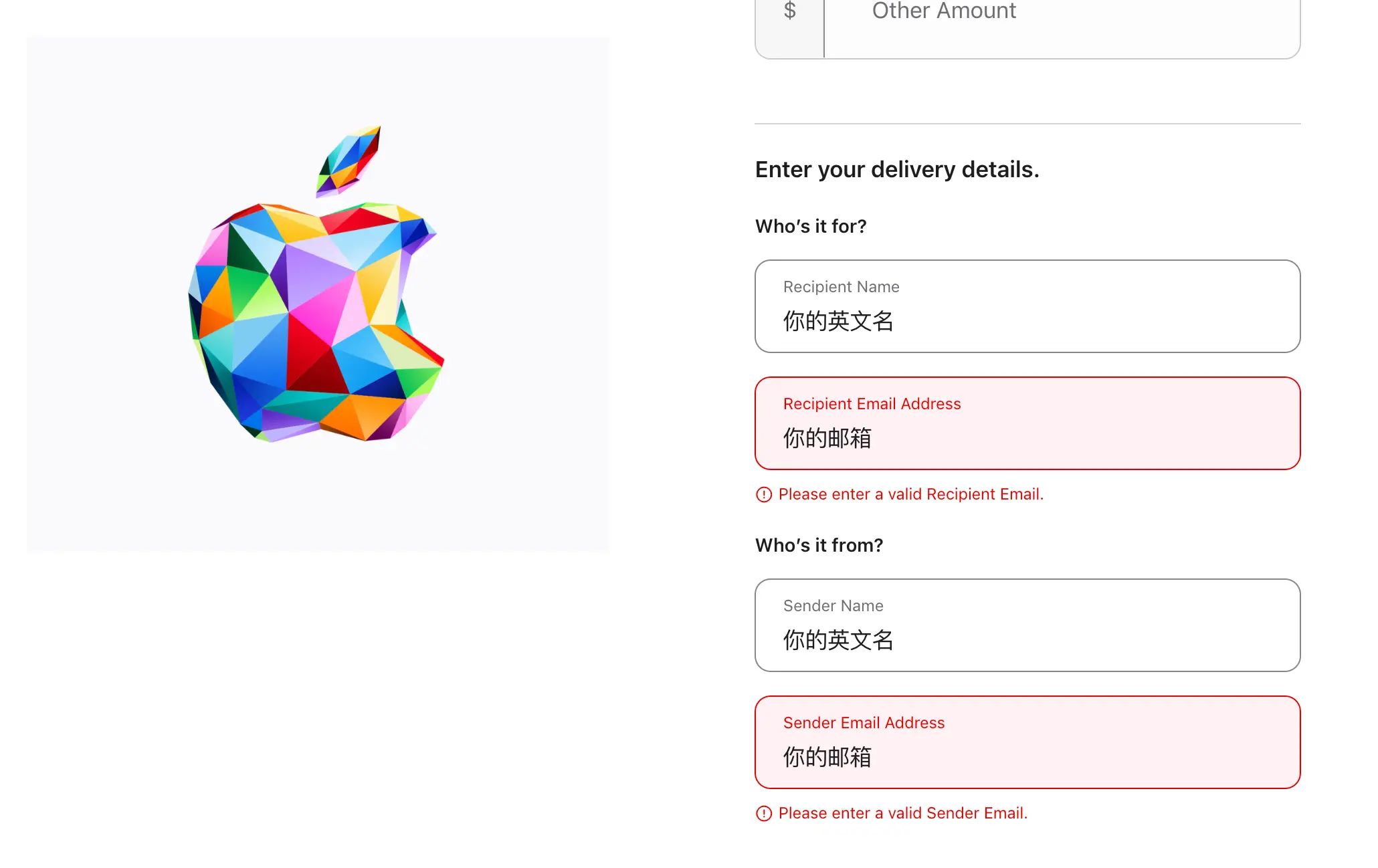
3. Fill in the recipient information
- Recipient: Enter your own English name
- Recipient Email: Enter your email address (to receive the redemption code)
- From: You can fill in anything, even yourself
- Message: Leave blank or write anything
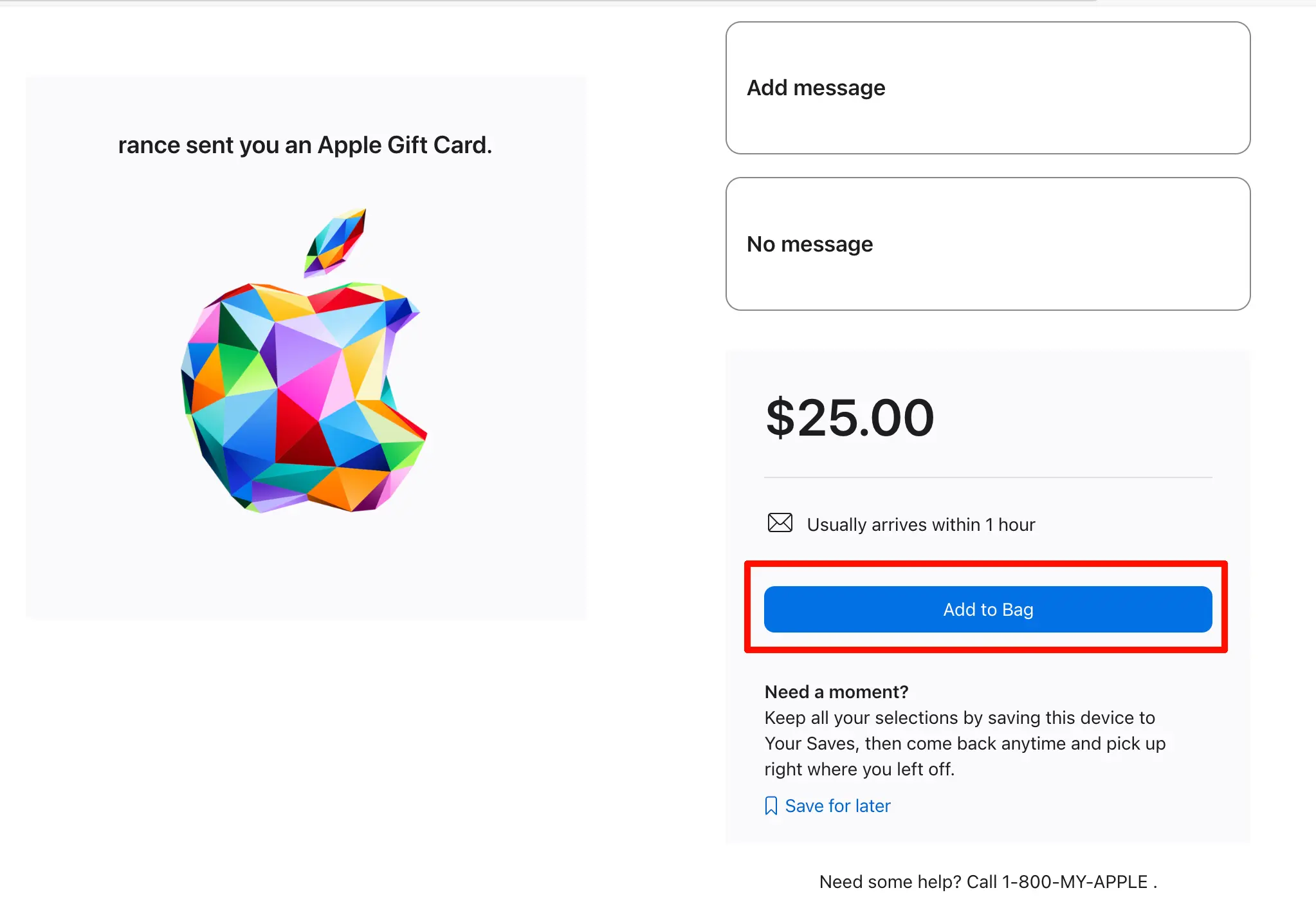
4. Add to bag and check out
- Click ‘Add to Bag’
- Click ‘Check Out’ (you can use Apple Pay if you’ve set it up)
- The system will ask you to sign in with your Apple ID (use your US Apple ID)

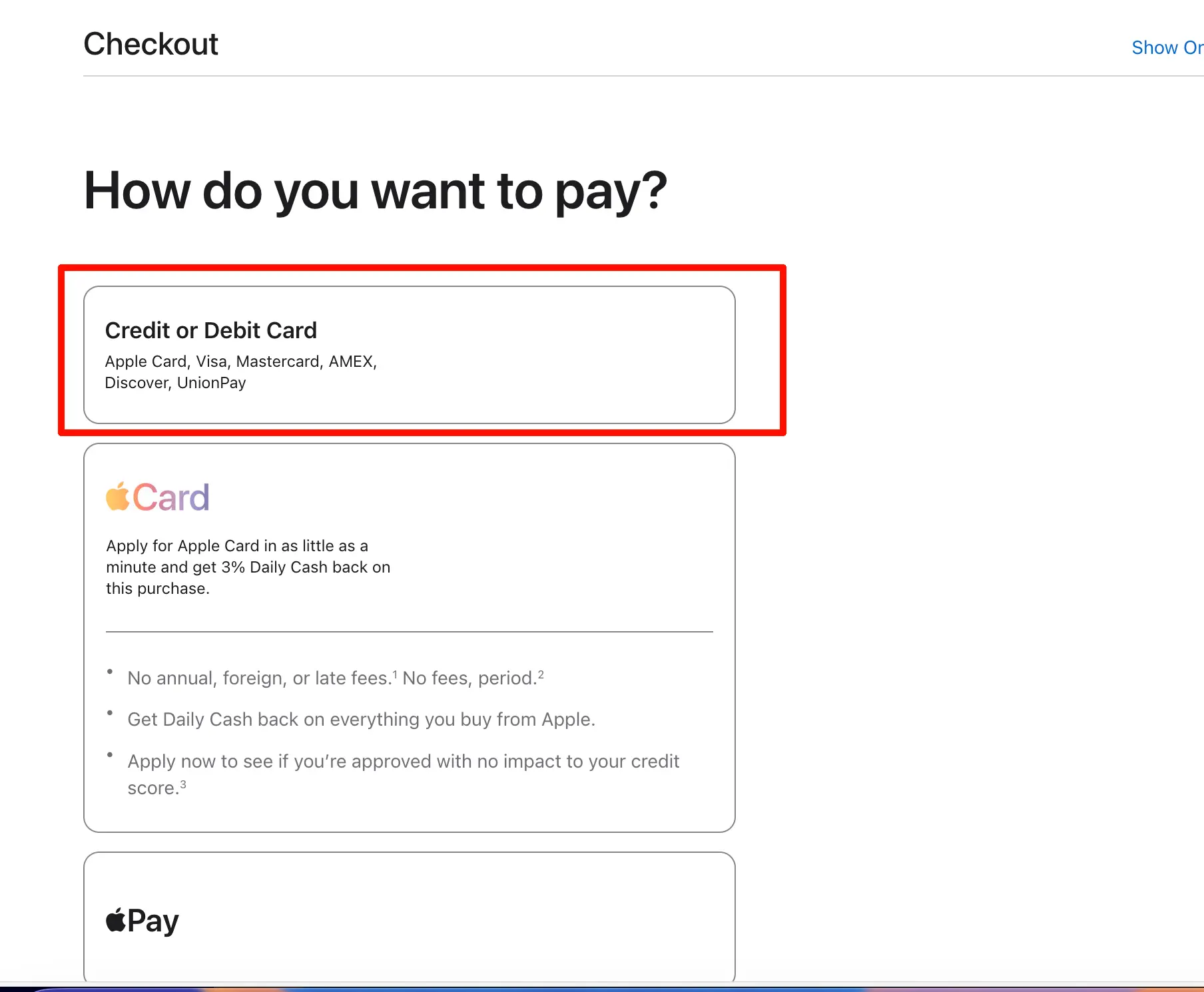
5. Enter payment method
- Key point: You can directly use a UnionPay credit or debit card from China
- Enter the card number, expiration date, and CVV as they appear
- Cardholder name: Enter the name in pinyin as it appears on the card
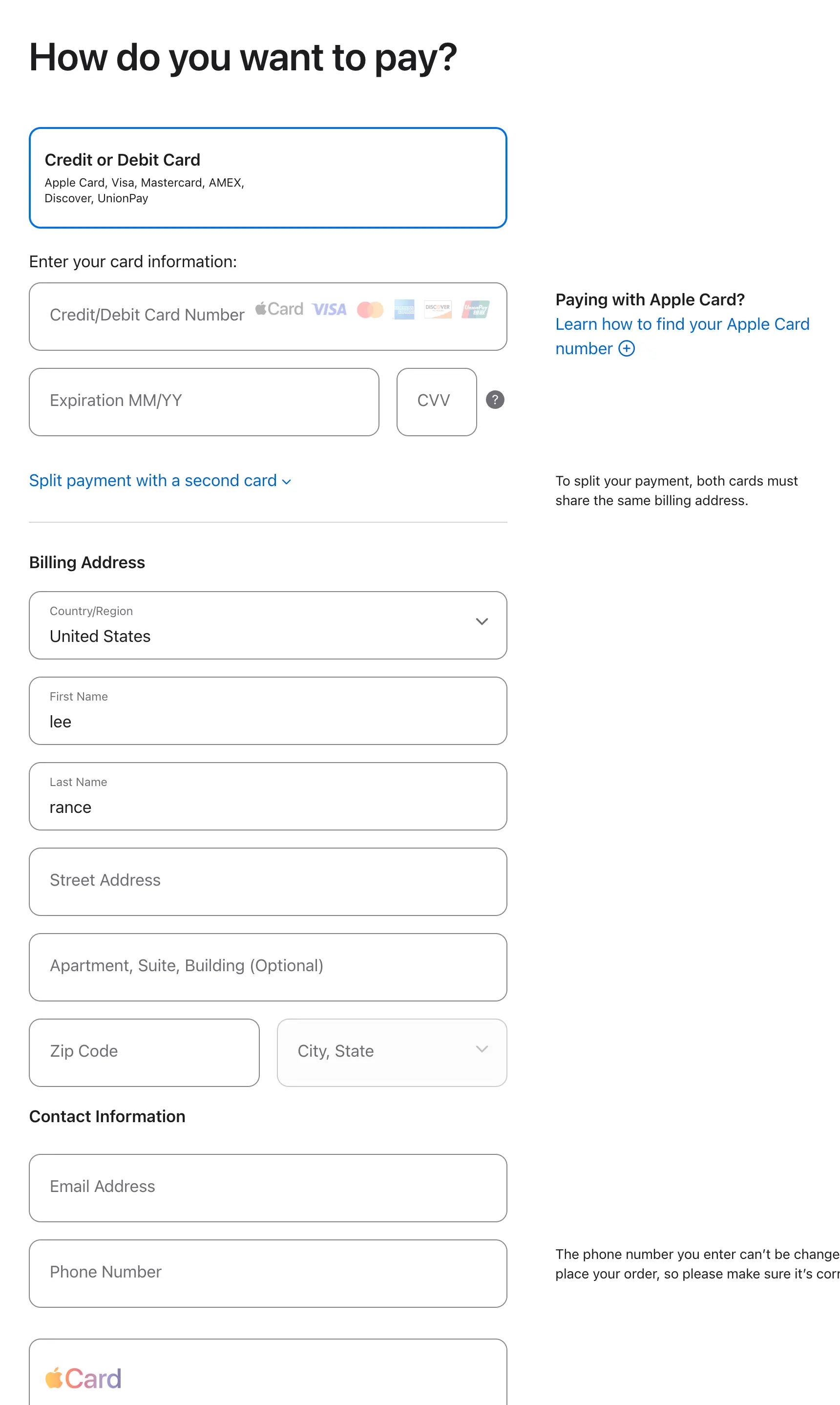
6. Fill in the Billing Address
This is a crucial step! You need to enter a US address. It’s recommended to choose a tax-free state to save money:
- Alaska
- Oregon
- Delaware
- Montana
- New Hampshire
How to fill it in?
- Open Google Maps or Apple Maps
- Search for ‘Oregon hotel’ or ‘Alaska hotel’ (find a hotel address)
- Copy the hotel’s address, city, zip code, and phone number
- Fill them into the Billing Address fields
Example (a hotel address in Oregon):
Street: 1234 SW Broadway
City: Portland
State: Oregon
ZIP: 97201
Phone: (503) 123-4567
7. Complete the payment
- After verifying the information is correct, click ‘Place Your Order’
- Wait for the bank to process the payment (you may need to enter an SMS verification code)
8. Wait for the redemption code
- After successful payment, you’ll receive an email within minutes to a few hours
- The email contains the redemption code (16 alphanumeric characters)
- Sometimes it may take up to 24 hours
Redeeming the Gift Card to Your Apple ID
Once you have the redemption code, you need to redeem it to your Apple ID balance.
Steps:
1. Open the App Store
- Open the App Store on your iPhone or iPad
- Make sure you are signed in with your non-China Apple ID
2. Go to the redemption page
- Tap your profile icon in the top right corner
- Find ‘Redeem Gift Card or Code’
3. Enter the redemption code
- Option 1: Use the camera to scan the code
- Option 2: Manually enter the 16-digit code
- Tap ‘Redeem’
4. Confirm the balance
- After successful redemption, the balance will immediately appear in your account
- You can check the current balance on the ‘Account’ page
Possible issues:
Issue 1: ‘This code must be redeemed in the US Store’
- Cause: Your Apple ID region setting is incorrect
- Solution: Go to ‘Settings > Apple ID > Media & Purchases’ and switch the region
Issue 2: Balance not showing after redemption
- Cause: Account is under risk control
- Solution: See the risk control section below
One-Click Login to AI Tools with Your Apple Account (Super Convenient)
This is another huge advantage of the Apple subscription method that many people don’t know: You can directly log in to AI tools with your Apple ID, without needing to register a separate account!
Why recommend logging in with Apple ID?
The hassle of traditional registration:
- Requires email verification
- Requires setting a password (another password to remember)
- Some platforms also require phone number verification (foreign phone numbers are troublesome)
- Platforms like ChatGPT have restrictions on Chinese email addresses
Benefits of logging in with Apple ID:
- One-click login: Complete registration and login with one tap
- No verification needed: No email or phone verification required
- Privacy protection: Apple hides your real email address
- High security: Apple’s two-factor authentication protects your account
- Unified management: All AI subscriptions are tied to your Apple ID
AI tools that support Apple login
Most mainstream AI tools now support ‘Sign in with Apple’:
- ChatGPT: Fully supported
- Claude: Fully supported
- Perplexity: Fully supported
- Notion AI: Fully supported
- Most other AI tools: Generally supported
Detailed steps
Using ChatGPT as an example:
1. Download the ChatGPT app
- Make sure you are signed in with your non-China Apple ID
- Search for ‘ChatGPT’ in the App Store
- Download and install
2. Open the app and choose a login method
- Open the ChatGPT app
- The home screen will show ‘Log in’ or ‘Sign up’
- After tapping, you’ll see various login options
3. Select ‘Continue with Apple’
- Do not choose email login
- Directly tap ‘Continue with Apple’
- The system will pop up an Apple ID authorization window
4. Confirm authorization
- Apple will display:
- ‘ChatGPT would like to use your Apple ID’
- Your name and email
- You can choose:
- Share My Email: The AI tool can see your real email
- Hide My Email: Apple will generate a random email to forward to the AI tool
- It’s recommended to choose ‘Hide My Email’ for better privacy
5. Complete Face ID/Touch ID verification
- Confirm with Face ID or Touch ID
- Registration and login are completed automatically in seconds
6. Start using
- Login successful, you’ll enter the app directly
- Your account has been automatically created
- The app will automatically log you in next time
You can also use Apple login on the web
Not just mobile apps, many AI tools’ web versions also support Apple login:
Steps:
- Open the AI tool’s website (e.g., claude.ai)
- Click ‘Log in’
- Select ‘Continue with Apple’
- An Apple login window will pop up
- Enter your Apple ID and password
- Complete two-factor authentication
- Login successful
Notes:
- For web login, you need a Mac or a Windows PC with iCloud installed
- Or log in using Safari on your iPhone/iPad
Additional benefits of Apple login
1. Cross-device sync
- After logging in with Apple ID, you can seamlessly use it on all your Apple devices
- iPhone, iPad, and Mac will automatically sync the login status
2. Security management
- If you have issues with your AI account, you can revoke authorization in Apple ID settings with one tap
- Path: Settings > Apple ID > Password & Security > Apps Using Apple ID
3. No need to worry about forgetting passwords
- Because you don’t have a password at all—you always log in with Apple ID
- As long as your Apple ID is secure, your AI account is secure
Tips
What if you’ve already registered an AI account with email?
Most AI tools support ’linking your Apple account’:
- Log in to your AI account
- Go to Account Settings
- Find ‘Connected Accounts’ or ‘Sign-in methods’
- Add ‘Sign in with Apple’
- Next time you can log in with Apple ID
Can one Apple ID log in to multiple AI tools?
Absolutely! One Apple ID can log in to:
- ChatGPT
- Claude
- Perplexity
- Notion AI
- And all other tools that support Apple login
They don’t conflict with each other; each tool is an independent account.
Subscribing to AI Services
Once you have a balance, you can subscribe to AI services.
Steps:
1. Download the AI app
- Make sure you are signed in with your non-China Apple ID
- Search and download in the App Store:
- ChatGPT (OpenAI)
- Claude (Anthropic)
- Gemini (Google)
2. Open the app and subscribe
- Open the app and find ‘Subscribe’ or ‘Upgrade’
- Choose a subscription plan (Plus/Pro, etc.)
- Confirm the payment method as Apple ID balance
- Complete the subscription
3. Subscription successful
- You’ll receive a subscription confirmation email from Apple
- The app will show your subscribed status
Dealing with Risk Control Issues
What is risk control?
If you redeem a large gift card amount at once (e.g., over $100), Apple may trigger risk control:
- Balance shows but cannot be used
- ‘Payment method declined’ when subscribing
- Balance is frozen
Solutions
Method 1: Wait a few days (recommended)
- Do nothing and wait 3-7 days
- The system will automatically lift the risk control
- After that, the balance can be used normally
Method 2: Contact Apple Support (faster)
- Call Apple Support:
- China: 400-666-8800
- Explain the situation: ‘I redeemed a gift card but it’s not working.’ The Chinese support will transfer you to an international colleague, and you can communicate in Chinese.
- The support will verify the information and manually lift the risk control
- Usually restored within 48 hours
Tips to avoid risk control:
- Don’t redeem more than $50 on your first try
- Redeem in smaller amounts, not all at once
- Wait 1-2 days after redemption before subscribing
Summary: Complete Process Recap
Complete steps:
- Register a non-China Apple ID (US/Japan/Hong Kong)
- Get a gift card (purchase from official website or Taobao)
- Redeem the gift card to your Apple ID
- Use Apple ID to log in to AI tools with one click (no separate registration needed)
- Download the AI app and subscribe
- If you encounter risk control, wait or contact support
Cost reference:
- ChatGPT Plus: $20/month
- Claude Pro: $20/month
- Gemini Advanced: $19.99/month
Money-saving tips:
- Choose regions with favorable exchange rates (e.g., Japan, Hong Kong)
- Select a tax-free state when purchasing gift cards from the official website
- Subscribe monthly and cancel anytime when not needed