I’ve been thinking about how to use AI for a side hustle. I tried writing a WeChat public account, but honestly, I couldn’t even earn back my monthly AI subscription fee. I also set up a framework for a novel, but I wasn’t happy with the first chapter. Then I thought, why not try using AI to assist with stock trading? And that led to today’s experience.
Let me be clear: I’m not saying AI stock trading works, nor am I recommending this method. I just bought Claude Max today and wanted to take advantage of the ample quota to build a complete AI-assisted system, with charting being just one part. As for whether this system can actually help me make money from stocks—if I ever strike it rich, we’ll revisit this framework.
But I got stuck on a bug: the endpoints of the “strokes” in Chan Theory should be precisely aligned with the highs and lows of the candlesticks, but the charts drawn by AI were always off.
I asked it to fix it three times, and each time the AI said “fixed”, but when I opened the chart, it was still wrong.
Then I remembered a Skill called PUA that I had seen before, even recommended by Kashen. I always thought it was a joke—using “big company workplace pressure” to PUA your AI? Sounds ridiculous.
But I tried it anyway, as a last resort.
And it was fixed in one go!
First, Let’s See the Effect
First, look at the chart before the fix. Notice the obvious offset between the endpoints of the strokes and the highs/lows of the candlesticks:
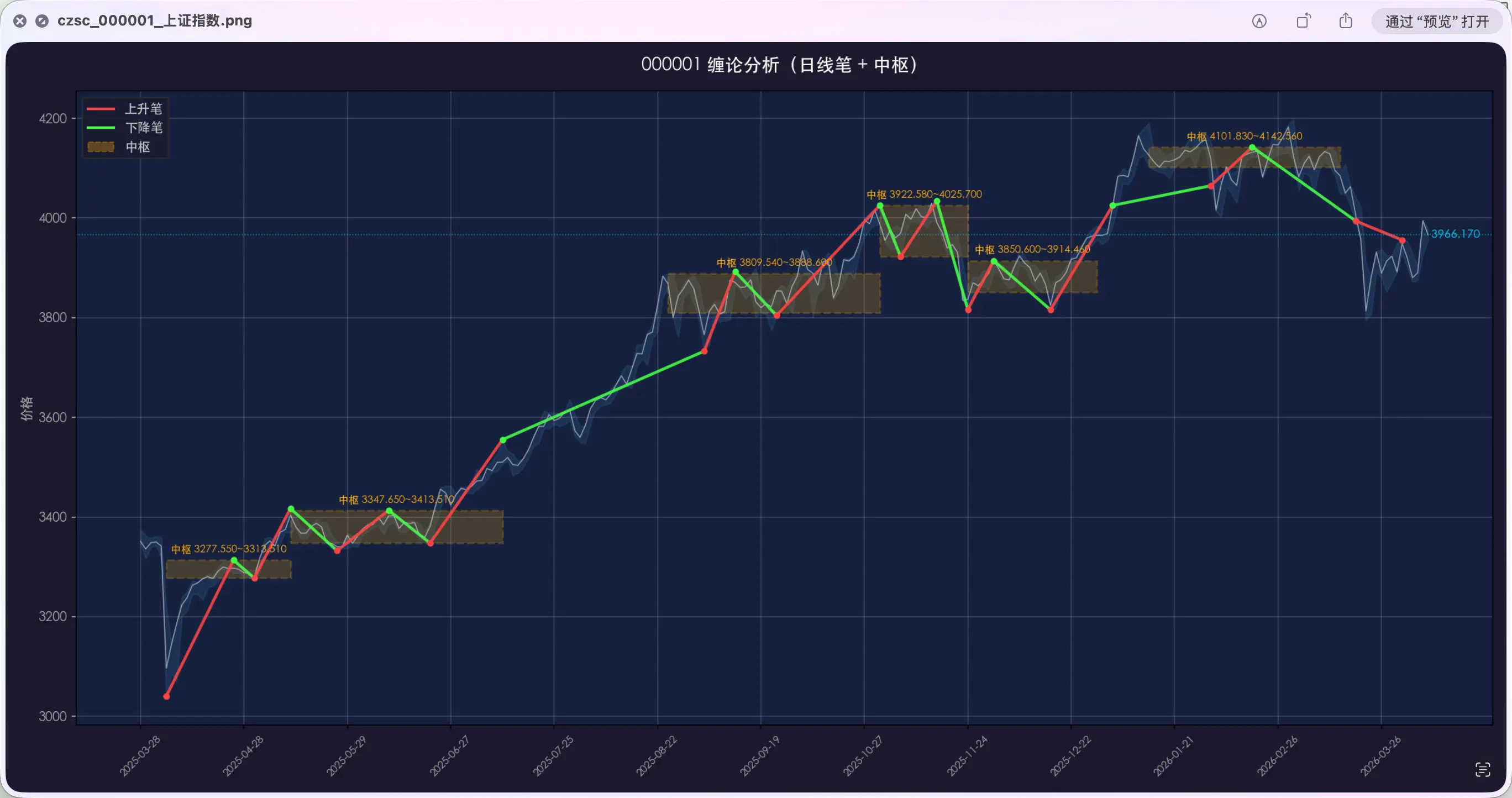
After using the PUA Skill, the AI re-analyzed the problem, and here’s the result after the fix:
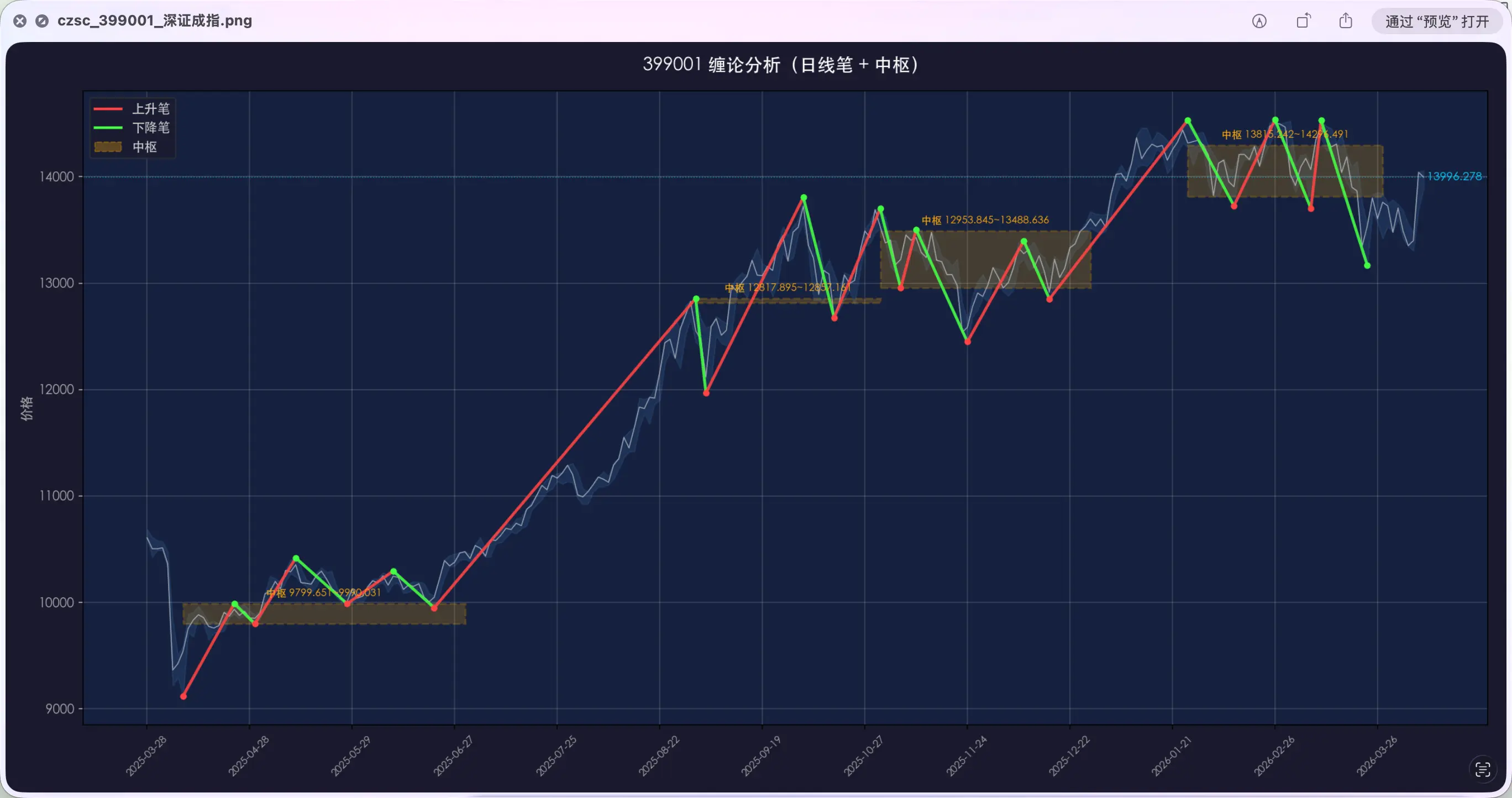
The endpoints are now directly aligned with the highest and lowest points of the candlesticks. What three previous attempts couldn’t achieve, the PUA Skill fixed in one go.
What Actually Happened?
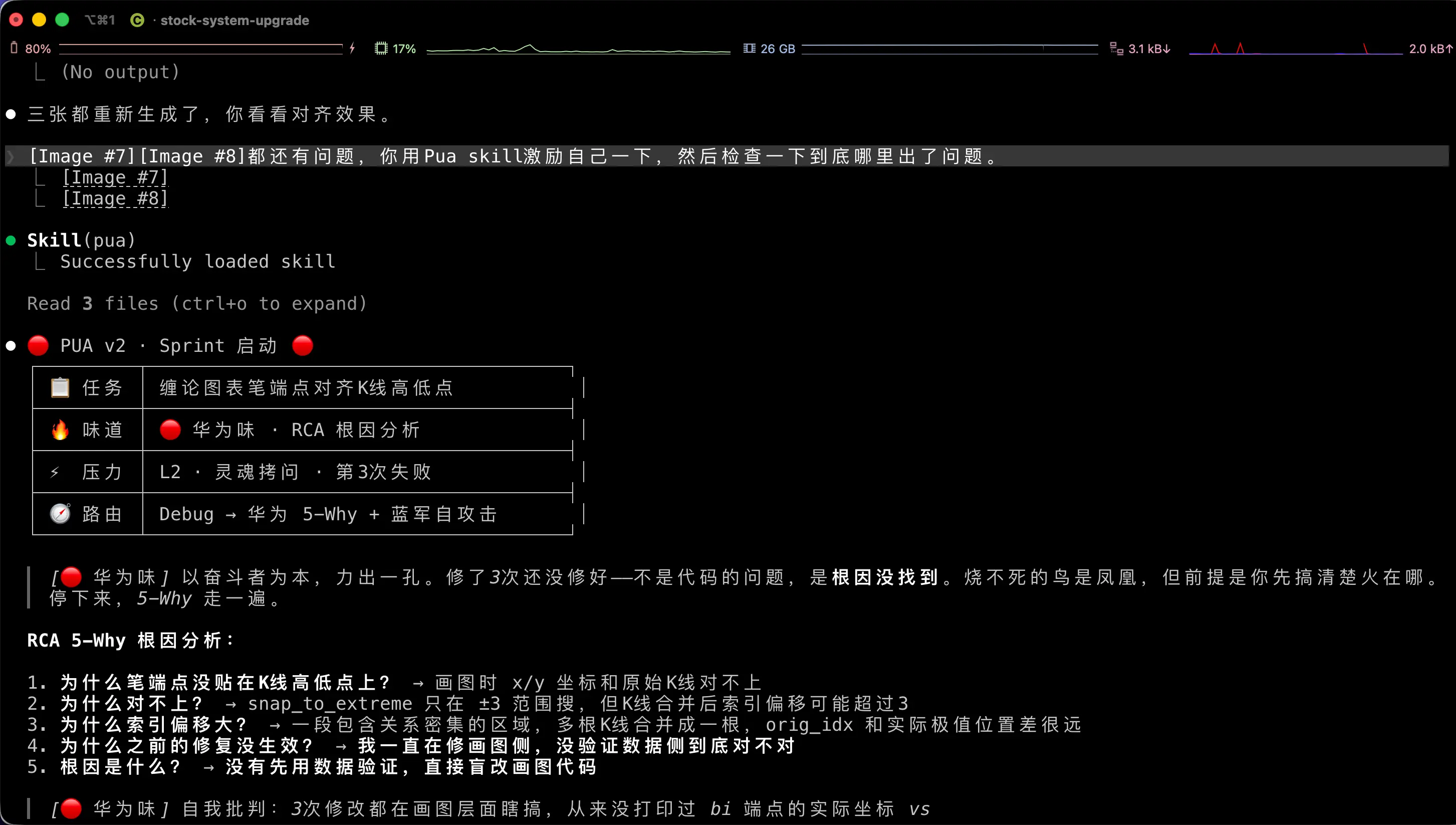
I said to the AI in the conversation:
Use the PUA Skill to motivate yourself, and then check what’s really wrong.
Then the AI loaded the PUA Skill, and its style changed dramatically. It first chose the “Huawei flavor” for itself, and then launched a methodology called RCA 5-Why Root Cause Analysis.
Simply put, it asks “why” five times in a row:
- Why weren’t the stroke endpoints aligned with the candlestick highs/lows? → The coordinates in the chart didn’t match the original candlesticks.
- Why didn’t they match? → The code for searching extreme points only looked within a range of ±3 candlesticks, but the actual offset could be far more than 3.
- Why was the offset so large? → After merging candlesticks, multiple candlesticks become one, so the index was off.
- Why didn’t the previous three fixes work? → I kept modifying the charting code but never verified whether the data itself was correct.
- What was the root cause? → No data validation, blindly modifying code.
After finding the root cause, the AI’s approach changed completely. It didn’t rush to modify the code; instead, it first printed a set of data—comparing the actual coordinates of the stroke endpoints with the true highs and lows of the original candlesticks:
up end: orig_idx=185, snap±3=188:4025, true_extreme±10=194:4179
→ Off by 6 candlesticks and 154 points!
With the data laid out, the problem was clear: the search range of ±3 candlesticks was simply insufficient. The AI changed the approach to “search for extremes in the complete interval between adjacent strokes”, instead of using a fixed radius. After the fix, all three charts were regenerated correctly in one go.
In the previous three failures, each time the AI directly modified the code, said “fixed”, and ended. This time was different—diagnose first, then verify, and only then take action.
What caused this change in behavior? It was the PUA Skill.
What is the PUA Skill?
One-sentence explanation: It gives the AI a “big company employee” persona, making it work using big company methodologies.
GitHub URL: https://github.com/tanweai/pua
It sounds like a joke project, but it actually contains a very complete set of tools.
It supports 13 “flavors”, each corresponding to a big company’s cultural style:
| Flavor | Representative Company | Core Methodology |
|---|---|---|
| 🟠 Alibaba Flavor | Alibaba | Set goals → Track progress → Achieve results closed loop |
| 🔴 Huawei Flavor | Huawei | RCA Root Cause Analysis + Blue Army Self-Attack |
| ⬛ Musk Flavor | Tesla/SpaceX | Question → Delete → Simplify → Accelerate → Automate |
| 🟡 ByteDance Flavor | ByteDance | A/B Test + Data-Driven |
| ⬜ Jobs Flavor | Apple | Subtraction First + Pixel-Perfect |
| 🔶 Amazon Flavor | Amazon | Working Backwards + 6-Pager Document |
Here’s the key: Each flavor isn’t just a change in tone; it’s a change in problem-solving methodology.
Moreover, it has a “methodology router”—it automatically selects the most appropriate methodology based on your current task type. In my case, it was a debugging scenario, so it automatically chose the Huawei flavor’s RCA root cause analysis. If it were developing a new feature, it would choose the Musk flavor’s first principles. For code review, it would choose the Jobs flavor’s subtraction first.
You don’t need to choose; it decides on its own.
Why Does It Look Funny but Actually Work?
Many people see “PUA your AI” and think it’s a joke. I thought so too at first. But after using it, I realized there’s a good reason it works.
Turning “Be Serious” into Concrete Steps
If you tell the AI “think carefully” or “check thoroughly”, does it work?
Most likely not. Because the AI doesn’t know what specific actions “carefully” entails. It’s like telling a colleague “be serious”—they say okay but still work the same way.
The PUA Skill doesn’t say “be serious”. It says: “Execute Huawei RCA 5-Why Root Cause Analysis”, “Diagnose with data first, don’t modify code”, “Blue Army self-attack, assume your solution is wrong”.
Each sentence is a specific execution step, not an abstract attitude requirement.
It’s like not telling a new employee “do a good job”, but giving them an SOP manual—do A first, then B, then check against the checklist after C. When the AI receives such specific instructions, the execution effect is completely different.
Three Red Lines Block “Fake Completion”
The PUA Skill has three red lines that cannot be crossed:
- Not verified means not complete — Before saying “fixed”, you must run tests and paste output results.
- No data means not solved — Before saying “it might be an environment issue”, have you verified it? Or are you guessing?
- Not exhausted means don’t give up — Before saying “I can’t solve it”, have you tried all methods?
Looking back at my three previous failures, each time the AI modified the code and said “fixed” without verification. If those red lines had been in place, it would have been forced to run the chart and compare the endpoint positions, and it would have discovered the problem was still there on the first attempt.
These three red lines sound like “big company corporate culture”, but in essence, they change the definition of “done” from “I think it’s fixed” to “data proves it’s fixed”.
Failure Means Change Method, Not Retry
Normally, if the AI fails to fix something after three attempts, and you ask for a fourth, it will most likely use the same approach and keep going in circles in the same pit.
The PUA Skill does it differently. It has a failure switching chain: after consecutive failures, it automatically switches to a different methodology.
Original method doesn’t work → Switch to Musk flavor’s first principles, question the requirement itself → Still doesn’t work → Switch to Huawei flavor’s Blue Army reverse attack, assume your solution is wrong → Still doesn’t work → Switch to Amazon’s Dive Deep, analyze at the data level.
Each switch is the complement of the previous method—looking at the problem from a completely different angle, instead of stubbornly sticking to the same path.
My case was typical. The first three times, the AI kept modifying the charting code, which was “repeatedly trying the same approach”. After the PUA Skill intervened, it switched directly to data diagnosis—first don’t modify code, first check if the data is correct. Once the angle changed, the root cause was immediately exposed.
Behavioral Constraints in the Prompt Really Work
Some might ask: giving the AI a “P8” label, does it really perform better? Is it pseudoscience?
It’s not pseudoscience. What the AI does and how it does it all depends on what’s written in the prompt. The PUA Skill injects not just a title, but a complete set of behavioral constraints:
- Before doing anything, ask yourself “What else haven’t I thought of?”
- When solving a problem, check if similar problems also exist.
- Don’t wait for the user to point it out; proactively find problems.
These constraints are written in the prompt, and the AI references them every time it generates a response.
For example: giving a newcomer the title of “project lead” may not be useful, but if you also give them a “project lead behavior manual”—when to report, what to check, how to accept—their behavior pattern will indeed change. The PUA Skill does the latter.
How to Install and Use
Installation
Download from GitHub: https://github.com/tanweai/pua
Place the entire folder in ~/.claude/skills/pua/, making sure SKILL.md is in that path.
No need to configure any API Key, no need to install additional dependencies. Just place it and it’s ready to use.
Usage
Method 1: Direct Invocation
In Claude Code, enter:
/pua
The AI will load the PUA Skill and switch to big company mode. After that, you can make requests normally, and it will automatically work with the methodology.
Method 2: Trigger in Conversation
No need to call it specifically; just say it directly in the conversation:
Use the PUA Skill to motivate yourself
Or more directly:
You got it wrong again. Can you be more careful?
The PUA Skill is designed to recognize such expressions of “user dissatisfaction” and activate automatically.
Methodology Router
You don’t need to manually select a “flavor”. The PUA Skill automatically matches based on your current task type:
- Debugging? → Huawei flavor RCA root cause analysis
- Writing a new feature? → Musk flavor first principles
- Doing code review? → Jobs flavor subtraction first
- Doing research? → Baidu flavor search first
Of course, you can also specify manually, for example, “use Alibaba flavor for this task”.
Summary
PUA-ing your AI isn’t really about manipulation. The shell is funny, but the methodology inside is effective.
What we learned today:
- What is the PUA Skill — A Skill that injects big company methodologies and behavioral constraints into the AI, supporting 13 corporate culture “flavors”.
- Why it works — Turns vague “be serious” into concrete execution steps, uses red lines to block fake completion, and automatically switches methodologies on failure.
- Core principle — It’s not psychological suggestion; it’s the structured instructions in the prompt that work. Methodology concretization + behavioral constraints + forced verification loop.
- How to use — Download and place in
~/.claude/skills/pua/, enter/puaor trigger directly in conversation.
Key takeaways:
- If your AI often “fixes and refixes” or “says it’s fixed but isn’t”, try the PUA Skill.
- It essentially installs a set of SOP for the AI—diagnose first, then verify, and only then take action.
- Open source and free, no configuration needed, just drop it in and use it.