From Typist to Super Assistant
We’ve previously learned to use Claude Code for projects, and you may have experienced the power of AI programming. But have you noticed a problem:
Every time you do something similar, you have to describe the requirements all over again.
For example, you want AI to help you:
- Write Git commit messages
- Review code
- Generate project documentation
- Sync files
You might do these tasks several times a day, but each time you have to type a long paragraph telling AI what to do. It’s exhausting!
It’s like every time you order takeout, you have to tell the restaurant:
“I want a bowl of braised beef noodles, no cilantro, extra chili, noodles should be firm, less soup…”
Is there a way to turn these common operations into one-click commands?
Yes, that’s what we’re going to talk about today: Skill.
What is Skill?
One-sentence explanation
Skill = AI’s shortcut command
Just like the Shortcuts app on your phone, Skill encapsulates complex operations into a simple command.
Official definition
Skill refers to a reusable “capability module” that encapsulates tools/APIs/scripts and prompts into a standard interface, allowing AI to call on demand to complete specific tasks.
It emphasizes:
- Clear input and output
- Dependency and version management
- Testable and updatable
- Turning general AI into a business-oriented professional assistant
Intuitive understanding
Without Skill:
You: Please review this code and check the following:
1. Are there any performance issues?
2. Are there any security vulnerabilities?
3. Does the code style follow the conventions?
4. Is there any duplicate code?
5. Are variable names clear?
6. Are comments complete?
……(continue describing for 10 more lines)
With Skill:
You: /review
AI automatically reviews the code according to preset standards and provides a detailed report.
See the difference? From hundreds of words to one command—that’s the power of Skill.
Differences between Skill, Prompt, and MCP
Many people ask: What are the differences between Skill, Prompt, and MCP?
Concept comparison
| Aspect | Prompt | Skill | MCP |
|---|---|---|---|
| Essence | Text instruction | Encapsulated capability module | Protocol for connecting external tools |
| Reusability | Low, must re-enter each time | High, define once and reuse | High, configure once and use continuously |
| Complexity | Simple | Medium | Complex |
| Capability scope | Text processing only | Text + simple scripts | Text + external system interaction |
| Learning curve | Lowest | Medium | Relatively high |
Using analogies
Prompt = Verbal instruction
- You have to verbally tell AI what to do each time
- Suitable for one-time, ad-hoc tasks
- For example: “Translate this paragraph”
Skill = Workflow
- Solidify common instructions into a standard workflow
- Suitable for repetitive, standardized tasks
- For example:
/commitautomatically generates Git commit messages
MCP = External system
- Let AI connect to external tools and data sources
- Suitable for tasks that need to access external systems
- For example: connect to Obsidian to read/write notes, connect to database to query data
Relationship among the three
Prompt → The most basic interaction method
    ↓
Skill → Encapsulates prompt + simple logic
    ↓
MCP → Skill + external system capabilities
Figuratively speaking:
- Prompt = You cook yourself
- Skill = Heat up instant food in microwave
- MCP = Order food delivery platform
When to use which?
Use Prompt if:
- Task is simple, one-time
- Requirements are flexible and changeable
- No need for reuse
Use Skill if:
- Task is highly repetitive
- Has standardized workflow
- Want to improve efficiency
Use MCP if:
- Need to access external data (database, API, file system, etc.)
- Need to interact with other software (Obsidian, browser, etc.)
- Need to get real-time information
Practical case comparison:
Scenario 1: Translate a paragraph
- Use Prompt: “Translate this paragraph” (simplest)
Scenario 2: Translate many documents daily
- Use Skill:
/translate(standardized translation workflow)
Scenario 3: Automatically translate Obsidian notes and save
- Use MCP: Connect to Obsidian, automatically read, translate, save (most powerful)
Basic Usage of Skill
How to view existing Skills?
In Claude Code or Codex, enter:
/skill
It will list all available Skills.

How to use Skill?
Method 1: Direct execution
Enter /skill, then use Tab to select the desired Skill, and press Enter to execute.

Method 2: Execute with parameters
After selecting a Skill, continue typing your specific request:
/translate translate the comments in this code to English
Common built-in Skills
Most AI programming tools come with some commonly used built-in Skills:
| Skill | Function | Example |
|---|---|---|
/commit |
Automatically generate Git commit message | /commit |
/review |
Review code quality | /review |
/fix |
Fix code errors | /fix |
/test |
Generate test cases | /test |
/doc |
Generate documentation | /doc |
/refactor |
Refactor code | /refactor |
These built-in Skills can already solve 80% of daily needs.
Creating Your Own Skill
If the built-in Skills are not enough, you can create your own Skill.
Two creation methods
Method 1: Let AI create it for you (recommended)
Codex comes with a Skill for creating Skills (sounds confusing, but it’s powerful).
Steps:
- Enter
/skill - Find the option related to “Create Skill”
- After selecting, tell AI what Skill you want
Example:
/create-skill

I want a translation Skill with the following features:
1. Automatically detect Chinese comments in code
2. Translate them into English
3. Keep the code format unchanged
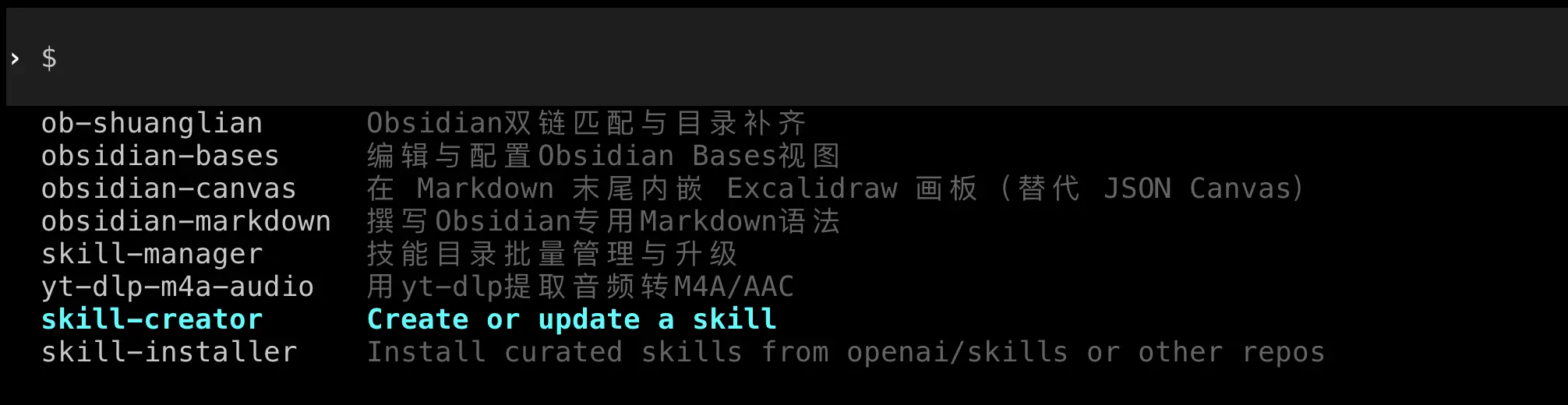
AI will automatically create the Skill file and place it in the correct location.
Method 2: Manual creation
If you want to understand the structure of Skill more deeply, you can create it manually.
Skill file structure:
Each Skill is a folder that must contain a SKILL.md file:
my-skill/
  ├── SKILL.md          # Skill description and configuration
  └── scripts/          # Optional: helper scripts
      └── helper.py
Basic format of SKILL.md:
---
name: Skill name
description: Skill description
---

# Detailed description

Write detailed usage instructions and implementation logic here.

## Parameters

- `--param1`: Description of parameter 1
- `--param2`: Description of parameter 2

## Example

Example usage code
The “Practical Case” section later in this chapter will detail how to create a complete Skill.
Installing Others’ Skills
There are many ready-made Skills on GitHub that you can download and use directly.
Finding the Skill folder
Codex Skill location:
- Mac/Linux:
~/.codex/skills/ - Windows:
%USERPROFILE%\.codex\skills\
Claude Code Skill location:
- Mac/Linux:
~/.claude/skills/ - Windows:
%USERPROFILE%\.claude\skills\
Installation steps
- Open the Skill folder
If the folder does not exist, you can create it manually:
# Mac/Linux
mkdir -p ~/.codex/skills

# Windows (PowerShell)
New-Item -Path "$env:USERPROFILE\.codex\skills" -ItemType Directory -Force

- Download the Skill file
Download the Skill folder from GitHub or other sources.
- Copy to the Skill directory
Copy the entire Skill folder to the corresponding skills directory.
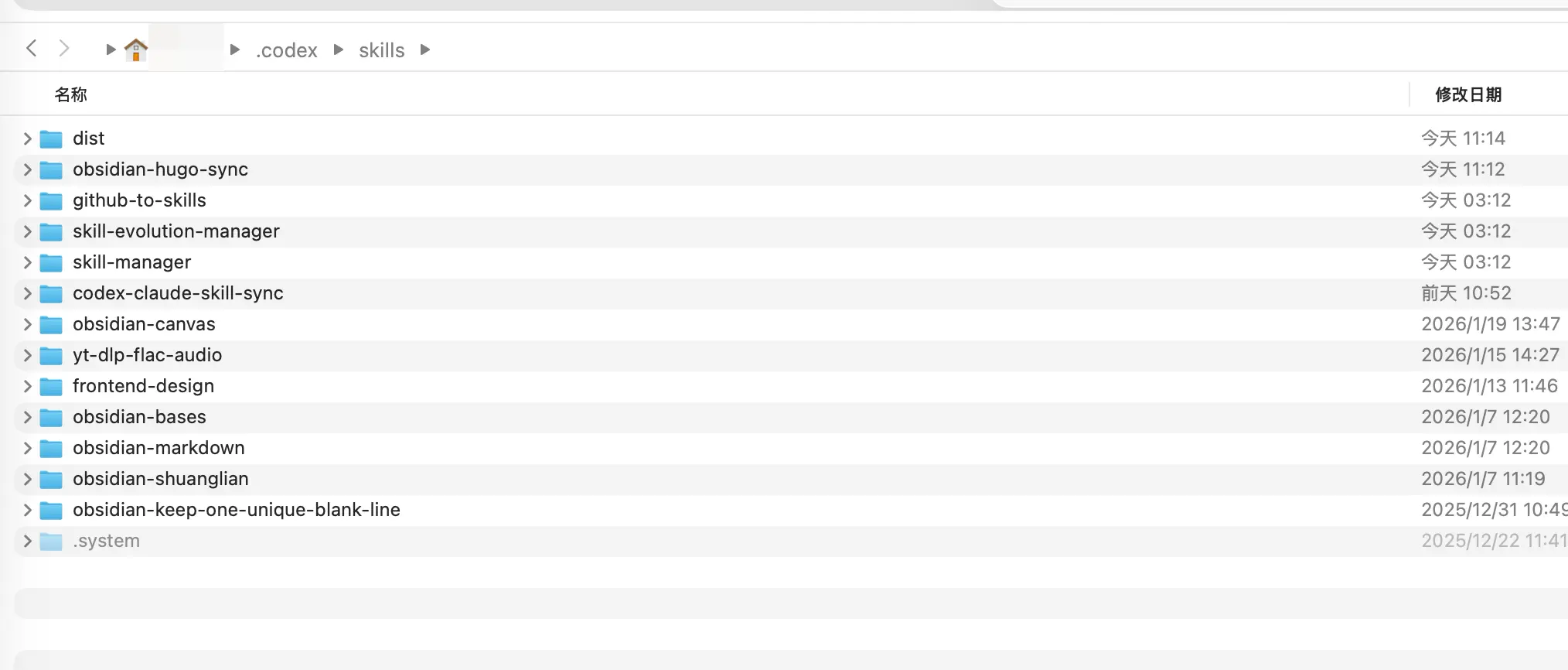
- Restart the tool
Note: Codex currently does not support hot reload; you need to exit and restart to see the new Skill. Claude Code can usually recognize it automatically.
Verify installation
After restarting, enter /skill to view the list and confirm the new Skill has appeared.
Practical Case: Creating a Sync Skill
Problem scenario
If you use both Codex and Claude Code (many people do), you’ll encounter a problem:
Skills for the two tools need to be managed separately, which is very inconvenient.
- Codex Skills are in
~/.codex/skills/ - Claude Code Skills are in
~/.claude/skills/
Every time you create a useful Skill in Codex, you have to manually copy it to Claude’s folder. Too tedious!
At this point, we can create a Skill to automatically sync the contents of the two folders—using a Skill to manage Skills.
This Skill will:
- Check the differences between the two Skill folders
- Report which Skills need to be synced
- After your confirmation, automatically sync
We just need to tell AI the requirements.
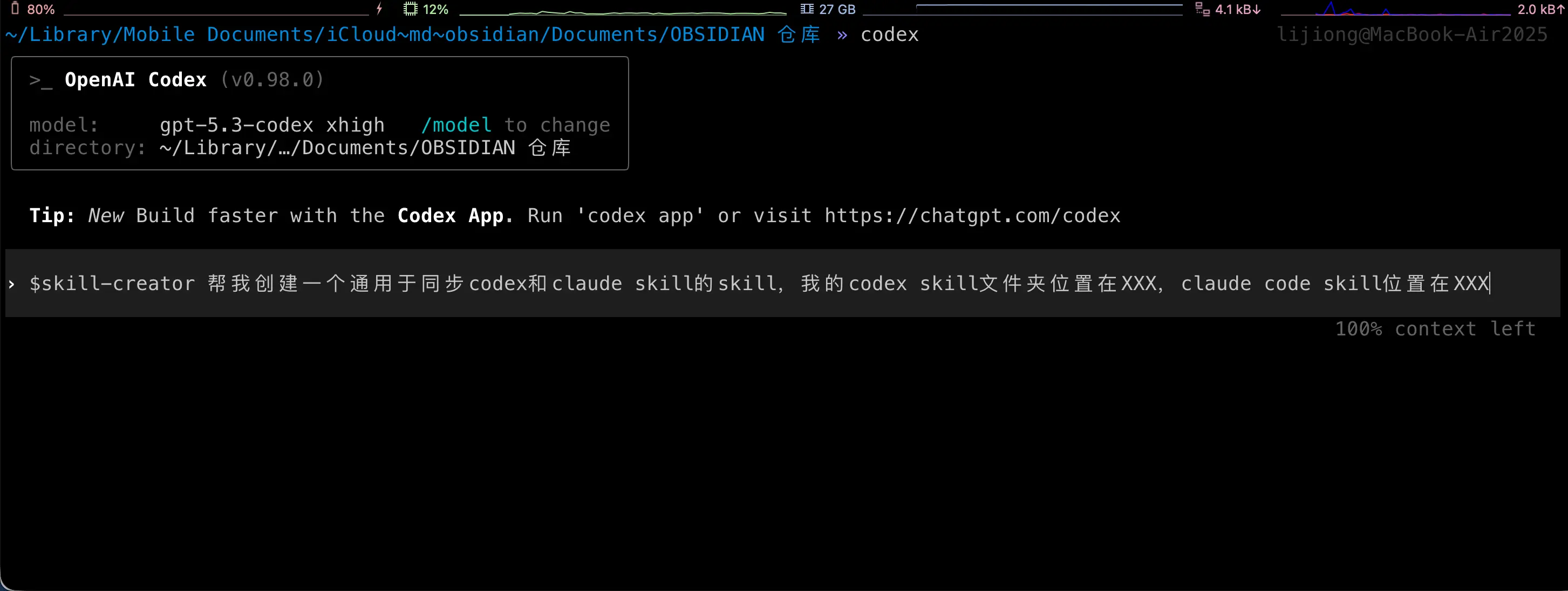
Below is what AI does for you. Note that these steps are all automatic; you don’t need to do anything! It’s shown here for demonstration only.
Step 1: Create the Skill folder
In the skills directory of Codex or Claude Code, create a new folder:
mkdir ~/.codex/skills/codex-claude-skill-sync
Step 2: Create SKILL.md
Create a SKILL.md file in the folder:
name: codex-claude-skill-sync
description: Sync Codex and Claude Skills
---

# Codex/Claude Skill Sync

## Overview

Used to check and sync the Skill directories of Codex and Claude, keeping both sides consistent. By default, only reports differences; executes sync after user confirmation.

## Workflow

1. Run difference report (no modification):

   `python3 scripts/sync_skills.py`

2. Report differences to the user in English and wait for explicit consent before proceeding.
3. After consent, execute sync:

   `python3 scripts/sync_skills.py --apply`

4. When encountering a conflict (same modification time but different content), pause and ask the user which side to keep.

## Rules

- Default directories:
  - Codex: `/Users/yourusername/.codex/skills`
  - Claude: `/Users/yourusername/.claude/skills`
- Only process top-level directories that contain `SKILL.md`, skip hidden directories and `.system`
- Determine which side is newer based on the latest modification time in the directory
- When syncing, delete the target Skill directory first, then copy the entire source directory

## Parameters

- `--apply` Execute sync (default is report only)
- `--codex <path>` Override Codex directory
- `--claude <path>` Override Claude directory
- `--prefer codex|claude` When modification time is the same but content differs, use the specified side to overwrite (requires explicit user authorization)
Important: Change the paths above to your actual paths!
Step 3: Create the script file
Create a scripts directory under the Skill folder, then create sync_skills.py:
mkdir ~/.codex/skills/codex-claude-skill-sync/scripts

Complete code for sync_skills.py:
#!/usr/bin/env python3
"""
Compare and sync skill folders between Codex and Claude.

Default behavior is report-only. Use --apply to perform sync.
"""

from __future__ import annotations

import argparse
import hashlib
import os
from datetime import datetime
from pathlib import Path
import shutil
import sys

DEFAULT_CODEX = Path("/Users/yourusername/.codex/skills")
DEFAULT_CLAUDE = Path("/Users/yourusername/.claude/skills")

IGNORE_DIR_NAMES = {".git", ".idea", ".vscode", "__pycache__", ".pytest_cache", ".mypy_cache"}
IGNORE_FILE_NAMES = {".DS_Store"}
TIME_EPSILON = 1.0


def format_time(timestamp: float) -> str:
    return datetime.fromtimestamp(timestamp).strftime("%Y-%m-%d %H:%M:%S")


def list_skill_dirs(root: Path) -> tuple[dict[str, Path], list[str]]:
    if not root.exists():
        raise FileNotFoundError(f"Root path does not exist: {root}")
    if not root.is_dir():
        raise NotADirectoryError(f"Root path is not a directory: {root}")

    skills: dict[str, Path] = {}
    ignored: list[str] = []
    for entry in sorted(root.iterdir(), key=lambda p: p.name):
        if not entry.is_dir():
            continue
        if entry.name.startswith("."):
            ignored.append(entry.name)
            continue
        if not (entry / "SKILL.md").is_file():
            continue
        skills[entry.name] = entry
    return skills, ignored


def dir_state(path: Path) -> tuple[str, float, int]:
    hasher = hashlib.sha256()
    latest_mtime = path.stat().st_mtime
    file_count = 0

    for root, dirs, files in os.walk(path):
        dirs[:] = [d for d in dirs if d not in IGNORE_DIR_NAMES]
        dirs.sort()
        files = sorted(f for f in files if f not in IGNORE_FILE_NAMES)

        rel_dir = os.path.relpath(root, path)
        if rel_dir == ".":
            rel_dir = ""
        hasher.update(f"D|{rel_dir}\n".encode())

        try:
            latest_mtime = max(latest_mtime, os.stat(root).st_mtime)
        except FileNotFoundError:
            continue

        for name in files:
            file_path = Path(root) / name
            rel_path = os.path.relpath(file_path, path)

            if file_path.is_symlink():
                try:
                    target = os.readlink(file_path)
                except OSError:
                    target = ""
                hasher.update(f"L|{rel_path}\n{target}\n".encode())
                try:
                    latest_mtime = max(latest_mtime, file_path.lstat().st_mtime)
                except FileNotFoundError:
                    pass
                continue

            if not file_path.is_file():
                continue

            stat = file_path.stat()
            latest_mtime = max(latest_mtime, stat.st_mtime)
            file_count += 1
            hasher.update(f"F|{rel_path}\n{stat.st_size}\n".encode())

            with open(file_path, "rb") as handle:
                for chunk in iter(lambda: handle.read(1024 * 1024), b""):
                    hasher.update(chunk)

    return hasher.hexdigest(), latest_mtime, file_count


def build_plan(
    codex_skills: dict[str, Path],
    claude_skills: dict[str, Path],
    codex_root: Path,
    claude_root: Path,
    prefer: str | None,
) -> tuple[list[dict], list[str], list[dict]]:
    actions: list[dict] = []
    identical: list[str] = []
    conflicts: list[dict] = []

    all_names = sorted(set(codex_skills) | set(claude_skills))
    for name in all_names:
        codex_path = codex_skills.get(name)
        claude_path = claude_skills.get(name)

        if codex_path and not claude_path:
            actions.append(
                {
                    "name": name,
                    "src": codex_path,
                    "dst": claude_root / name,
                    "reason": "only in codex",
                    "direction": "codex -> claude",
                }
            )
            continue
        if claude_path and not codex_path:
            actions.append(
                {
                    "name": name,
                    "src": claude_path,
                    "dst": codex_root / name,
                    "reason": "only in claude",
                    "direction": "claude -> codex",
                }
            )
            continue

        if not codex_path or not claude_path:
            continue

        codex_hash, codex_mtime, _ = dir_state(codex_path)
        claude_hash, claude_mtime, _ = dir_state(claude_path)

        if codex_hash == claude_hash:
            identical.append(name)
            continue

        time_delta = codex_mtime - claude_mtime
        if abs(time_delta) <= TIME_EPSILON:
            if prefer == "codex":
                actions.append(
                    {
                        "name": name,
                        "src": codex_path,
                        "dst": claude_path,
                        "reason": "same mtime, prefer codex",
                        "direction": "codex -> claude",
                        "codex_mtime": codex_mtime,
                        "claude_mtime": claude_mtime,
                    }
                )
            elif prefer == "claude":
                actions.append(
                    {
                        "name": name,
                        "src": claude_path,
                        "dst": codex_path,
                        "reason": "same mtime, prefer claude",
                        "direction": "claude -> codex",
                        "codex_mtime": codex_mtime,
                        "claude_mtime": claude_mtime,
                    }
                )
            else:
                conflicts.append(
                    {
                        "name": name,
                        "codex_mtime": codex_mtime,
                        "claude_mtime": claude_mtime,
                    }
                )
            continue

        if time_delta > 0:
            actions.append(
                {
                    "name": name,
                    "src": codex_path,
                    "dst": claude_path,
                    "reason": "codex newer",
                    "direction": "codex -> claude",
                    "codex_mtime": codex_mtime,
                    "claude_mtime": claude_mtime,
                }
            )
        else:
            actions.append(
                {
                    "name": name,
                    "src": claude_path,
                    "dst": codex_path,
                    "reason": "claude newer",
                    "direction": "claude -> codex",
                    "codex_mtime": codex_mtime,
                    "claude_mtime": claude_mtime,
                }
            )

    return actions, identical, conflicts


def print_report(
    actions: list[dict],
    identical: list[str],
    conflicts: list[dict],
    codex_root: Path,
    claude_root: Path,
    apply: bool,
    ignored_codex: list[str],
    ignored_claude: list[str],
) -> None:
    print("Skill sync report")
    print(f"Codex: {codex_root}")
    print(f"Claude: {claude_root}")

    if ignored_codex:
        print(f"Ignored in Codex: {', '.join(sorted(ignored_codex))}")
    if ignored_claude:
        print(f"Ignored in Claude: {', '.join(sorted(ignored_claude))}")

    print("\nPlanned sync actions:")
    if not actions:
        print("- none")
    else:
        for item in actions:
            codex_mtime = item.get("codex_mtime")
            claude_mtime = item.get("claude_mtime")
            details = []
            if codex_mtime is not None:
                details.append(f"codex mtime: {format_time(codex_mtime)}")
            if claude_mtime is not None:
                details.append(f"claude mtime: {format_time(claude_mtime)}")
            detail_text = f" ({', '.join(details)})" if details else ""
            print(f"- {item['name']}: {item['direction']} [{item['reason']}]" + detail_text)

    print("\nConflicts:")
    if not conflicts:
        print("- none")
    else:
        for item in conflicts:
            print(
                f"- {item['name']}: same mtime but different content "
                f"(codex {format_time(item['codex_mtime'])}, claude {format_time(item['claude_mtime'])})"
            )

    print(f"\nUp-to-date skills: {len(identical)}")

    if not apply:
        print("\nDry run only. Re-run with --apply to sync.")


def apply_actions(actions: list[dict]) -> None:
    for item in actions:
        src = Path(item["src"])
        dst = Path(item["dst"])

        if dst.exists():
            if dst.is_dir():
                shutil.rmtree(dst)
            else:
                dst.unlink()

        shutil.copytree(src, dst, symlinks=True)


def parse_args() -> argparse.Namespace:
    parser = argparse.ArgumentParser(description="Sync Codex and Claude skill folders")
    parser.add_argument("--codex", type=Path, default=DEFAULT_CODEX, help="Codex skill root")
    parser.add_argument("--claude", type=Path, default=DEFAULT_CLAUDE, help="Claude skill root")
    parser.add_argument("--apply", action="store_true", help="Apply sync actions")
    parser.add_argument(
        "--prefer",
        choices=["codex", "claude"],
        help="Break ties when mtimes are equal",
    )
    return parser.parse_args()


def main() -> int:
    args = parse_args()

    try:
        codex_skills, ignored_codex = list_skill_dirs(args.codex)
        claude_skills, ignored_claude = list_skill_dirs(args.claude)
    except (FileNotFoundError, NotADirectoryError) as exc:
        print(str(exc), file=sys.stderr)
        return 2

    actions, identical, conflicts = build_plan(
        codex_skills,
        claude_skills,
        args.codex,
        args.claude,
        args.prefer,
    )
    print_report(
        actions,
        identical,
        conflicts,
        args.codex,
        args.claude,
        args.apply,
        ignored_codex,
        ignored_claude,
    )

    if args.apply and actions:
        apply_actions(actions)
        print("\nSync complete.")
    elif args.apply and not actions:
        print("\nNo changes to apply.")

    if conflicts and not args.prefer:
        return 1
    return 0


if __name__ == "__main__":
    raise SystemExit(main())
Important: Remember to modify the paths at the beginning:
DEFAULT_CODEX = Path("/Users/yourusername/.codex/skills")
DEFAULT_CLAUDE = Path("/Users/yourusername/.claude/skills")
Change them to your actual paths.
Using the Sync Skill
Step 1: View differences
In Claude Code or Codex, enter:
/codex-claude-skill-sync
AI will automatically run the script and report the differences between the two Skill folders.
Step 2: Confirm sync
If you agree to sync, tell AI:
Agreed, please execute sync.
AI will run python3 scripts/sync_skills.py --apply to complete the sync.
Done! From now on, whenever you create or modify a Skill on either side, just run this sync Skill once, and both sides will stay consistent.
Advanced Skill Tips
Tip 1: Combine Skills
Multiple Skills can be used in sequence:
/review then /fix to fix the issues found
AI will first review the code, then automatically fix based on the review results.
Tip 2: Customize Skill parameters
Many Skills support parameters:
/commit --type feat --scope api
This will generate a commit message in a specific format.
Tip 3: Skill templates
You can create Skill templates to quickly generate new Skills:
- Copy an existing Skill folder
- Modify SKILL.md
- Save
Tip 4: Share Skills with the team
Put the Skill folder in a Git repository so team members can share:
git clone https://github.com/your-team/skills.git ~/.codex/skills/team-skills
Summary
What we learned today:
- What is Skill: A reusable capability module that turns complex operations into simple commands
- Skill vs Prompt vs MCP: Differences and applicable scenarios
- How to use Skill:
/skillto view and invoke - How to create Skill: Let AI help or create manually
- How to install Skill: Copy to the corresponding folder
- Practical case: Create a sync Skill to solve multi-tool management
Key points:
- Skill upgrades AI from a “typist” to a “professional assistant”
- Common operations should be encapsulated into Skills
- A good Skill can save 90% of time