Dari Juru Ketik Menjadi Asisten Super
Kita sebelumnya telah belajar menggunakan Claude Code untuk proyek, dan Anda mungkin telah merasakan kekuatan pemrograman AI. Namun, apakah Anda menyadari satu masalah:
Setiap kali Anda melakukan hal yang serupa, Anda harus menjelaskan persyaratan dari awal lagi.
Misalnya, Anda ingin AI membantu Anda:
- Menulis pesan commit Git
- Meninjau kode
- Membuat dokumentasi proyek
- Menyinkronkan file
Anda mungkin melakukan tugas-tugas ini beberapa kali sehari, tetapi setiap kali Anda harus mengetik paragraf panjang untuk memberi tahu AI apa yang harus dilakukan. Ini melelahkan!
Ini seperti setiap kali Anda memesan makanan, Anda harus memberi tahu restoran:
“Saya ingin semangkuk mie sapi rebus, tanpa daun ketumbar, ekstra cabai, mie harus kenyal, sedikit kuah…”
Apakah ada cara untuk mengubah operasi umum ini menjadi perintah satu klik?
Ya, itulah yang akan kita bahas hari ini: Skill.
Apa itu Skill?
Penjelasan satu kalimat
Skill = Perintah pintasan AI
Sama seperti aplikasi Shortcuts di ponsel Anda, Skill merangkum operasi kompleks menjadi perintah sederhana.
Definisi resmi
Skill mengacu pada “modul kemampuan” yang dapat digunakan kembali yang merangkum alat/API/script dan prompt ke dalam antarmuka standar, memungkinkan AI untuk memanggil sesuai kebutuhan guna menyelesaikan tugas tertentu.
Ini menekankan:
- Input dan output yang jelas
- Manajemen dependensi dan versi
- Dapat diuji dan diperbarui
- Mengubah AI umum menjadi asisten profesional yang berorientasi bisnis
Pemahaman intuitif
Tanpa Skill:
You: Please review this code and check the following:
1. Are there any performance issues?
2. Are there any security vulnerabilities?
3. Does the code style follow the conventions?
4. Is there any duplicate code?
5. Are variable names clear?
6. Are comments complete?
……(continue describing for 10 more lines)
Dengan Skill:
You: /review
AI secara otomatis meninjau kode sesuai dengan standar yang telah ditentukan dan memberikan laporan terperinci.
Lihat perbedaannya? Dari ratusan kata menjadi satu perintah—itulah kekuatan Skill.
Perbedaan antara Skill, Prompt, dan MCP
Banyak orang bertanya: Apa perbedaan antara Skill, Prompt, dan MCP?
Perbandingan konsep
| Aspek | Prompt | Skill | MCP |
|---|---|---|---|
| Esensi | Instruksi teks | Modul kemampuan yang dirangkum | Protokol untuk menghubungkan alat eksternal |
| Dapat digunakan kembali | Rendah, harus memasukkan ulang setiap kali | Tinggi, definisikan sekali dan gunakan kembali | Tinggi, konfigurasikan sekali dan gunakan terus |
| Kompleksitas | Sederhana | Sedang | Kompleks |
| Ruang lingkup kemampuan | Hanya pemrosesan teks | Teks + script sederhana | Teks + interaksi sistem eksternal |
| Kurva pembelajaran | Paling rendah | Sedang | Relatif tinggi |
Menggunakan analogi
Prompt = Instruksi lisan
- Anda harus memberi tahu AI secara lisan setiap kali
- Cocok untuk tugas satu kali dan ad-hoc
- Contoh: “Terjemahkan paragraf ini”
Skill = Alur kerja
- Membakukan instruksi umum menjadi alur kerja standar
- Cocok untuk tugas berulang dan terstandarisasi
- Contoh:
/commitsecara otomatis menghasilkan pesan commit Git
MCP = Sistem eksternal
- Biarkan AI terhubung ke alat dan sumber data eksternal
- Cocok untuk tugas yang perlu mengakses sistem eksternal
- Contoh: terhubung ke Obsidian untuk membaca/menulis catatan, terhubung ke database untuk menanyakan data
Hubungan antara ketiganya
Prompt → The most basic interaction method
    ↓
Skill → Encapsulates prompt + simple logic
    ↓
MCP → Skill + external system capabilities
Secara kiasan:
- Prompt = Anda memasak sendiri
- Skill = Memanaskan makanan instan di microwave
- MCP = Memesan platform pengiriman makanan
Kapan menggunakan yang mana?
Gunakan Prompt jika:
- Tugas sederhana, satu kali
- Persyaratan fleksibel dan berubah-ubah
- Tidak perlu digunakan kembali
Gunakan Skill jika:
- Tugas sangat berulang
- Memiliki alur kerja standar
- Ingin meningkatkan efisiensi
Gunakan MCP jika:
- Perlu mengakses data eksternal (database, API, sistem file, dll.)
- Perlu berinteraksi dengan perangkat lunak lain (Obsidian, browser, dll.)
- Perlu mendapatkan informasi waktu nyata
Perbandingan kasus praktis:
Skenario 1: Menerjemahkan sebuah paragraf
- Gunakan Prompt: “Terjemahkan paragraf ini” (paling sederhana)
Skenario 2: Menerjemahkan banyak dokumen setiap hari
- Gunakan Skill:
/translate(alur kerja penerjemahan standar)
Skenario 3: Secara otomatis menerjemahkan catatan Obsidian dan menyimpannya
- Gunakan MCP: Terhubung ke Obsidian, secara otomatis membaca, menerjemahkan, menyimpan (paling kuat)
Penggunaan Dasar Skill
Bagaimana cara melihat Skill yang ada?
Di Claude Code atau Codex, masukkan:
/skill
Ini akan mencantumkan semua Skill yang tersedia.

Bagaimana cara menggunakan Skill?
Metode 1: Eksekusi langsung
Masukkan /skill, lalu gunakan Tab untuk memilih Skill yang diinginkan, dan tekan Enter untuk menjalankan.

Metode 2: Eksekusi dengan parameter
Setelah memilih Skill, lanjutkan mengetik permintaan spesifik Anda:
/translate translate the comments in this code to English
Skill bawaan yang umum
Sebagian besar alat pemrograman AI dilengkapi dengan beberapa Skill bawaan yang umum digunakan:
| Skill | Fungsi | Contoh |
|---|---|---|
/commit |
Secara otomatis menghasilkan pesan commit Git | /commit |
/review |
Meninjau kualitas kode | /review |
/fix |
Memperbaiki kesalahan kode | /fix |
/test |
Menghasilkan kasus uji | /test |
/doc |
Menghasilkan dokumentasi | /doc |
/refactor |
Merefaktor kode | /refactor |
Skill bawaan ini sudah dapat menyelesaikan 80% kebutuhan sehari-hari.
Membuat Skill Sendiri
Jika Skill bawaan tidak mencukupi, Anda dapat membuat Skill sendiri.
Dua metode pembuatan
Metode 1: Biarkan AI membuatkannya untuk Anda (disarankan)
Codex dilengkapi dengan Skill untuk membuat Skill (terdengar membingungkan, tetapi sangat kuat).
Langkah-langkah:
- Masukkan
/skill - Temukan opsi yang terkait dengan “Buat Skill”
- Setelah memilih, beri tahu AI Skill apa yang Anda inginkan
Contoh:
/create-skill

I want a translation Skill with the following features:
1. Automatically detect Chinese comments in code
2. Translate them into English
3. Keep the code format unchanged
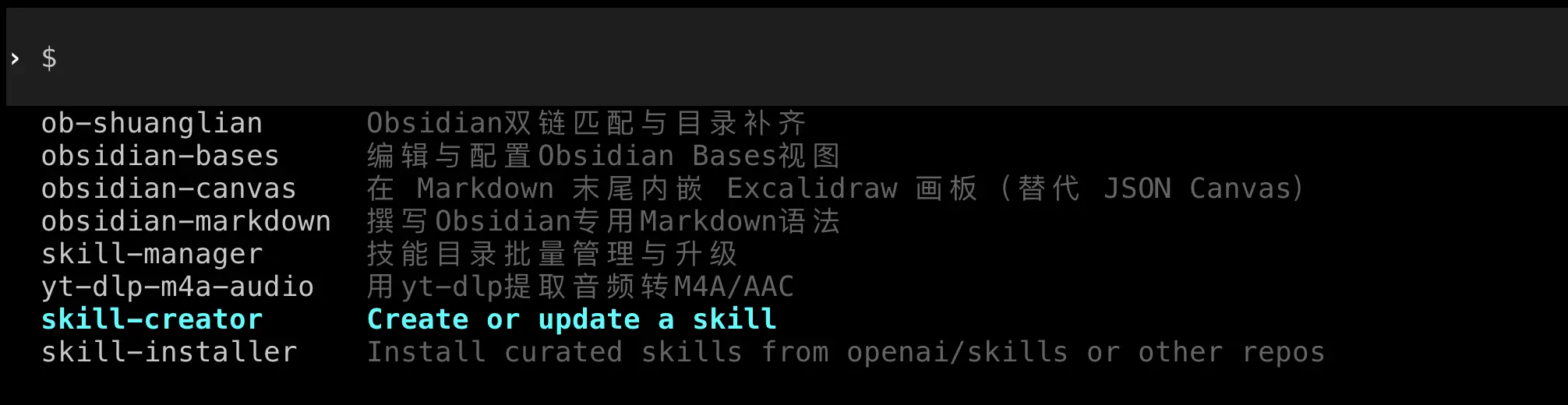
AI akan secara otomatis membuat file Skill dan menempatkannya di lokasi yang benar.
Metode 2: Pembuatan manual
Jika Anda ingin memahami struktur Skill lebih dalam, Anda dapat membuatnya secara manual.
Struktur file Skill:
Setiap Skill adalah folder yang harus berisi file SKILL.md:
my-skill/
  ├── SKILL.md          # Skill description and configuration
  └── scripts/          # Optional: helper scripts
      └── helper.py
Format dasar SKILL.md:
---
name: Skill name
description: Skill description
---

# Detailed description

Write detailed usage instructions and implementation logic here.

## Parameters

- `--param1`: Description of parameter 1
- `--param2`: Description of parameter 2

## Example

Example usage code
Bagian “Kasus Praktis” nanti dalam bab ini akan merinci cara membuat Skill yang lengkap.
Menginstal Skill Orang Lain
Ada banyak Skill siap pakai di GitHub yang dapat Anda unduh dan gunakan langsung.
Menemukan folder Skill
Lokasi Skill Codex:
- Mac/Linux:
~/.codex/skills/ - Windows:
%USERPROFILE%\.codex\skills\
Lokasi Skill Claude Code:
- Mac/Linux:
~/.claude/skills/ - Windows:
%USERPROFILE%\.claude\skills\
Langkah instalasi
- Buka folder Skill
Jika folder tidak ada, Anda dapat membuatnya secara manual:
# Mac/Linux
mkdir -p ~/.codex/skills

# Windows (PowerShell)
New-Item -Path "$env:USERPROFILE\.codex\skills" -ItemType Directory -Force

- Unduh file Skill
Unduh folder Skill dari GitHub atau sumber lain.
- Salin ke direktori Skill
Salin seluruh folder Skill ke direktori skills yang sesuai.
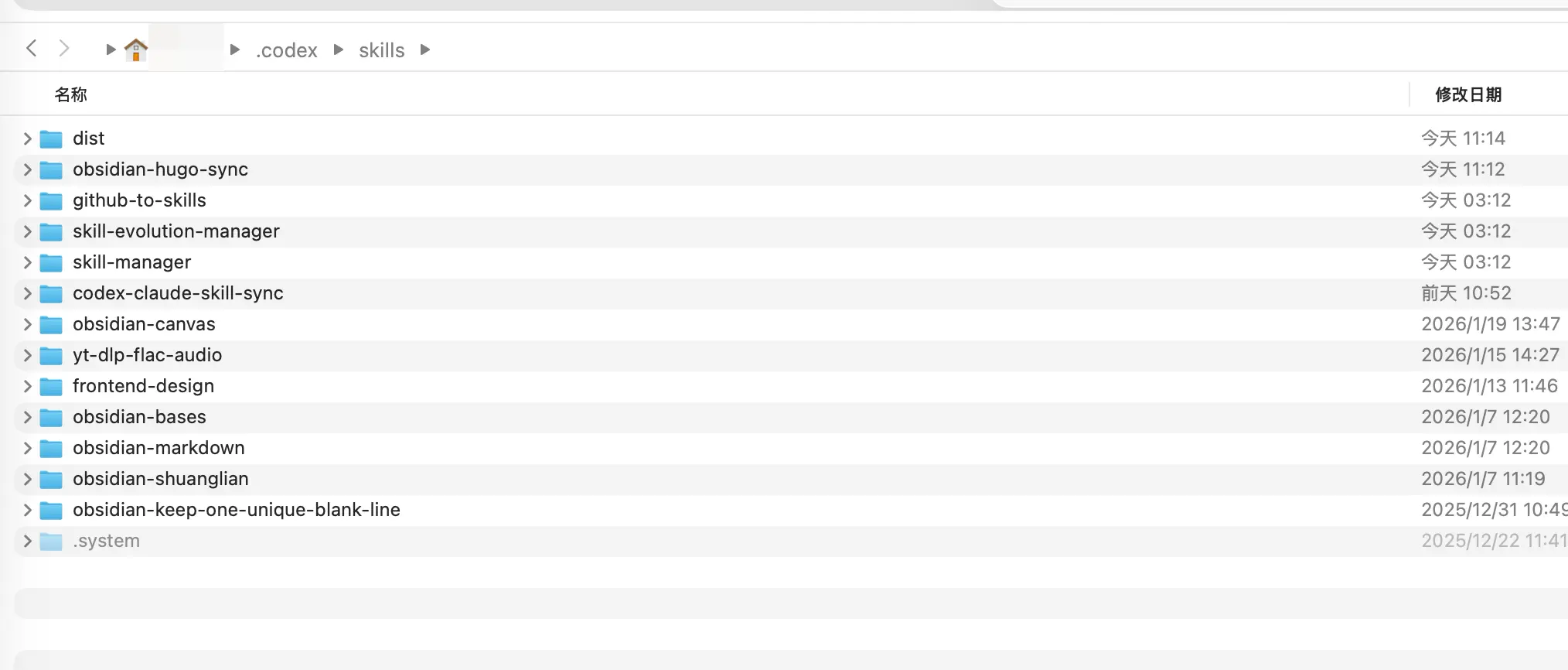
- Mulai ulang alat
Catatan: Codex saat ini tidak mendukung muat ulang panas; Anda harus keluar dan memulai ulang untuk melihat Skill baru. Claude Code biasanya dapat mengenalinya secara otomatis.
Verifikasi instalasi
Setelah memulai ulang, masukkan /skill untuk melihat daftar dan konfirmasi bahwa Skill baru telah muncul.
Kasus Praktis: Membuat Skill Sinkronisasi
Skenario masalah
Jika Anda menggunakan Codex dan Claude Code (banyak orang melakukannya), Anda akan menemui masalah:
Skill untuk kedua alat perlu dikelola secara terpisah, yang sangat merepotkan.
- Skill Codex ada di
~/.codex/skills/ - Skill Claude Code ada di
~/.claude/skills/
Setiap kali Anda membuat Skill yang berguna di Codex, Anda harus menyalinnya secara manual ke folder Claude. Terlalu merepotkan!
Pada titik ini, kita dapat membuat Skill untuk secara otomatis menyinkronkan konten kedua folder—menggunakan Skill untuk mengelola Skill.
Skill ini akan:
- Memeriksa perbedaan antara kedua folder Skill
- Melaporkan Skill mana yang perlu disinkronkan
- Setelah konfirmasi Anda, secara otomatis menyinkronkan
Kita hanya perlu memberi tahu AI persyaratannya.
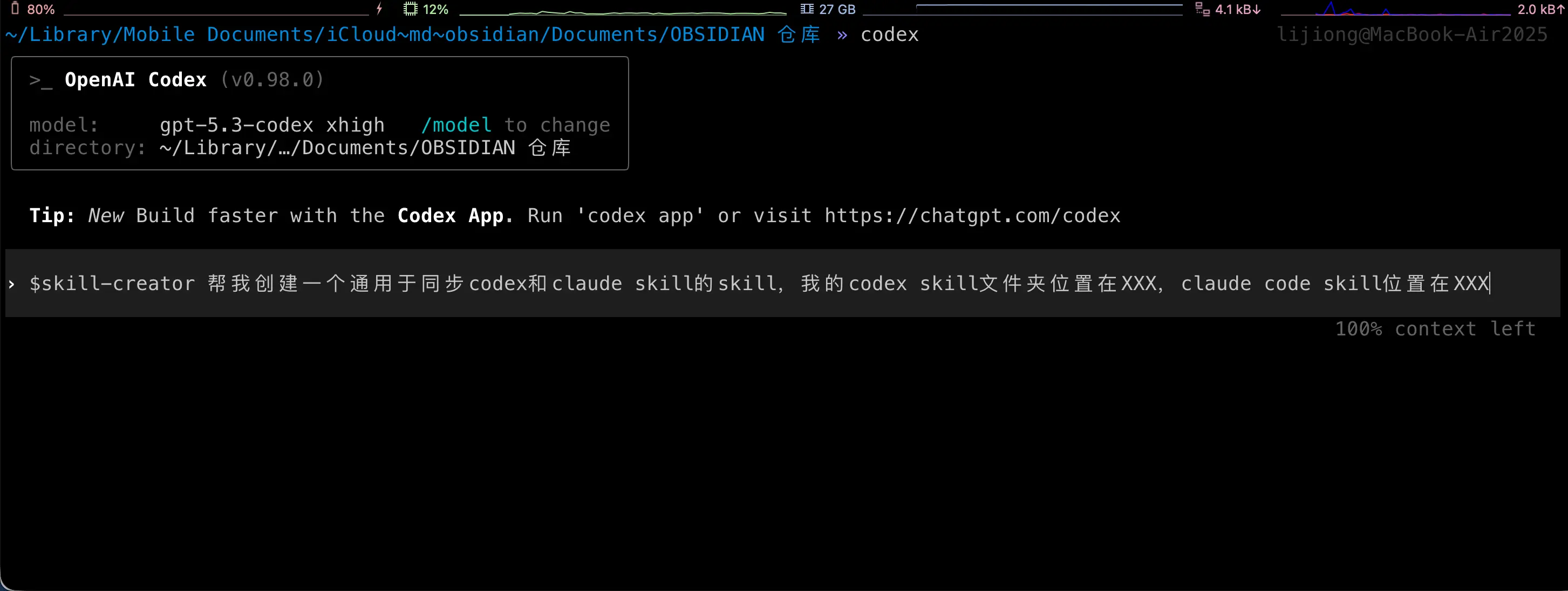
Di bawah ini adalah apa yang AI lakukan untuk Anda. Perhatikan bahwa langkah-langkah ini semuanya otomatis; Anda tidak perlu melakukan apa pun! Ini ditampilkan di sini hanya untuk demonstrasi.
Langkah 1: Buat folder Skill
Di direktori skills Codex atau Claude Code, buat folder baru:
mkdir ~/.codex/skills/codex-claude-skill-sync
Langkah 2: Buat SKILL.md
Buat file SKILL.md di folder tersebut:
name: codex-claude-skill-sync
description: Sync Codex and Claude Skills
---

# Codex/Claude Skill Sync

## Overview

Used to check and sync the Skill directories of Codex and Claude, keeping both sides consistent. By default, only reports differences; executes sync after user confirmation.

## Workflow

1. Run difference report (no modification):

   `python3 scripts/sync_skills.py`

2. Report differences to the user in English and wait for explicit consent before proceeding.
3. After consent, execute sync:

   `python3 scripts/sync_skills.py --apply`

4. When encountering a conflict (same modification time but different content), pause and ask the user which side to keep.

## Rules

- Default directories:
  - Codex: `/Users/yourusername/.codex/skills`
  - Claude: `/Users/yourusername/.claude/skills`
- Only process top-level directories that contain `SKILL.md`, skip hidden directories and `.system`
- Determine which side is newer based on the latest modification time in the directory
- When syncing, delete the target Skill directory first, then copy the entire source directory

## Parameters

- `--apply` Execute sync (default is report only)
- `--codex <path>` Override Codex directory
- `--claude <path>` Override Claude directory
- `--prefer codex|claude` When modification time is the same but content differs, use the specified side to overwrite (requires explicit user authorization)
Penting: Ubah jalur di atas ke jalur Anda yang sebenarnya!
Langkah 3: Buat file script
Buat direktori scripts di bawah folder Skill, lalu buat sync_skills.py:
mkdir ~/.codex/skills/codex-claude-skill-sync/scripts

Kode lengkap untuk sync_skills.py:
#!/usr/bin/env python3
"""
Compare and sync skill folders between Codex and Claude.

Default behavior is report-only. Use --apply to perform sync.
"""

from __future__ import annotations

import argparse
import hashlib
import os
from datetime import datetime
from pathlib import Path
import shutil
import sys

DEFAULT_CODEX = Path("/Users/yourusername/.codex/skills")
DEFAULT_CLAUDE = Path("/Users/yourusername/.claude/skills")

IGNORE_DIR_NAMES = {".git", ".idea", ".vscode", "__pycache__", ".pytest_cache", ".mypy_cache"}
IGNORE_FILE_NAMES = {".DS_Store"}
TIME_EPSILON = 1.0


def format_time(timestamp: float) -> str:
    return datetime.fromtimestamp(timestamp).strftime("%Y-%m-%d %H:%M:%S")


def list_skill_dirs(root: Path) -> tuple[dict[str, Path], list[str]]:
    if not root.exists():
        raise FileNotFoundError(f"Root path does not exist: {root}")
    if not root.is_dir():
        raise NotADirectoryError(f"Root path is not a directory: {root}")

    skills: dict[str, Path] = {}
    ignored: list[str] = []
    for entry in sorted(root.iterdir(), key=lambda p: p.name):
        if not entry.is_dir():
            continue
        if entry.name.startswith("."):
            ignored.append(entry.name)
            continue
        if not (entry / "SKILL.md").is_file():
            continue
        skills[entry.name] = entry
    return skills, ignored


def dir_state(path: Path) -> tuple[str, float, int]:
    hasher = hashlib.sha256()
    latest_mtime = path.stat().st_mtime
    file_count = 0

    for root, dirs, files in os.walk(path):
        dirs[:] = [d for d in dirs if d not in IGNORE_DIR_NAMES]
        dirs.sort()
        files = sorted(f for f in files if f not in IGNORE_FILE_NAMES)

        rel_dir = os.path.relpath(root, path)
        if rel_dir == ".":
            rel_dir = ""
        hasher.update(f"D|{rel_dir}\n".encode())

        try:
            latest_mtime = max(latest_mtime, os.stat(root).st_mtime)
        except FileNotFoundError:
            continue

        for name in files:
            file_path = Path(root) / name
            rel_path = os.path.relpath(file_path, path)

            if file_path.is_symlink():
                try:
                    target = os.readlink(file_path)
                except OSError:
                    target = ""
                hasher.update(f"L|{rel_path}\n{target}\n".encode())
                try:
                    latest_mtime = max(latest_mtime, file_path.lstat().st_mtime)
                except FileNotFoundError:
                    pass
                continue

            if not file_path.is_file():
                continue

            stat = file_path.stat()
            latest_mtime = max(latest_mtime, stat.st_mtime)
            file_count += 1
            hasher.update(f"F|{rel_path}\n{stat.st_size}\n".encode())

            with open(file_path, "rb") as handle:
                for chunk in iter(lambda: handle.read(1024 * 1024), b""):
                    hasher.update(chunk)

    return hasher.hexdigest(), latest_mtime, file_count


def build_plan(
    codex_skills: dict[str, Path],
    claude_skills: dict[str, Path],
    codex_root: Path,
    claude_root: Path,
    prefer: str | None,
) -> tuple[list[dict], list[str], list[dict]]:
    actions: list[dict] = []
    identical: list[str] = []
    conflicts: list[dict] = []

    all_names = sorted(set(codex_skills) | set(claude_skills))
    for name in all_names:
        codex_path = codex_skills.get(name)
        claude_path = claude_skills.get(name)

        if codex_path and not claude_path:
            actions.append(
                {
                    "name": name,
                    "src": codex_path,
                    "dst": claude_root / name,
                    "reason": "only in codex",
                    "direction": "codex -> claude",
                }
            )
            continue
        if claude_path and not codex_path:
            actions.append(
                {
                    "name": name,
                    "src": claude_path,
                    "dst": codex_root / name,
                    "reason": "only in claude",
                    "direction": "claude -> codex",
                }
            )
            continue

        if not codex_path or not claude_path:
            continue

        codex_hash, codex_mtime, _ = dir_state(codex_path)
        claude_hash, claude_mtime, _ = dir_state(claude_path)

        if codex_hash == claude_hash:
            identical.append(name)
            continue

        time_delta = codex_mtime - claude_mtime
        if abs(time_delta) <= TIME_EPSILON:
            if prefer == "codex":
                actions.append(
                    {
                        "name": name,
                        "src": codex_path,
                        "dst": claude_path,
                        "reason": "same mtime, prefer codex",
                        "direction": "codex -> claude",
                        "codex_mtime": codex_mtime,
                        "claude_mtime": claude_mtime,
                    }
                )
            elif prefer == "claude":
                actions.append(
                    {
                        "name": name,
                        "src": claude_path,
                        "dst": codex_path,
                        "reason": "same mtime, prefer claude",
                        "direction": "claude -> codex",
                        "codex_mtime": codex_mtime,
                        "claude_mtime": claude_mtime,
                    }
                )
            else:
                conflicts.append(
                    {
                        "name": name,
                        "codex_mtime": codex_mtime,
                        "claude_mtime": claude_mtime,
                    }
                )
            continue

        if time_delta > 0:
            actions.append(
                {
                    "name": name,
                    "src": codex_path,
                    "dst": claude_path,
                    "reason": "codex newer",
                    "direction": "codex -> claude",
                    "codex_mtime": codex_mtime,
                    "claude_mtime": claude_mtime,
                }
            )
        else:
            actions.append(
                {
                    "name": name,
                    "src": claude_path,
                    "dst": codex_path,
                    "reason": "claude newer",
                    "direction": "claude -> codex",
                    "codex_mtime": codex_mtime,
                    "claude_mtime": claude_mtime,
                }
            )

    return actions, identical, conflicts


def print_report(
    actions: list[dict],
    identical: list[str],
    conflicts: list[dict],
    codex_root: Path,
    claude_root: Path,
    apply: bool,
    ignored_codex: list[str],
    ignored_claude: list[str],
) -> None:
    print("Skill sync report")
    print(f"Codex: {codex_root}")
    print(f"Claude: {claude_root}")

    if ignored_codex:
        print(f"Ignored in Codex: {', '.join(sorted(ignored_codex))}")
    if ignored_claude:
        print(f"Ignored in Claude: {', '.join(sorted(ignored_claude))}")

    print("\nPlanned sync actions:")
    if not actions:
        print("- none")
    else:
        for item in actions:
            codex_mtime = item.get("codex_mtime")
            claude_mtime = item.get("claude_mtime")
            details = []
            if codex_mtime is not None:
                details.append(f"codex mtime: {format_time(codex_mtime)}")
            if claude_mtime is not None:
                details.append(f"claude mtime: {format_time(claude_mtime)}")
            detail_text = f" ({', '.join(details)})" if details else ""
            print(f"- {item['name']}: {item['direction']} [{item['reason']}]" + detail_text)

    print("\nConflicts:")
    if not conflicts:
        print("- none")
    else:
        for item in conflicts:
            print(
                f"- {item['name']}: same mtime but different content "
                f"(codex {format_time(item['codex_mtime'])}, claude {format_time(item['claude_mtime'])})"
            )

    print(f"\nUp-to-date skills: {len(identical)}")

    if not apply:
        print("\nDry run only. Re-run with --apply to sync.")


def apply_actions(actions: list[dict]) -> None:
    for item in actions:
        src = Path(item["src"])
        dst = Path(item["dst"])

        if dst.exists():
            if dst.is_dir():
                shutil.rmtree(dst)
            else:
                dst.unlink()

        shutil.copytree(src, dst, symlinks=True)


def parse_args() -> argparse.Namespace:
    parser = argparse.ArgumentParser(description="Sync Codex and Claude skill folders")
    parser.add_argument("--codex", type=Path, default=DEFAULT_CODEX, help="Codex skill root")
    parser.add_argument("--claude", type=Path, default=DEFAULT_CLAUDE, help="Claude skill root")
    parser.add_argument("--apply", action="store_true", help="Apply sync actions")
    parser.add_argument(
        "--prefer",
        choices=["codex", "claude"],
        help="Break ties when mtimes are equal",
    )
    return parser.parse_args()


def main() -> int:
    args = parse_args()

    try:
        codex_skills, ignored_codex = list_skill_dirs(args.codex)
        claude_skills, ignored_claude = list_skill_dirs(args.claude)
    except (FileNotFoundError, NotADirectoryError) as exc:
        print(str(exc), file=sys.stderr)
        return 2

    actions, identical, conflicts = build_plan(
        codex_skills,
        claude_skills,
        args.codex,
        args.claude,
        args.prefer,
    )
    print_report(
        actions,
        identical,
        conflicts,
        args.codex,
        args.claude,
        args.apply,
        ignored_codex,
        ignored_claude,
    )

    if args.apply and actions:
        apply_actions(actions)
        print("\nSync complete.")
    elif args.apply and not actions:
        print("\nNo changes to apply.")

    if conflicts and not args.prefer:
        return 1
    return 0


if __name__ == "__main__":
    raise SystemExit(main())
Penting: Ingat untuk memodifikasi jalur di awal:
DEFAULT_CODEX = Path("/Users/yourusername/.codex/skills")
DEFAULT_CLAUDE = Path("/Users/yourusername/.claude/skills")
Ubah ke jalur Anda yang sebenarnya.
Menggunakan Skill Sinkronisasi
Langkah 1: Lihat perbedaan
Di Claude Code atau Codex, masukkan:
/codex-claude-skill-sync
AI akan secara otomatis menjalankan script dan melaporkan perbedaan antara kedua folder Skill.
Langkah 2: Konfirmasi sinkronisasi
Jika Anda setuju untuk menyinkronkan, beri tahu AI:
Agreed, please execute sync.
AI akan menjalankan python3 scripts/sync_skills.py --apply untuk menyelesaikan sinkronisasi.
Selesai! Mulai sekarang, setiap kali Anda membuat atau memodifikasi Skill di salah satu sisi, jalankan Skill sinkronisasi ini sekali, dan kedua sisi akan tetap konsisten.
Tips Skill Tingkat Lanjut
Tip 1: Menggabungkan Skill
Beberapa Skill dapat digunakan secara berurutan:
/review then /fix to fix the issues found
AI akan terlebih dahulu meninjau kode, lalu secara otomatis memperbaiki berdasarkan hasil tinjauan.
Tip 2: Menyesuaikan parameter Skill
Banyak Skill mendukung parameter:
/commit --type feat --scope api
Ini akan menghasilkan pesan commit dalam format tertentu.
Tip 3: Template Skill
Anda dapat membuat template Skill untuk dengan cepat menghasilkan Skill baru:
- Salin folder Skill yang ada
- Modifikasi SKILL.md
- Simpan
Tip 4: Berbagi Skill dengan tim
Letakkan folder Skill di repositori Git sehingga anggota tim dapat berbagi:
git clone https://github.com/your-team/skills.git ~/.codex/skills/team-skills
Ringkasan
Apa yang kita pelajari hari ini:
- Apa itu Skill: Modul kemampuan yang dapat digunakan kembali yang mengubah operasi kompleks menjadi perintah sederhana
- Skill vs Prompt vs MCP: Perbedaan dan skenario yang sesuai
- Cara menggunakan Skill:
/skilluntuk melihat dan memanggil - Cara membuat Skill: Biarkan AI membantu atau buat secara manual
- Cara menginstal Skill: Salin ke folder yang sesuai
- Kasus praktis: Buat Skill sinkronisasi untuk menyelesaikan manajemen multi-alat
Poin-poin penting:
- Skill meningkatkan AI dari “juru ketik” menjadi “asisten profesional”
- Operasi umum harus dirangkum menjadi Skill
- Skill yang baik dapat menghemat 90% waktu