タイピストからスーパーアシスタントへ
これまでClaude Codeを使ってプロジェクトを進めてきて、AIプログラミングの力を実感されたかもしれません。しかし、一つ問題にお気づきですか?
似たような作業をするたびに、要件を毎回ゼロから説明しなければならないのです。
例えば、AIに次のことを頼みたいとします。
- Gitのコミットメッセージを書く
- コードをレビューする
- プロジェクトのドキュメントを生成する
- ファイルを同期する
これらの作業は1日に何度も行うかもしれませんが、そのたびに長い文章を入力してAIに指示しなければなりません。疲れますよね!
まるでテイクアウトを注文するたびに、レストランにこう伝えるようなものです。
「红烧牛肉面を一碗、パクチーなし、辛さ多め、麺は硬め、スープ少なめで…」
これらのよく行う操作をワンクリックコマンドにできないでしょうか?
はい、それが今日のテーマです:スキル。
スキルとは?
一言で説明
スキル = AIのショートカットコマンド
スマホのショートカットアプリのように、スキルは複雑な操作をシンプルなコマンドにまとめます。
公式な定義
スキルとは、ツール/API/スクリプトとプロンプトを標準インターフェースにカプセル化した**再利用可能な「機能モジュール」**であり、AIが必要に応じて呼び出し、特定のタスクを完了できるようにするものです。
その特徴は:
- 明確な入力と出力
- 依存関係とバージョン管理
- テスト可能で更新可能
- 汎用AIをビジネス向けの専門アシスタントに変える
直感的な理解
スキルなし:
You: Please review this code and check the following:
1. Are there any performance issues?
2. Are there any security vulnerabilities?
3. Does the code style follow the conventions?
4. Is there any duplicate code?
5. Are variable names clear?
6. Are comments complete?
……(continue describing for 10 more lines)
スキルあり:
You: /review
AIが事前に設定された基準に従ってコードを自動レビューし、詳細なレポートを提供します。
違いが分かりますか? 数百語からたった一つのコマンドへ——これがスキルの力です。
スキル、プロンプト、MCPの違い
よく聞かれます:スキル、プロンプト、MCPの違いは何ですか?
概念比較
| 項目 | プロンプト | スキル | MCP |
|---|---|---|---|
| 本質 | テキスト指示 | カプセル化された機能モジュール | 外部ツール接続のためのプロトコル |
| 再利用性 | 低い、毎回再入力が必要 | 高い、一度定義すれば再利用可能 | 高い、一度設定すれば継続利用可能 |
| 複雑さ | シンプル | 中程度 | 複雑 |
| 機能範囲 | テキスト処理のみ | テキスト+簡単なスクリプト | テキスト+外部システム連携 |
| 学習曲線 | 最も低い | 中程度 | 比較的高い |
たとえ話で理解する
プロンプト = 口頭指示
- 毎回、口頭でAIにやることを伝えなければならない
- 一回限りのアドホックなタスクに適している
- 例:「この段落を翻訳して」
スキル = ワークフロー
- よく使う指示を標準ワークフローとして固める
- 繰り返し行う標準化されたタスクに適している
- 例:
/commitでGitコミットメッセージを自動生成
MCP = 外部システム
- AIを外部ツールやデータソースに接続させる
- 外部システムへのアクセスが必要なタスクに適している
- 例:Obsidianに接続してノートの読み書き、データベースに接続してデータを照会
三者の関係
Prompt → The most basic interaction method
    ↓
Skill → Encapsulates prompt + simple logic
    ↓
MCP → Skill + external system capabilities
比喩的に言うと:
- プロンプト = 自分で料理する
- スキル = インスタント食品を電子レンジで温める
- MCP = 出前プラットフォームで注文する
どれをいつ使うべきか?
プロンプトを使うべき場合:
- タスクがシンプルで一回限り
- 要件が柔軟で変化しやすい
- 再利用の必要がない
スキルを使うべき場合:
- タスクの反復性が高い
- 標準化されたワークフローがある
- 効率を向上させたい
MCPを使うべき場合:
- 外部データ(データベース、API、ファイルシステムなど)へのアクセスが必要
- 他のソフトウェア(Obsidian、ブラウザなど)との連携が必要
- リアルタイム情報の取得が必要
実践的なケース比較:
シナリオ1:段落を翻訳する
- プロンプトを使う:「この段落を翻訳して」(最もシンプル)
シナリオ2:毎日多くの文書を翻訳する
- スキルを使う:
/translate(標準化された翻訳ワークフロー)
シナリオ3:Obsidianノートを自動翻訳して保存する
- MCPを使う:Obsidianに接続し、自動読み取り、翻訳、保存(最も強力)
スキルの基本的な使い方
既存のスキルを確認する方法
Claude CodeまたはCodexで、次のように入力します:
/skill
利用可能なすべてのスキルが表示されます。

スキルの使い方
方法1:直接実行
/skill と入力し、Tabキーで目的のスキルを選択してEnterキーを押すと実行されます。

方法2:パラメータ付きで実行
スキルを選択した後、具体的なリクエストを続けて入力します:
/translate translate the comments in this code to English
よくある組み込みスキル
ほとんどのAIプログラミングツールには、よく使われる組み込みスキルがいくつか付属しています:
| スキル | 機能 | 例 |
|---|---|---|
/commit |
Gitコミットメッセージを自動生成 | /commit |
/review |
コード品質をレビュー | /review |
/fix |
コードエラーを修正 | /fix |
/test |
テストケースを生成 | /test |
/doc |
ドキュメントを生成 | /doc |
/refactor |
コードをリファクタリング | /refactor |
これらの組み込みスキルで、日常のニーズの80%はすでに解決できます。
独自のスキルを作成する
組み込みスキルで足りない場合は、独自のスキルを作成できます。
2つの作成方法
方法1:AIに作成してもらう(推奨)
Codexにはスキルを作成するためのスキルが付属しています(混乱するかもしれませんが、強力です)。
手順:
/skillと入力- 「スキルを作成」に関するオプションを見つける
- 選択後、AIにどのようなスキルが欲しいか伝える
例:
/create-skill

I want a translation Skill with the following features:
1. Automatically detect Chinese comments in code
2. Translate them into English
3. Keep the code format unchanged
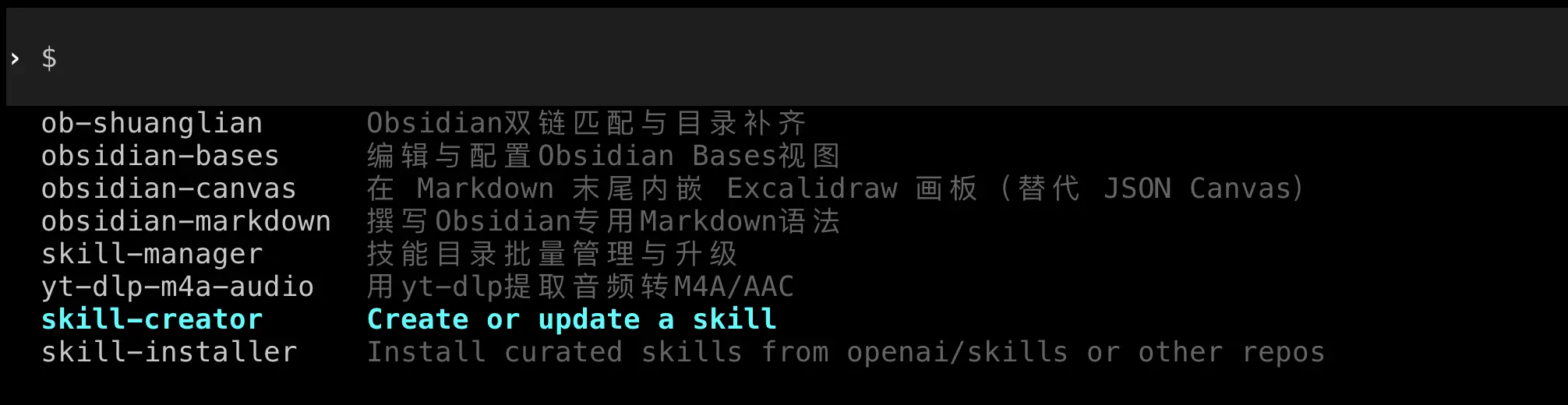
AIが自動的にスキルファイルを作成し、正しい場所に配置します。
方法2:手動で作成
スキルの構造をより深く理解したい場合は、手動で作成することもできます。
スキルファイルの構造:
各スキルはフォルダであり、SKILL.md ファイルを含む必要があります:
my-skill/
  ├── SKILL.md          # Skill description and configuration
  └── scripts/          # Optional: helper scripts
      └── helper.py
SKILL.mdの基本フォーマット:
---
name: Skill name
description: Skill description
---

# Detailed description

Write detailed usage instructions and implementation logic here.

## Parameters

- `--param1`: Description of parameter 1
- `--param2`: Description of parameter 2

## Example

Example usage code
この章の後半の「実践ケース」セクションで、完全なスキルの作成方法を詳しく説明します。
他人のスキルをインストールする
GitHubには既製のスキルが多数あり、直接ダウンロードして使用できます。
スキルフォルダの場所
Codexのスキル保存場所:
- Mac/Linux:
~/.codex/skills/ - Windows:
%USERPROFILE%\.codex\skills\
Claude Codeのスキル保存場所:
- Mac/Linux:
~/.claude/skills/ - Windows:
%USERPROFILE%\.claude\skills\
インストール手順
- スキルフォルダを開く
フォルダが存在しない場合は、手動で作成できます:
# Mac/Linux
mkdir -p ~/.codex/skills

# Windows (PowerShell)
New-Item -Path "$env:USERPROFILE\.codex\skills" -ItemType Directory -Force

- スキルファイルをダウンロードする
GitHubなどからスキルフォルダをダウンロードします。
- スキルディレクトリにコピーする
スキルフォルダ全体を該当するskillsディレクトリにコピーします。
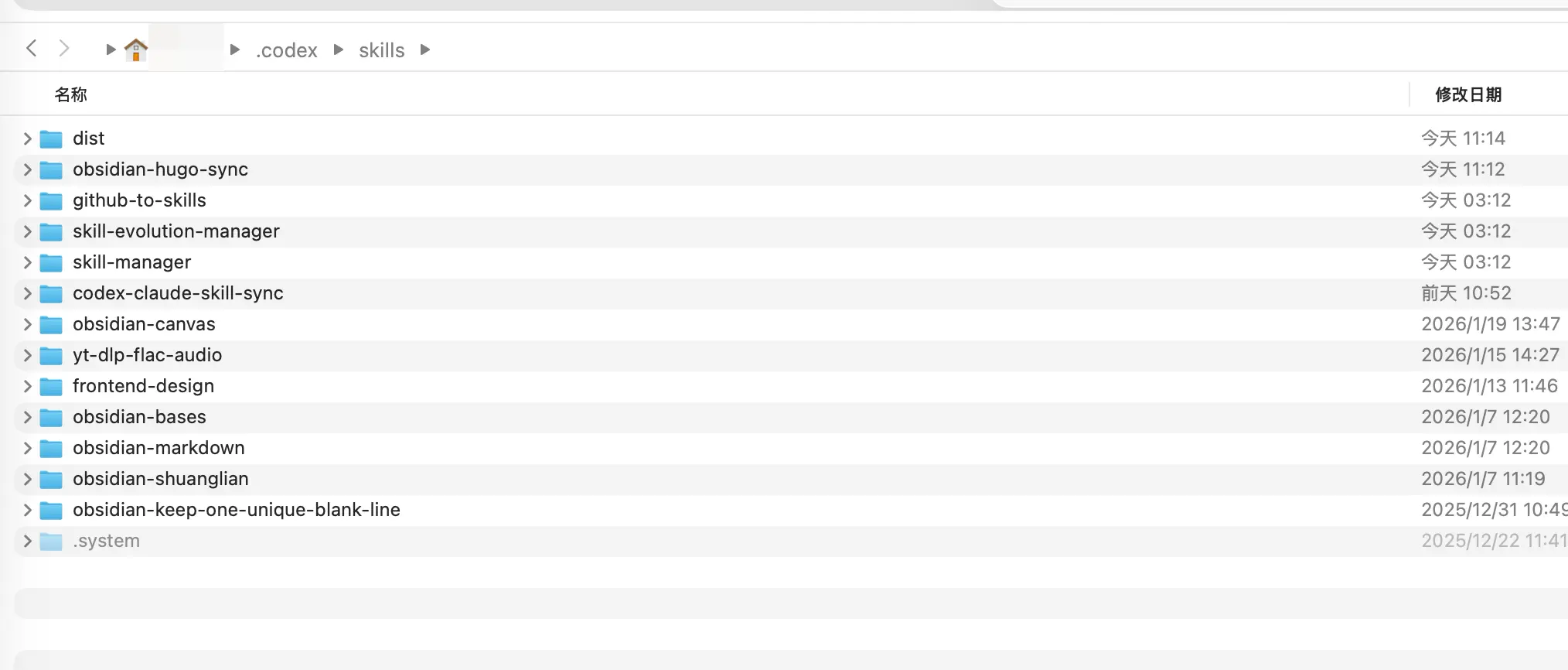
- ツールを再起動する
注意: Codexは現在ホットリロードをサポートしていません。新しいスキルを表示するには、終了して再起動する必要があります。Claude Codeは通常、自動的に認識します。
インストールの確認
再起動後、/skill と入力してリストを表示し、新しいスキルが表示されていることを確認します。
実践ケース:同期スキルの作成
問題シナリオ
CodexとClaude Codeの両方を使用している場合(多くの人がそうしています)、次のような問題に直面します:
2つのツールのスキルを別々に管理する必要があり、非常に不便です。
- Codexのスキルは
~/.codex/skills/ - Claude Codeのスキルは
~/.claude/skills/
Codexで便利なスキルを作成するたびに、手動でClaudeのフォルダにコピーしなければなりません。面倒すぎます!
そこで、2つのフォルダの内容を自動的に同期するスキルを作成しましょう。スキルでスキルを管理するのです。
このスキルは:
- 2つのスキルフォルダの差分を確認する
- どのスキルを同期する必要があるかを報告する
- 確認後、自動的に同期する
要件をAIに伝えるだけです。
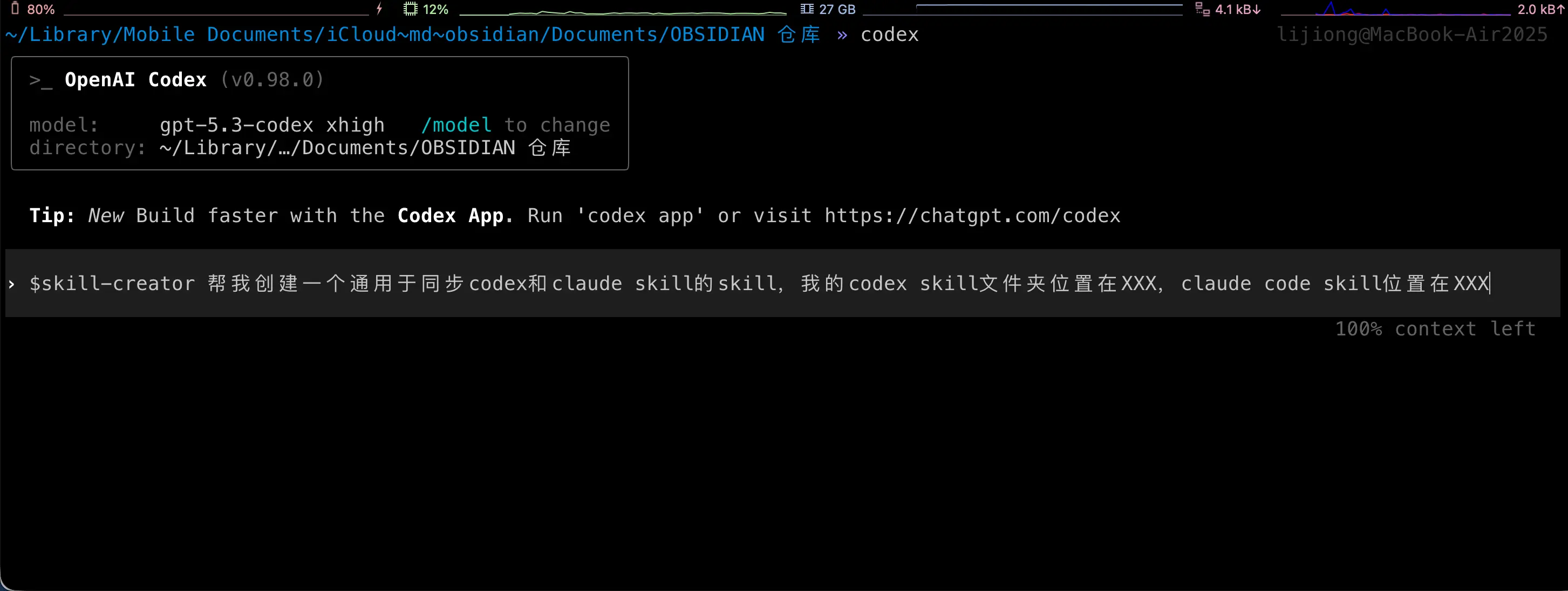
以下はAIが行う処理です。これらの手順はすべて自動で行われるため、何もする必要はありません! ここでは説明のために表示しています。
ステップ1:スキルフォルダを作成する
CodexまたはClaude Codeのskillsディレクトリに新しいフォルダを作成します:
mkdir ~/.codex/skills/codex-claude-skill-sync
ステップ2:SKILL.mdを作成する
フォルダ内に SKILL.md ファイルを作成します:
name: codex-claude-skill-sync
description: Sync Codex and Claude Skills
---

# Codex/Claude Skill Sync

## Overview

Used to check and sync the Skill directories of Codex and Claude, keeping both sides consistent. By default, only reports differences; executes sync after user confirmation.

## Workflow

1. Run difference report (no modification):

   `python3 scripts/sync_skills.py`

2. Report differences to the user in English and wait for explicit consent before proceeding.
3. After consent, execute sync:

   `python3 scripts/sync_skills.py --apply`

4. When encountering a conflict (same modification time but different content), pause and ask the user which side to keep.

## Rules

- Default directories:
  - Codex: `/Users/yourusername/.codex/skills`
  - Claude: `/Users/yourusername/.claude/skills`
- Only process top-level directories that contain `SKILL.md`, skip hidden directories and `.system`
- Determine which side is newer based on the latest modification time in the directory
- When syncing, delete the target Skill directory first, then copy the entire source directory

## Parameters

- `--apply` Execute sync (default is report only)
- `--codex <path>` Override Codex directory
- `--claude <path>` Override Claude directory
- `--prefer codex|claude` When modification time is the same but content differs, use the specified side to overwrite (requires explicit user authorization)
重要: 上記のパスは実際のパスに変更してください!
ステップ3:スクリプトファイルを作成する
スキルフォルダの下に scripts ディレクトリを作成し、sync_skills.py を作成します:
mkdir ~/.codex/skills/codex-claude-skill-sync/scripts

sync_skills.py の完全なコード:
#!/usr/bin/env python3
"""
Compare and sync skill folders between Codex and Claude.

Default behavior is report-only. Use --apply to perform sync.
"""

from __future__ import annotations

import argparse
import hashlib
import os
from datetime import datetime
from pathlib import Path
import shutil
import sys

DEFAULT_CODEX = Path("/Users/yourusername/.codex/skills")
DEFAULT_CLAUDE = Path("/Users/yourusername/.claude/skills")

IGNORE_DIR_NAMES = {".git", ".idea", ".vscode", "__pycache__", ".pytest_cache", ".mypy_cache"}
IGNORE_FILE_NAMES = {".DS_Store"}
TIME_EPSILON = 1.0


def format_time(timestamp: float) -> str:
    return datetime.fromtimestamp(timestamp).strftime("%Y-%m-%d %H:%M:%S")


def list_skill_dirs(root: Path) -> tuple[dict[str, Path], list[str]]:
    if not root.exists():
        raise FileNotFoundError(f"Root path does not exist: {root}")
    if not root.is_dir():
        raise NotADirectoryError(f"Root path is not a directory: {root}")

    skills: dict[str, Path] = {}
    ignored: list[str] = []
    for entry in sorted(root.iterdir(), key=lambda p: p.name):
        if not entry.is_dir():
            continue
        if entry.name.startswith("."):
            ignored.append(entry.name)
            continue
        if not (entry / "SKILL.md").is_file():
            continue
        skills[entry.name] = entry
    return skills, ignored


def dir_state(path: Path) -> tuple[str, float, int]:
    hasher = hashlib.sha256()
    latest_mtime = path.stat().st_mtime
    file_count = 0

    for root, dirs, files in os.walk(path):
        dirs[:] = [d for d in dirs if d not in IGNORE_DIR_NAMES]
        dirs.sort()
        files = sorted(f for f in files if f not in IGNORE_FILE_NAMES)

        rel_dir = os.path.relpath(root, path)
        if rel_dir == ".":
            rel_dir = ""
        hasher.update(f"D|{rel_dir}\n".encode())

        try:
            latest_mtime = max(latest_mtime, os.stat(root).st_mtime)
        except FileNotFoundError:
            continue

        for name in files:
            file_path = Path(root) / name
            rel_path = os.path.relpath(file_path, path)

            if file_path.is_symlink():
                try:
                    target = os.readlink(file_path)
                except OSError:
                    target = ""
                hasher.update(f"L|{rel_path}\n{target}\n".encode())
                try:
                    latest_mtime = max(latest_mtime, file_path.lstat().st_mtime)
                except FileNotFoundError:
                    pass
                continue

            if not file_path.is_file():
                continue

            stat = file_path.stat()
            latest_mtime = max(latest_mtime, stat.st_mtime)
            file_count += 1
            hasher.update(f"F|{rel_path}\n{stat.st_size}\n".encode())

            with open(file_path, "rb") as handle:
                for chunk in iter(lambda: handle.read(1024 * 1024), b""):
                    hasher.update(chunk)

    return hasher.hexdigest(), latest_mtime, file_count


def build_plan(
    codex_skills: dict[str, Path],
    claude_skills: dict[str, Path],
    codex_root: Path,
    claude_root: Path,
    prefer: str | None,
) -> tuple[list[dict], list[str], list[dict]]:
    actions: list[dict] = []
    identical: list[str] = []
    conflicts: list[dict] = []

    all_names = sorted(set(codex_skills) | set(claude_skills))
    for name in all_names:
        codex_path = codex_skills.get(name)
        claude_path = claude_skills.get(name)

        if codex_path and not claude_path:
            actions.append(
                {
                    "name": name,
                    "src": codex_path,
                    "dst": claude_root / name,
                    "reason": "only in codex",
                    "direction": "codex -> claude",
                }
            )
            continue
        if claude_path and not codex_path:
            actions.append(
                {
                    "name": name,
                    "src": claude_path,
                    "dst": codex_root / name,
                    "reason": "only in claude",
                    "direction": "claude -> codex",
                }
            )
            continue

        if not codex_path or not claude_path:
            continue

        codex_hash, codex_mtime, _ = dir_state(codex_path)
        claude_hash, claude_mtime, _ = dir_state(claude_path)

        if codex_hash == claude_hash:
            identical.append(name)
            continue

        time_delta = codex_mtime - claude_mtime
        if abs(time_delta) <= TIME_EPSILON:
            if prefer == "codex":
                actions.append(
                    {
                        "name": name,
                        "src": codex_path,
                        "dst": claude_path,
                        "reason": "same mtime, prefer codex",
                        "direction": "codex -> claude",
                        "codex_mtime": codex_mtime,
                        "claude_mtime": claude_mtime,
                    }
                )
            elif prefer == "claude":
                actions.append(
                    {
                        "name": name,
                        "src": claude_path,
                        "dst": codex_path,
                        "reason": "same mtime, prefer claude",
                        "direction": "claude -> codex",
                        "codex_mtime": codex_mtime,
                        "claude_mtime": claude_mtime,
                    }
                )
            else:
                conflicts.append(
                    {
                        "name": name,
                        "codex_mtime": codex_mtime,
                        "claude_mtime": claude_mtime,
                    }
                )
            continue

        if time_delta > 0:
            actions.append(
                {
                    "name": name,
                    "src": codex_path,
                    "dst": claude_path,
                    "reason": "codex newer",
                    "direction": "codex -> claude",
                    "codex_mtime": codex_mtime,
                    "claude_mtime": claude_mtime,
                }
            )
        else:
            actions.append(
                {
                    "name": name,
                    "src": claude_path,
                    "dst": codex_path,
                    "reason": "claude newer",
                    "direction": "claude -> codex",
                    "codex_mtime": codex_mtime,
                    "claude_mtime": claude_mtime,
                }
            )

    return actions, identical, conflicts


def print_report(
    actions: list[dict],
    identical: list[str],
    conflicts: list[dict],
    codex_root: Path,
    claude_root: Path,
    apply: bool,
    ignored_codex: list[str],
    ignored_claude: list[str],
) -> None:
    print("Skill sync report")
    print(f"Codex: {codex_root}")
    print(f"Claude: {claude_root}")

    if ignored_codex:
        print(f"Ignored in Codex: {', '.join(sorted(ignored_codex))}")
    if ignored_claude:
        print(f"Ignored in Claude: {', '.join(sorted(ignored_claude))}")

    print("\nPlanned sync actions:")
    if not actions:
        print("- none")
    else:
        for item in actions:
            codex_mtime = item.get("codex_mtime")
            claude_mtime = item.get("claude_mtime")
            details = []
            if codex_mtime is not None:
                details.append(f"codex mtime: {format_time(codex_mtime)}")
            if claude_mtime is not None:
                details.append(f"claude mtime: {format_time(claude_mtime)}")
            detail_text = f" ({', '.join(details)})" if details else ""
            print(f"- {item['name']}: {item['direction']} [{item['reason']}]" + detail_text)

    print("\nConflicts:")
    if not conflicts:
        print("- none")
    else:
        for item in conflicts:
            print(
                f"- {item['name']}: same mtime but different content "
                f"(codex {format_time(item['codex_mtime'])}, claude {format_time(item['claude_mtime'])})"
            )

    print(f"\nUp-to-date skills: {len(identical)}")

    if not apply:
        print("\nDry run only. Re-run with --apply to sync.")


def apply_actions(actions: list[dict]) -> None:
    for item in actions:
        src = Path(item["src"])
        dst = Path(item["dst"])

        if dst.exists():
            if dst.is_dir():
                shutil.rmtree(dst)
            else:
                dst.unlink()

        shutil.copytree(src, dst, symlinks=True)


def parse_args() -> argparse.Namespace:
    parser = argparse.ArgumentParser(description="Sync Codex and Claude skill folders")
    parser.add_argument("--codex", type=Path, default=DEFAULT_CODEX, help="Codex skill root")
    parser.add_argument("--claude", type=Path, default=DEFAULT_CLAUDE, help="Claude skill root")
    parser.add_argument("--apply", action="store_true", help="Apply sync actions")
    parser.add_argument(
        "--prefer",
        choices=["codex", "claude"],
        help="Break ties when mtimes are equal",
    )
    return parser.parse_args()


def main() -> int:
    args = parse_args()

    try:
        codex_skills, ignored_codex = list_skill_dirs(args.codex)
        claude_skills, ignored_claude = list_skill_dirs(args.claude)
    except (FileNotFoundError, NotADirectoryError) as exc:
        print(str(exc), file=sys.stderr)
        return 2

    actions, identical, conflicts = build_plan(
        codex_skills,
        claude_skills,
        args.codex,
        args.claude,
        args.prefer,
    )
    print_report(
        actions,
        identical,
        conflicts,
        args.codex,
        args.claude,
        args.apply,
        ignored_codex,
        ignored_claude,
    )

    if args.apply and actions:
        apply_actions(actions)
        print("\nSync complete.")
    elif args.apply and not actions:
        print("\nNo changes to apply.")

    if conflicts and not args.prefer:
        return 1
    return 0


if __name__ == "__main__":
    raise SystemExit(main())
重要: 先頭のパスを忘れずに変更してください:
DEFAULT_CODEX = Path("/Users/yourusername/.codex/skills")
DEFAULT_CLAUDE = Path("/Users/yourusername/.claude/skills")
実際のパスに変更します。
同期スキルの使い方
ステップ1:差分を確認する
Claude CodeまたはCodexで、次のように入力します:
/codex-claude-skill-sync
AIが自動的にスクリプトを実行し、2つのスキルフォルダの差分を報告します。
ステップ2:同期を確認する
同期に同意する場合は、AIに次のように伝えます:
Agreed, please execute sync.
AIが python3 scripts/sync_skills.py --apply を実行し、同期を完了します。
完了! 今後、どちらか一方でスキルを作成または変更した場合、この同期スキルを1回実行するだけで、両方が一貫した状態になります。
スキルの高度なヒント
ヒント1:スキルの組み合わせ
複数のスキルを順番に使用できます:
/review then /fix to fix the issues found
AIはまずコードをレビューし、レビュー結果に基づいて自動的に修正します。
ヒント2:スキルのパラメータをカスタマイズ
多くのスキルはパラメータをサポートしています:
/commit --type feat --scope api
これにより、特定の形式でコミットメッセージが生成されます。
ヒント3:スキルテンプレート
スキルテンプレートを作成して、新しいスキルを素早く生成できます:
- 既存のスキルフォルダをコピー
- SKILL.mdを修正
- 保存
ヒント4:チームでスキルを共有
スキルフォルダをGitリポジトリに置くことで、チームメンバーと共有できます:
git clone https://github.com/your-team/skills.git ~/.codex/skills/team-skills
まとめ
今日学んだこと:
- スキルとは:複雑な操作をシンプルなコマンドに変える再利用可能な機能モジュール
- スキル vs プロンプト vs MCP:違いと適用シナリオ
- スキルの使い方:
/skillで表示・呼び出し - スキルの作成方法:AIに任せるか手動で作成
- スキルのインストール方法:該当フォルダにコピー
- 実践ケース:同期スキルを作成してマルチツール管理を解決
重要なポイント:
- スキルはAIを「タイピスト」から「プロフェッショナルアシスタント」にアップグレードする
- よく行う操作はスキルにカプセル化すべき
- 優れたスキルは90%の時間を節約できる