타이피스트에서 슈퍼 어시스턴트로
이전에 Claude Code를 사용하여 프로젝트를 진행하는 방법을 배웠고, AI 프로그래밍의 강력함을 경험했을 것입니다. 하지만 한 가지 문제를 눈치채셨나요?
비슷한 작업을 할 때마다 매번 요구사항을 다시 설명해야 합니다.
예를 들어, AI에게 다음과 같은 작업을 시키고 싶을 때:
- Git 커밋 메시지 작성
- 코드 리뷰
- 프로젝트 문서 생성
- 파일 동기화
이런 작업을 하루에도 여러 번 할 수 있는데, 매번 긴 문장을 입력해서 AI에게 무엇을 해야 하는지 알려줘야 합니다. 정말 피곤하죠!
마치 배달 음식을 시킬 때마다 식당에 이렇게 말하는 것과 같습니다:
“소고기 국수 한 그릇 주세요. 고수 빼고, 고추 추가, 면은 좀 더 쫄깃하게, 국물은 적게…”
이런 공통 작업을 원클릭 명령으로 바꿀 수 있는 방법은 없을까요?
네, 오늘 우리가 이야기할 내용이 바로 그것입니다: 스킬(Skill).
스킬이란 무엇인가?
한 문장으로 설명
스킬 = AI의 단축 명령어
마치 스마트폰의 단축어 앱처럼, 스킬은 복잡한 작업을 간단한 명령어로 캡슐화합니다.
공식 정의
스킬은 재사용 가능한 ‘기능 모듈’ 로, 도구/API/스크립트와 프롬프트를 표준 인터페이스에 캡슐화하여 AI가 필요에 따라 호출해 특정 작업을 완료할 수 있게 합니다.
다음이 강조됩니다:
- 명확한 입력과 출력
- 의존성 및 버전 관리
- 테스트 가능하고 업데이트 가능
- 범용 AI를 업무 지향적인 전문 어시스턴트로 전환
직관적 이해
스킬이 없을 때:
You: Please review this code and check the following:
1. Are there any performance issues?
2. Are there any security vulnerabilities?
3. Does the code style follow the conventions?
4. Is there any duplicate code?
5. Are variable names clear?
6. Are comments complete?
……(continue describing for 10 more lines)
스킬이 있을 때:
You: /review
AI가 미리 설정된 기준에 따라 자동으로 코드를 리뷰하고 상세한 보고서를 제공합니다.
차이가 보이시나요? 수백 단어에서 하나의 명령어로—이것이 스킬의 힘입니다.
스킬, 프롬프트, MCP의 차이점
많은 분들이 묻습니다: 스킬, 프롬프트, MCP의 차이는 무엇인가요?
개념 비교
| 항목 | 프롬프트 | 스킬 | MCP |
|---|---|---|---|
| 본질 | 텍스트 명령어 | 캡슐화된 기능 모듈 | 외부 도구 연결을 위한 프로토콜 |
| 재사용성 | 낮음, 매번 다시 입력해야 함 | 높음, 한 번 정의하면 계속 사용 | 높음, 한 번 설정하면 계속 사용 |
| 복잡성 | 단순 | 중간 | 복잡 |
| 기능 범위 | 텍스트 처리만 | 텍스트 + 간단한 스크립트 | 텍스트 + 외부 시스템 상호작용 |
| 학습 곡선 | 가장 낮음 | 중간 | 비교적 높음 |
비유로 이해하기
프롬프트 = 구두 명령
- 매번 AI에게 무엇을 해야 하는지 말로 알려줘야 함
- 일회성, 임시 작업에 적합
- 예: “이 문단을 번역해 줘”
스킬 = 워크플로우
- 공통 명령어를 표준 워크플로우로 고정
- 반복적이고 표준화된 작업에 적합
- 예:
/commit이 자동으로 Git 커밋 메시지 생성
MCP = 외부 시스템
- AI가 외부 도구와 데이터 소스에 연결할 수 있게 함
- 외부 시스템에 접근해야 하는 작업에 적합
- 예: Obsidian에 연결하여 노트 읽기/쓰기, 데이터베이스에 연결하여 데이터 조회
세 가지의 관계
Prompt → The most basic interaction method
    ↓
Skill → Encapsulates prompt + simple logic
    ↓
MCP → Skill + external system capabilities
비유하자면:
- 프롬프트 = 직접 요리하기
- 스킬 = 전자레인지로 즉석 식품 데우기
- MCP = 배달 앱으로 음식 주문하기
언제 무엇을 사용할까?
프롬프트를 사용할 때:
- 작업이 단순하고 일회성인 경우
- 요구사항이 유연하고 자주 바뀌는 경우
- 재사용이 필요 없는 경우
스킬을 사용할 때:
- 작업이 반복성이 높은 경우
- 표준화된 워크플로우가 있는 경우
- 효율성을 높이고 싶은 경우
MCP를 사용할 때:
- 외부 데이터(데이터베이스, API, 파일 시스템 등)에 접근해야 하는 경우
- 다른 소프트웨어(Obsidian, 브라우저 등)와 상호작용해야 하는 경우
- 실시간 정보를 가져와야 하는 경우
실제 사례 비교:
시나리오 1: 문단 번역
- 프롬프트 사용: “이 문단을 번역해 줘” (가장 간단)
시나리오 2: 매일 많은 문서 번역
- 스킬 사용:
/translate(표준화된 번역 워크플로우)
시나리오 3: Obsidian 노트를 자동 번역하여 저장
- MCP 사용: Obsidian에 연결, 자동으로 읽고 번역하고 저장 (가장 강력)
스킬 기본 사용법
기존 스킬 확인 방법
Claude Code 또는 Codex에서 다음을 입력:
/skill
사용 가능한 모든 스킬이 나열됩니다.

스킬 사용 방법
방법 1: 직접 실행
/skill을 입력한 후 Tab을 눌러 원하는 스킬을 선택하고 Enter를 눌러 실행합니다.

방법 2: 매개변수와 함께 실행
스킬을 선택한 후 계속해서 구체적인 요청을 입력:
/translate translate the comments in this code to English
일반적인 내장 스킬
대부분의 AI 프로그래밍 도구에는 몇 가지 일반적인 내장 스킬이 포함되어 있습니다:
| 스킬 | 기능 | 예시 |
|---|---|---|
/commit |
Git 커밋 메시지 자동 생성 | /commit |
/review |
코드 품질 리뷰 | /review |
/fix |
코드 오류 수정 | /fix |
/test |
테스트 케이스 생성 | /test |
/doc |
문서 생성 | /doc |
/refactor |
코드 리팩토링 | /refactor |
이러한 내장 스킬만으로도 일상적인 필요의 80%를 해결할 수 있습니다.
나만의 스킬 만들기
내장 스킬이 부족하다면 직접 스킬을 만들 수 있습니다.
두 가지 생성 방법
방법 1: AI가 대신 만들어 주도록 하기 (권장)
Codex에는 스킬을 생성하는 스킬이 내장되어 있습니다 (말이 좀 헷갈리지만 강력합니다).
단계:
/skill입력- ‘스킬 생성’ 관련 옵션 찾기
- 선택한 후 AI에게 원하는 스킬을 설명
예시:
/create-skill

I want a translation Skill with the following features:
1. Automatically detect Chinese comments in code
2. Translate them into English
3. Keep the code format unchanged
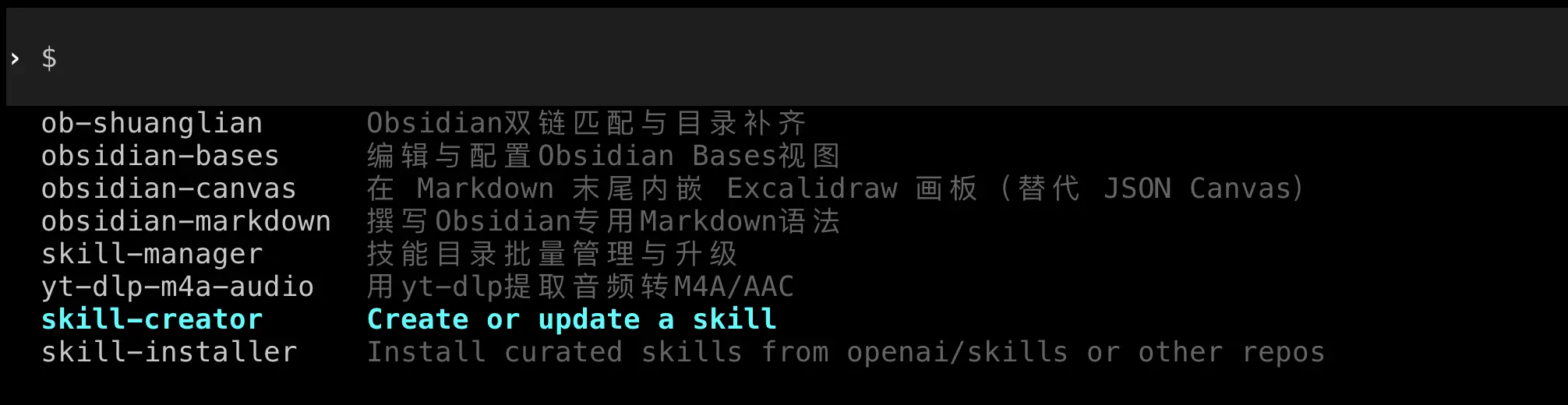
AI가 자동으로 스킬 파일을 생성하여 올바른 위치에 배치합니다.
방법 2: 수동 생성
스킬의 구조를 더 깊이 이해하고 싶다면 수동으로 생성할 수 있습니다.
스킬 파일 구조:
각 스킬은 폴더이며, 반드시 SKILL.md 파일을 포함해야 합니다:
my-skill/
  ├── SKILL.md          # Skill description and configuration
  └── scripts/          # Optional: helper scripts
      └── helper.py
SKILL.md의 기본 형식:
---
name: Skill name
description: Skill description
---

# Detailed description

Write detailed usage instructions and implementation logic here.

## Parameters

- `--param1`: Description of parameter 1
- `--param2`: Description of parameter 2

## Example

Example usage code
이 장의 ‘실전 사례’ 부분에서 완전한 스킬을 만드는 방법을 자세히 설명합니다.
다른 사람의 스킬 설치하기
GitHub에는 바로 사용할 수 있는 기성 스킬이 많이 있습니다. 다운로드하여 바로 사용할 수 있습니다.
스킬 폴더 찾기
Codex 스킬 위치:
- Mac/Linux:
~/.codex/skills/ - Windows:
%USERPROFILE%\.codex\skills\
Claude Code 스킬 위치:
- Mac/Linux:
~/.claude/skills/ - Windows:
%USERPROFILE%\.claude\skills\
설치 단계
- 스킬 폴더 열기
폴더가 없으면 수동으로 생성할 수 있습니다:
# Mac/Linux
mkdir -p ~/.codex/skills

# Windows (PowerShell)
New-Item -Path "$env:USERPROFILE\.codex\skills" -ItemType Directory -Force

- 스킬 파일 다운로드
GitHub 또는 다른 소스에서 스킬 폴더를 다운로드합니다.
- 스킬 디렉토리로 복사
전체 스킬 폴더를 해당 skills 디렉토리로 복사합니다.
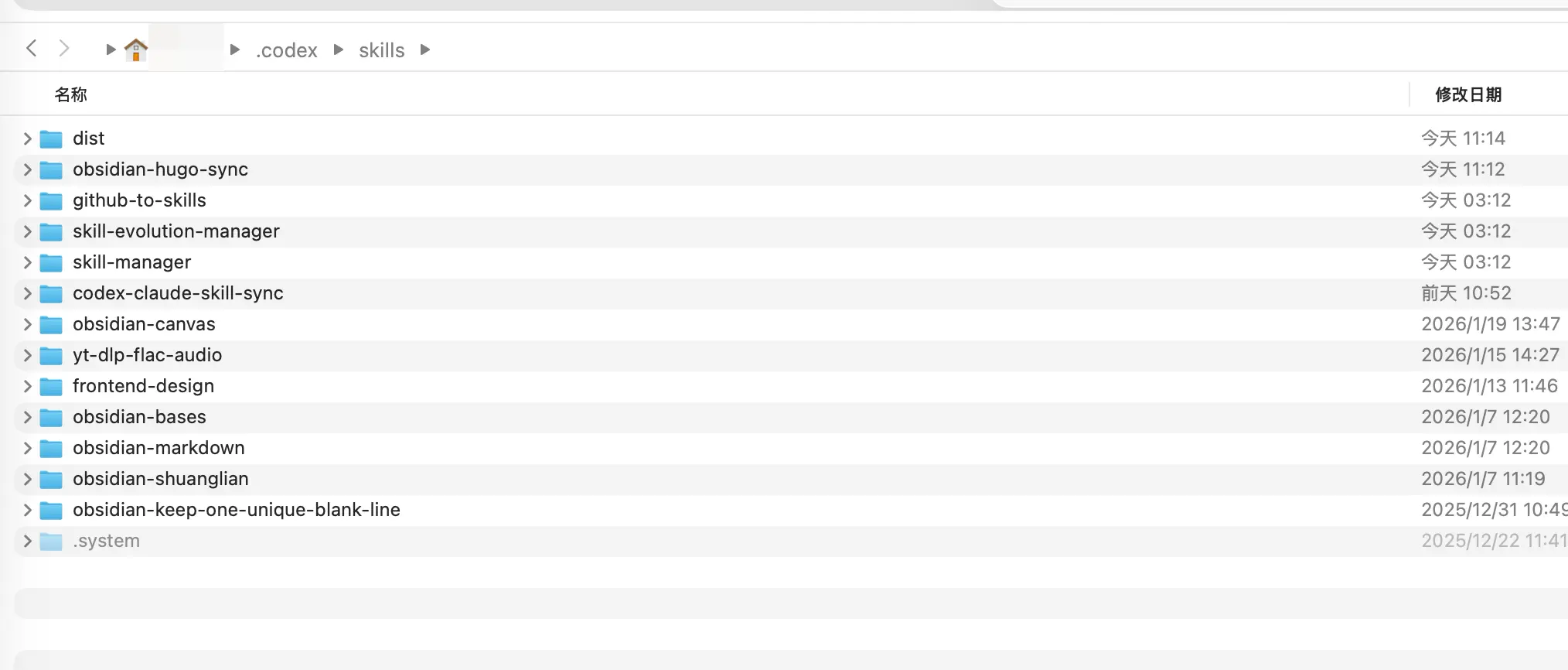
- 도구 재시작
참고: Codex는 현재 핫 리로드를 지원하지 않으므로 종료 후 다시 시작해야 새 스킬을 볼 수 있습니다. Claude Code는 일반적으로 자동으로 인식합니다.
설치 확인
재시작 후 /skill을 입력하여 목록을 확인하고 새 스킬이 나타났는지 확인합니다.
실전 사례: 동기화 스킬 만들기
문제 상황
Codex와 Claude Code를 모두 사용한다면 (많은 분들이 그렇습니다), 한 가지 문제에 직면하게 됩니다:
두 도구의 스킬을 따로 관리해야 하므로 매우 불편합니다.
- Codex 스킬:
~/.codex/skills/ - Claude Code 스킬:
~/.claude/skills/
Codex에서 유용한 스킬을 만들 때마다 Claude의 폴더로 수동으로 복사해야 합니다. 너무 번거롭습니다!
이때 스킬을 만들어 두 폴더의 내용을 자동으로 동기화할 수 있습니다—스킬로 스킬을 관리하는 것입니다.
이 스킬은:
- 두 스킬 폴더의 차이점을 확인
- 동기화해야 할 스킬을 보고
- 확인 후 자동으로 동기화
AI에게 요구사항만 알려주면 됩니다.
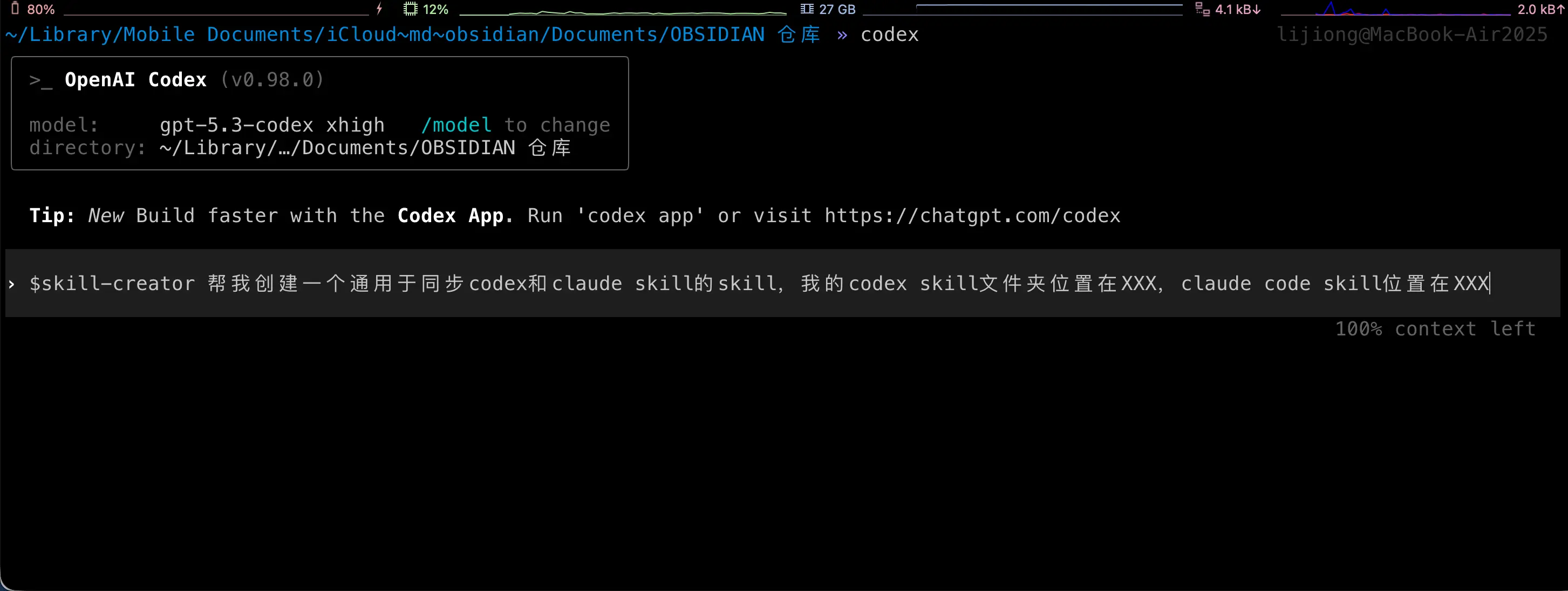
아래는 AI가 여러분을 위해 수행하는 작업입니다. 이 단계는 모두 자동으로 이루어지므로 여러분이 아무것도 할 필요가 없습니다! 여기서는 설명을 위해 보여드리는 것입니다.
1단계: 스킬 폴더 생성
Codex 또는 Claude Code의 skills 디렉토리에 새 폴더를 만듭니다:
mkdir ~/.codex/skills/codex-claude-skill-sync
2단계: SKILL.md 생성
폴더에 SKILL.md 파일을 만듭니다:
name: codex-claude-skill-sync
description: Sync Codex and Claude Skills
---

# Codex/Claude Skill Sync

## Overview

Used to check and sync the Skill directories of Codex and Claude, keeping both sides consistent. By default, only reports differences; executes sync after user confirmation.

## Workflow

1. Run difference report (no modification):

   `python3 scripts/sync_skills.py`

2. Report differences to the user in English and wait for explicit consent before proceeding.
3. After consent, execute sync:

   `python3 scripts/sync_skills.py --apply`

4. When encountering a conflict (same modification time but different content), pause and ask the user which side to keep.

## Rules

- Default directories:
  - Codex: `/Users/yourusername/.codex/skills`
  - Claude: `/Users/yourusername/.claude/skills`
- Only process top-level directories that contain `SKILL.md`, skip hidden directories and `.system`
- Determine which side is newer based on the latest modification time in the directory
- When syncing, delete the target Skill directory first, then copy the entire source directory

## Parameters

- `--apply` Execute sync (default is report only)
- `--codex <path>` Override Codex directory
- `--claude <path>` Override Claude directory
- `--prefer codex|claude` When modification time is the same but content differs, use the specified side to overwrite (requires explicit user authorization)
중요: 위 경로를 실제 경로로 변경하세요!
3단계: 스크립트 파일 생성
스킬 폴더 아래에 scripts 디렉토리를 만든 후 sync_skills.py를 생성합니다:
mkdir ~/.codex/skills/codex-claude-skill-sync/scripts

sync_skills.py의 전체 코드:
#!/usr/bin/env python3
"""
Compare and sync skill folders between Codex and Claude.

Default behavior is report-only. Use --apply to perform sync.
"""

from __future__ import annotations

import argparse
import hashlib
import os
from datetime import datetime
from pathlib import Path
import shutil
import sys

DEFAULT_CODEX = Path("/Users/yourusername/.codex/skills")
DEFAULT_CLAUDE = Path("/Users/yourusername/.claude/skills")

IGNORE_DIR_NAMES = {".git", ".idea", ".vscode", "__pycache__", ".pytest_cache", ".mypy_cache"}
IGNORE_FILE_NAMES = {".DS_Store"}
TIME_EPSILON = 1.0


def format_time(timestamp: float) -> str:
    return datetime.fromtimestamp(timestamp).strftime("%Y-%m-%d %H:%M:%S")


def list_skill_dirs(root: Path) -> tuple[dict[str, Path], list[str]]:
    if not root.exists():
        raise FileNotFoundError(f"Root path does not exist: {root}")
    if not root.is_dir():
        raise NotADirectoryError(f"Root path is not a directory: {root}")

    skills: dict[str, Path] = {}
    ignored: list[str] = []
    for entry in sorted(root.iterdir(), key=lambda p: p.name):
        if not entry.is_dir():
            continue
        if entry.name.startswith("."):
            ignored.append(entry.name)
            continue
        if not (entry / "SKILL.md").is_file():
            continue
        skills[entry.name] = entry
    return skills, ignored


def dir_state(path: Path) -> tuple[str, float, int]:
    hasher = hashlib.sha256()
    latest_mtime = path.stat().st_mtime
    file_count = 0

    for root, dirs, files in os.walk(path):
        dirs[:] = [d for d in dirs if d not in IGNORE_DIR_NAMES]
        dirs.sort()
        files = sorted(f for f in files if f not in IGNORE_FILE_NAMES)

        rel_dir = os.path.relpath(root, path)
        if rel_dir == ".":
            rel_dir = ""
        hasher.update(f"D|{rel_dir}\n".encode())

        try:
            latest_mtime = max(latest_mtime, os.stat(root).st_mtime)
        except FileNotFoundError:
            continue

        for name in files:
            file_path = Path(root) / name
            rel_path = os.path.relpath(file_path, path)

            if file_path.is_symlink():
                try:
                    target = os.readlink(file_path)
                except OSError:
                    target = ""
                hasher.update(f"L|{rel_path}\n{target}\n".encode())
                try:
                    latest_mtime = max(latest_mtime, file_path.lstat().st_mtime)
                except FileNotFoundError:
                    pass
                continue

            if not file_path.is_file():
                continue

            stat = file_path.stat()
            latest_mtime = max(latest_mtime, stat.st_mtime)
            file_count += 1
            hasher.update(f"F|{rel_path}\n{stat.st_size}\n".encode())

            with open(file_path, "rb") as handle:
                for chunk in iter(lambda: handle.read(1024 * 1024), b""):
                    hasher.update(chunk)

    return hasher.hexdigest(), latest_mtime, file_count


def build_plan(
    codex_skills: dict[str, Path],
    claude_skills: dict[str, Path],
    codex_root: Path,
    claude_root: Path,
    prefer: str | None,
) -> tuple[list[dict], list[str], list[dict]]:
    actions: list[dict] = []
    identical: list[str] = []
    conflicts: list[dict] = []

    all_names = sorted(set(codex_skills) | set(claude_skills))
    for name in all_names:
        codex_path = codex_skills.get(name)
        claude_path = claude_skills.get(name)

        if codex_path and not claude_path:
            actions.append(
                {
                    "name": name,
                    "src": codex_path,
                    "dst": claude_root / name,
                    "reason": "only in codex",
                    "direction": "codex -> claude",
                }
            )
            continue
        if claude_path and not codex_path:
            actions.append(
                {
                    "name": name,
                    "src": claude_path,
                    "dst": codex_root / name,
                    "reason": "only in claude",
                    "direction": "claude -> codex",
                }
            )
            continue

        if not codex_path or not claude_path:
            continue

        codex_hash, codex_mtime, _ = dir_state(codex_path)
        claude_hash, claude_mtime, _ = dir_state(claude_path)

        if codex_hash == claude_hash:
            identical.append(name)
            continue

        time_delta = codex_mtime - claude_mtime
        if abs(time_delta) <= TIME_EPSILON:
            if prefer == "codex":
                actions.append(
                    {
                        "name": name,
                        "src": codex_path,
                        "dst": claude_path,
                        "reason": "same mtime, prefer codex",
                        "direction": "codex -> claude",
                        "codex_mtime": codex_mtime,
                        "claude_mtime": claude_mtime,
                    }
                )
            elif prefer == "claude":
                actions.append(
                    {
                        "name": name,
                        "src": claude_path,
                        "dst": codex_path,
                        "reason": "same mtime, prefer claude",
                        "direction": "claude -> codex",
                        "codex_mtime": codex_mtime,
                        "claude_mtime": claude_mtime,
                    }
                )
            else:
                conflicts.append(
                    {
                        "name": name,
                        "codex_mtime": codex_mtime,
                        "claude_mtime": claude_mtime,
                    }
                )
            continue

        if time_delta > 0:
            actions.append(
                {
                    "name": name,
                    "src": codex_path,
                    "dst": claude_path,
                    "reason": "codex newer",
                    "direction": "codex -> claude",
                    "codex_mtime": codex_mtime,
                    "claude_mtime": claude_mtime,
                }
            )
        else:
            actions.append(
                {
                    "name": name,
                    "src": claude_path,
                    "dst": codex_path,
                    "reason": "claude newer",
                    "direction": "claude -> codex",
                    "codex_mtime": codex_mtime,
                    "claude_mtime": claude_mtime,
                }
            )

    return actions, identical, conflicts


def print_report(
    actions: list[dict],
    identical: list[str],
    conflicts: list[dict],
    codex_root: Path,
    claude_root: Path,
    apply: bool,
    ignored_codex: list[str],
    ignored_claude: list[str],
) -> None:
    print("Skill sync report")
    print(f"Codex: {codex_root}")
    print(f"Claude: {claude_root}")

    if ignored_codex:
        print(f"Ignored in Codex: {', '.join(sorted(ignored_codex))}")
    if ignored_claude:
        print(f"Ignored in Claude: {', '.join(sorted(ignored_claude))}")

    print("\nPlanned sync actions:")
    if not actions:
        print("- none")
    else:
        for item in actions:
            codex_mtime = item.get("codex_mtime")
            claude_mtime = item.get("claude_mtime")
            details = []
            if codex_mtime is not None:
                details.append(f"codex mtime: {format_time(codex_mtime)}")
            if claude_mtime is not None:
                details.append(f"claude mtime: {format_time(claude_mtime)}")
            detail_text = f" ({', '.join(details)})" if details else ""
            print(f"- {item['name']}: {item['direction']} [{item['reason']}]" + detail_text)

    print("\nConflicts:")
    if not conflicts:
        print("- none")
    else:
        for item in conflicts:
            print(
                f"- {item['name']}: same mtime but different content "
                f"(codex {format_time(item['codex_mtime'])}, claude {format_time(item['claude_mtime'])})"
            )

    print(f"\nUp-to-date skills: {len(identical)}")

    if not apply:
        print("\nDry run only. Re-run with --apply to sync.")


def apply_actions(actions: list[dict]) -> None:
    for item in actions:
        src = Path(item["src"])
        dst = Path(item["dst"])

        if dst.exists():
            if dst.is_dir():
                shutil.rmtree(dst)
            else:
                dst.unlink()

        shutil.copytree(src, dst, symlinks=True)


def parse_args() -> argparse.Namespace:
    parser = argparse.ArgumentParser(description="Sync Codex and Claude skill folders")
    parser.add_argument("--codex", type=Path, default=DEFAULT_CODEX, help="Codex skill root")
    parser.add_argument("--claude", type=Path, default=DEFAULT_CLAUDE, help="Claude skill root")
    parser.add_argument("--apply", action="store_true", help="Apply sync actions")
    parser.add_argument(
        "--prefer",
        choices=["codex", "claude"],
        help="Break ties when mtimes are equal",
    )
    return parser.parse_args()


def main() -> int:
    args = parse_args()

    try:
        codex_skills, ignored_codex = list_skill_dirs(args.codex)
        claude_skills, ignored_claude = list_skill_dirs(args.claude)
    except (FileNotFoundError, NotADirectoryError) as exc:
        print(str(exc), file=sys.stderr)
        return 2

    actions, identical, conflicts = build_plan(
        codex_skills,
        claude_skills,
        args.codex,
        args.claude,
        args.prefer,
    )
    print_report(
        actions,
        identical,
        conflicts,
        args.codex,
        args.claude,
        args.apply,
        ignored_codex,
        ignored_claude,
    )

    if args.apply and actions:
        apply_actions(actions)
        print("\nSync complete.")
    elif args.apply and not actions:
        print("\nNo changes to apply.")

    if conflicts and not args.prefer:
        return 1
    return 0


if __name__ == "__main__":
    raise SystemExit(main())
중요: 시작 부분의 경로를 수정하는 것을 잊지 마세요:
DEFAULT_CODEX = Path("/Users/yourusername/.codex/skills")
DEFAULT_CLAUDE = Path("/Users/yourusername/.claude/skills")
실제 경로로 변경하세요.
동기화 스킬 사용하기
1단계: 차이점 확인
Claude Code 또는 Codex에서 다음을 입력:
/codex-claude-skill-sync
AI가 자동으로 스크립트를 실행하고 두 스킬 폴더의 차이점을 보고합니다.
2단계: 동기화 확인
동의하면 AI에게 알려주세요:
Agreed, please execute sync.
AI가 python3 scripts/sync_skills.py --apply를 실행하여 동기화를 완료합니다.
완료! 이제 어느 한쪽에서 스킬을 만들거나 수정할 때마다 이 동기화 스킬을 한 번만 실행하면 양쪽이 일관되게 유지됩니다.
고급 스킬 팁
팁 1: 스킬 결합
여러 스킬을 순서대로 사용할 수 있습니다:
/review then /fix to fix the issues found
AI가 먼저 코드를 리뷰한 후, 리뷰 결과에 따라 자동으로 수정합니다.
팁 2: 스킬 매개변수 사용자 정의
많은 스킬이 매개변수를 지원합니다:
/commit --type feat --scope api
이렇게 하면 특정 형식의 커밋 메시지가 생성됩니다.
팁 3: 스킬 템플릿
스킬 템플릿을 만들어 새 스킬을 빠르게 생성할 수 있습니다:
- 기존 스킬 폴더 복사
- SKILL.md 수정
- 저장
팁 4: 팀과 스킬 공유
스킬 폴더를 Git 저장소에 넣어 팀원들과 공유할 수 있습니다:
git clone https://github.com/your-team/skills.git ~/.codex/skills/team-skills
요약
오늘 배운 내용:
- 스킬이란 무엇인가: 재사용 가능한 기능 모듈로, 복잡한 작업을 간단한 명령어로 전환
- 스킬 vs 프롬프트 vs MCP: 차이점과 적용 시나리오
- 스킬 사용 방법:
/skill로 확인 및 호출 - 스킬 생성 방법: AI가 도와주거나 수동 생성
- 스킬 설치 방법: 해당 폴더에 복사
- 실전 사례: 동기화 스킬을 만들어 다중 도구 관리 문제 해결
핵심 포인트:
- 스킬은 AI를 ‘타이피스트’에서 ‘전문 어시스턴트’로 업그레이드합니다
- 공통 작업은 스킬로 캡슐화해야 합니다
- 좋은 스킬 하나가 시간의 90%를 절약할 수 있습니다